

$0.99
FREE
100% Off
WiFiPhoto
Matteo Rossi




About the App
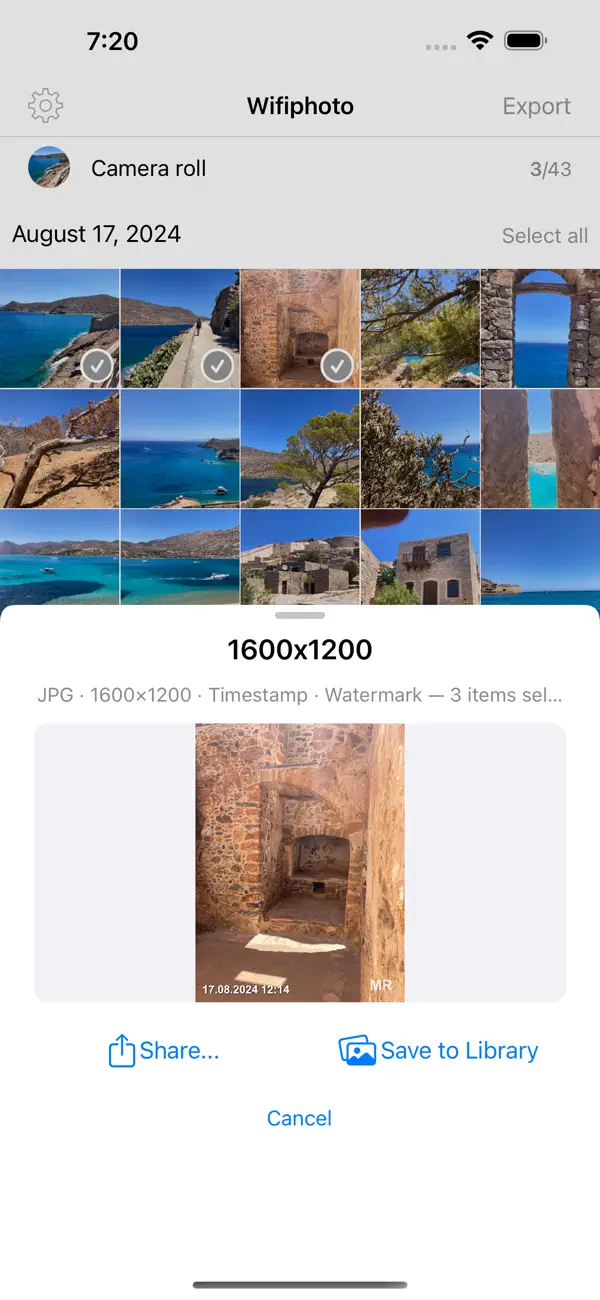
WiFiPhoto is not just a regular photo transfer app; it's an image processing toolkit designed for anyone who wants to manage their photos easily. With WiFiPhoto, you can create custom export templates to resize images, convert formats from JPEG to PNG, add timestamps, or apply watermark overlays. This means you can process hundreds of photos in one go, saving you time and effort.
Using WiFiPhoto is straightforward. You can create export templates that allow for format conversions, resizing, and applying overlays like timestamps and watermarks. After setting up your templates, you can batch process your entire selection and get a real-time preview of the results before you finalize everything. Once you’re happy with your edited photos, you can choose how to share them. You can share via Wi-Fi to any browser, use AirDrop, send through Mail, or save directly to your Photo Library organized into named albums.
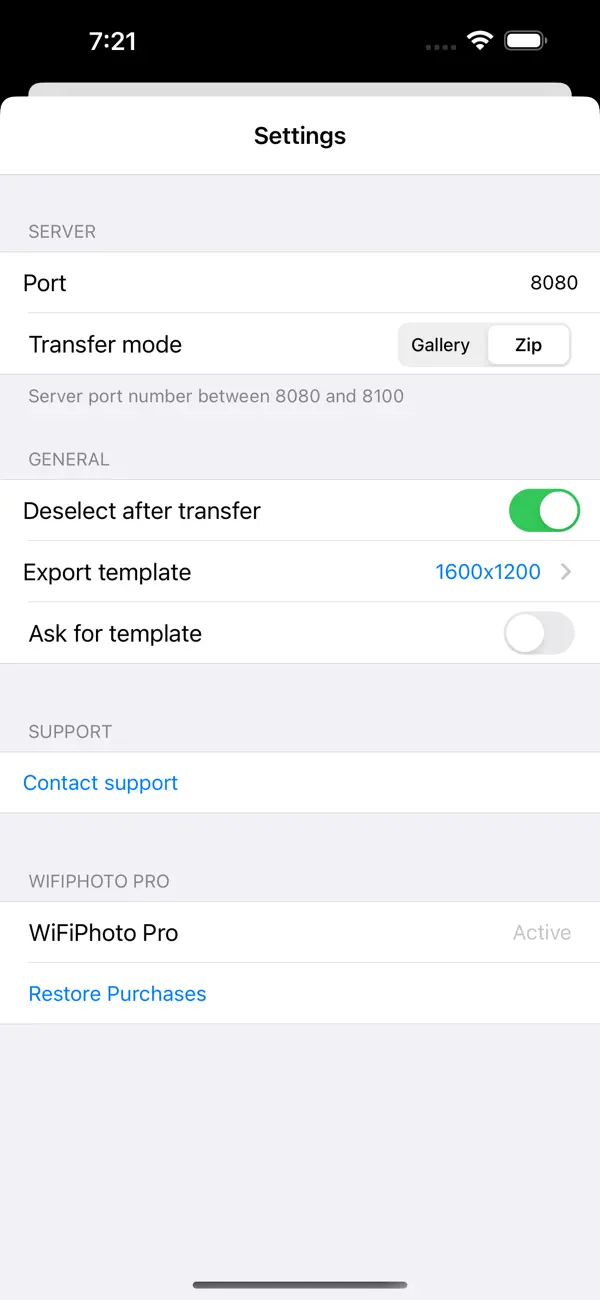
With the Wi-Fi transfer and web gallery feature, sharing becomes even easier. Simply scan the QR code or type in the URL on any computer to access your photos. Recipients can download them instantly as a zip file or browse a visually appealing web gallery where they can pick which photos to download selectively.
One of the unique aspects of WiFiPhoto is its two-way transfer capability. Not only can you send your photos, but you can also receive them. Just open the upload page in any browser and drag files directly into your Camera Roll, making it highly convenient.
WiFiPhoto comes with many free features, with no limits. Users can enjoy unlimited photo and video transfers and exports, and can export to different platforms like Files, AirDrop, Mail, and Messages. You can save your processed photos in your Library with organized albums, and make use of the web gallery for selective or zip downloads. The app even allows you to receive photos from any browser, and the QR code provides instant connection.
Additionally, the metadata viewer lets you long-press any photo to access important EXIF data, GPS metadata, and camera info. WiFiPhoto supports background processing for large batch exports, so you can continue using your device while it works. If you’re using an iPad, the drag and drop feature with haptic feedback makes it easy to organize your photos.
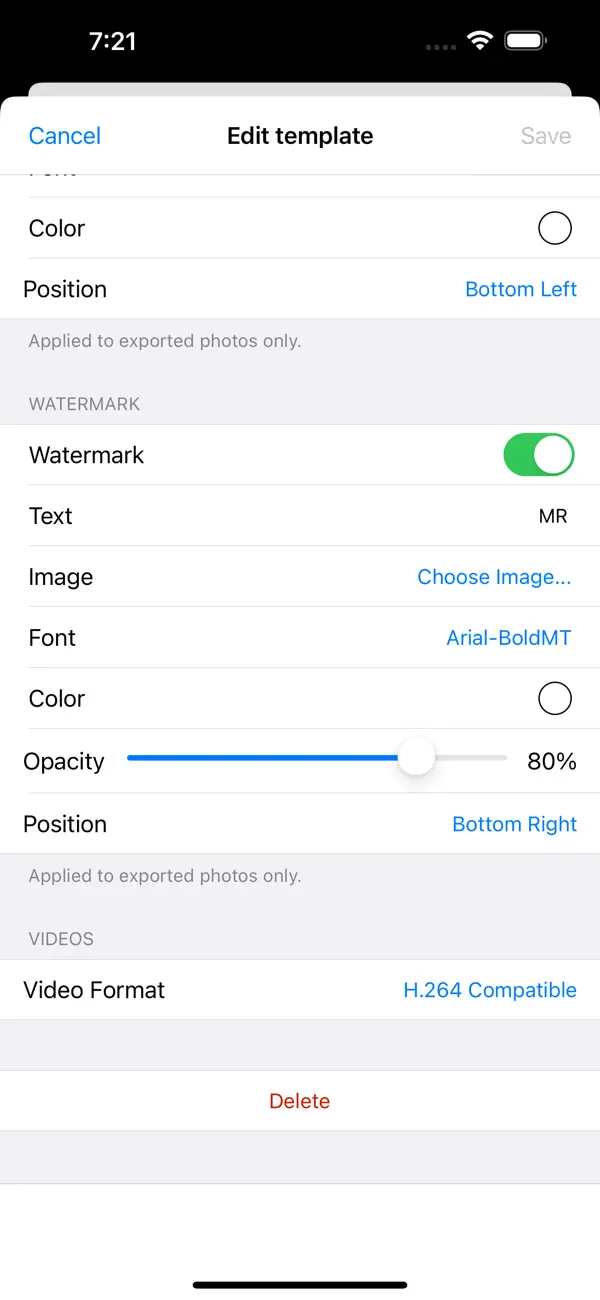
If you upgrade to WiFiPhoto Pro for a one-time fee of $2.99, you'll unlock powerful export tools perfect for professional users or photo enthusiasts. With Pro, you can create unlimited custom export templates, offering greater flexibility in image format conversion with quality control. The app allows for resizing options, including Size to Fit or Size to Fill, and custom filename patterns using placeholders like {date} or {original}. You can also choose specific fonts, colors, and positions for timestamp overlays and watermarks, whether they are text or images.
WiFiPhoto even offers H.264 video conversion to ensure compatibility across platforms. For privacy protection, you can strip metadata from your photos, ensuring that no EXIF, GPS, or camera info is shared without your consent. You can pick a template and preview it before you start the batch processing, making it easier to manage your work.
Your privacy matters with WiFiPhoto. The app works entirely on your local network, so no files are uploaded to any server. You won’t need to create an account, and there’s no tracking involved. Your photos remain your own, making WiFiPhoto a safe and efficient tool for managing your image library.
In summary, WiFiPhoto is a complete photo transfer and processing solution suitable for anyone, whether you're a casual user or a professional. With its versatile features and focus on user control, it simplifies photo management while keeping your privacy front and center.
Using WiFiPhoto is straightforward. You can create export templates that allow for format conversions, resizing, and applying overlays like timestamps and watermarks. After setting up your templates, you can batch process your entire selection and get a real-time preview of the results before you finalize everything. Once you’re happy with your edited photos, you can choose how to share them. You can share via Wi-Fi to any browser, use AirDrop, send through Mail, or save directly to your Photo Library organized into named albums.
With the Wi-Fi transfer and web gallery feature, sharing becomes even easier. Simply scan the QR code or type in the URL on any computer to access your photos. Recipients can download them instantly as a zip file or browse a visually appealing web gallery where they can pick which photos to download selectively.
One of the unique aspects of WiFiPhoto is its two-way transfer capability. Not only can you send your photos, but you can also receive them. Just open the upload page in any browser and drag files directly into your Camera Roll, making it highly convenient.
WiFiPhoto comes with many free features, with no limits. Users can enjoy unlimited photo and video transfers and exports, and can export to different platforms like Files, AirDrop, Mail, and Messages. You can save your processed photos in your Library with organized albums, and make use of the web gallery for selective or zip downloads. The app even allows you to receive photos from any browser, and the QR code provides instant connection.
Additionally, the metadata viewer lets you long-press any photo to access important EXIF data, GPS metadata, and camera info. WiFiPhoto supports background processing for large batch exports, so you can continue using your device while it works. If you’re using an iPad, the drag and drop feature with haptic feedback makes it easy to organize your photos.
If you upgrade to WiFiPhoto Pro for a one-time fee of $2.99, you'll unlock powerful export tools perfect for professional users or photo enthusiasts. With Pro, you can create unlimited custom export templates, offering greater flexibility in image format conversion with quality control. The app allows for resizing options, including Size to Fit or Size to Fill, and custom filename patterns using placeholders like {date} or {original}. You can also choose specific fonts, colors, and positions for timestamp overlays and watermarks, whether they are text or images.
WiFiPhoto even offers H.264 video conversion to ensure compatibility across platforms. For privacy protection, you can strip metadata from your photos, ensuring that no EXIF, GPS, or camera info is shared without your consent. You can pick a template and preview it before you start the batch processing, making it easier to manage your work.
Your privacy matters with WiFiPhoto. The app works entirely on your local network, so no files are uploaded to any server. You won’t need to create an account, and there’s no tracking involved. Your photos remain your own, making WiFiPhoto a safe and efficient tool for managing your image library.
In summary, WiFiPhoto is a complete photo transfer and processing solution suitable for anyone, whether you're a casual user or a professional. With its versatile features and focus on user control, it simplifies photo management while keeping your privacy front and center.

DayLight: Last Usable Light
Michal Kus
$1.99

Videocraft: Video Maker
Gamelarious
$2.99
$0.99

Panostory Pro – Photo Stitch
锐 王
$0.99