

$4.99
$3.99
20% Off
txt.edit: Code & Text Editor
Titans of Industry

About the App
txt.edit is a versatile code and text editor designed for iPhone, iPhone Duo, and iPad users. It’s perfect for quick tasks like fixing a single line in a config file, tidying up some JSON formatting, or wrapping up a Markdown draft while you're away from your desk. With txt.edit, you can open your file, make the necessary changes, and save it back to its original location.
With a one-time purchase, you gain access to every feature—there are no subscriptions and no annoying ads.
Your files are easy to manage with txt.edit. You can open and save files using iCloud Drive, or other locations accessible through the Files app, like Dropbox and Google Drive. If you work with multiple documents, txt.edit allows you to keep several files open in tabs. You can even long-press a tab to rename or close it. For those who need to edit their work, there is a find and replace function that comes with line numbers for easy navigation.
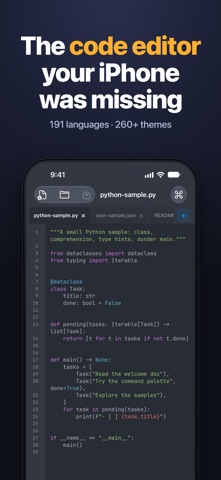
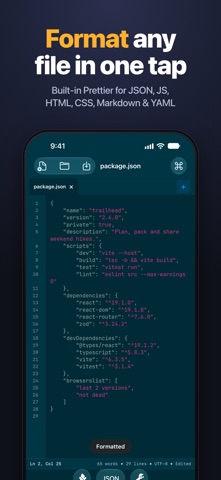
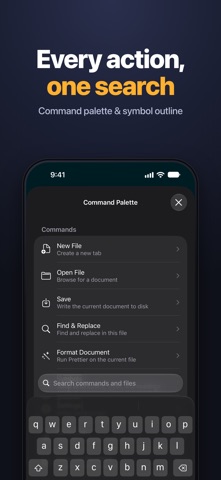
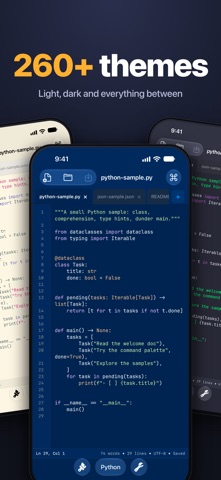
When it comes to coding, txt.edit shines with its robust features. It provides syntax highlighting for 191 programming languages, including HTML, CSS, JavaScript, Python, Swift, PHP, and YAML. The format document feature lets you run the built-in Prettier on your JSON, JavaScript, TypeScript, HTML, CSS, Markdown, and YAML files with just one tap, helping you instantly see if there’s an error. You can also utilize the command palette functionality to quickly find any action, sample, or recently accessed file, making your workflow smoother.
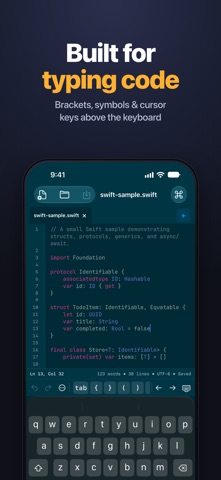
Navigating your code is a breeze with txt.edit. The symbol outline navigation allows you to jump directly to a function, type, or heading, while the minimap file navigation helps you see your position in a lengthy document at a glance. On top of that, a coding keyboard row places essential functions like undo and redo, tab, brackets, symbols, and cursor keys right above the keyboard for easy access. The app also includes an auto-indent feature, bracket pairing, and matching-bracket highlights to keep your code organized and clean.
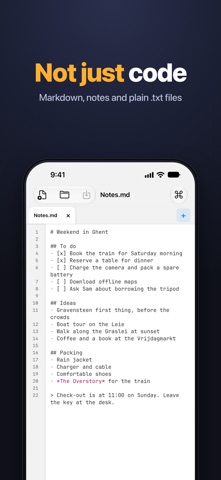
Not every file is code, and txt.edit supports that too. You can easily open Markdown draft editor files, to-do lists, and plain .txt files. By tapping the word count display, you can view reading time and other document statistics, ensuring you know the details of your text.
Making txt.edit your own is easy with over 260 themes to choose from, both light and dark, complete with a live theme preview as you browse. Additionally, you can select from a variety of monospaced font options, including JetBrains Mono, Fira Code, and Cascadia Code, allowing you to set the size that suits you best.
One purchase is all you need to enjoy txt.edit on your iPhone, iPhone Duo, and iPad, providing a seamless and comprehensive editing experience.
With a one-time purchase, you gain access to every feature—there are no subscriptions and no annoying ads.
Your files are easy to manage with txt.edit. You can open and save files using iCloud Drive, or other locations accessible through the Files app, like Dropbox and Google Drive. If you work with multiple documents, txt.edit allows you to keep several files open in tabs. You can even long-press a tab to rename or close it. For those who need to edit their work, there is a find and replace function that comes with line numbers for easy navigation.
When it comes to coding, txt.edit shines with its robust features. It provides syntax highlighting for 191 programming languages, including HTML, CSS, JavaScript, Python, Swift, PHP, and YAML. The format document feature lets you run the built-in Prettier on your JSON, JavaScript, TypeScript, HTML, CSS, Markdown, and YAML files with just one tap, helping you instantly see if there’s an error. You can also utilize the command palette functionality to quickly find any action, sample, or recently accessed file, making your workflow smoother.
Navigating your code is a breeze with txt.edit. The symbol outline navigation allows you to jump directly to a function, type, or heading, while the minimap file navigation helps you see your position in a lengthy document at a glance. On top of that, a coding keyboard row places essential functions like undo and redo, tab, brackets, symbols, and cursor keys right above the keyboard for easy access. The app also includes an auto-indent feature, bracket pairing, and matching-bracket highlights to keep your code organized and clean.
Not every file is code, and txt.edit supports that too. You can easily open Markdown draft editor files, to-do lists, and plain .txt files. By tapping the word count display, you can view reading time and other document statistics, ensuring you know the details of your text.
Making txt.edit your own is easy with over 260 themes to choose from, both light and dark, complete with a live theme preview as you browse. Additionally, you can select from a variety of monospaced font options, including JetBrains Mono, Fira Code, and Cascadia Code, allowing you to set the size that suits you best.
One purchase is all you need to enjoy txt.edit on your iPhone, iPhone Duo, and iPad, providing a seamless and comprehensive editing experience.

DraftCode for PHP IDE
Solesignal Limited
$9.99

Merge Voice Memos
PLATINUM CITY LLC
$4.99

ACDSee Pro
ACD Systems International Inc.
$5.99