

$5.99
FREE
100% Off
ACDSee Pro
ACD Systems International Inc.

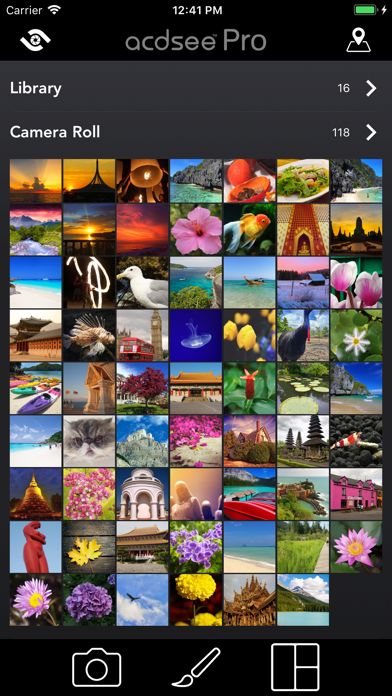



About the App
Capture, perfect, and share your photos with ACDSee Pro for iPhone. This app combines a professional grade camera and a powerful nondestructive photo editor, giving you all the tools you need to create stunning photographs.
With the ACDSee Pro camera, you can take full advantage of your device’s capabilities. It supports RAW processing, allowing you to shoot in DNG format. You can also choose lossless TIFF or PNG format for your images, ensuring the best quality. The app gives you excellent manual exposure control so you can adjust focus and white balance. You’ll see real-time effects and adjustments as you shoot, making it easy to get the perfect shot. The HDR fusion technique helps you create high dynamic range images by combining three different exposures into one. You can also use various flash illumination modes, which include options for both the front and rear cameras.
Editing your photos is simple with the ACDSee Pro nondestructive photo editor. It allows for a range of image adjustments, including light EQ adjustment, tone EQ adjustment, and colour EQ adjustment. You can also fine-tune details like shadows and highlights, exposure, contrast, and vibrance. The app supports gradient masking techniques, which lets you apply edits selectively to parts of your image. Whether you want to add a skin smoothing filter or explore creative photo enhancements with black & white effects, ACDSee Pro has you covered.
If you enjoy combining multiple images, the collage maker tool makes it easy. Quickly bring together several photos into one layout for easy sharing. You can choose from over 100 photo sharing layouts to find one that suits your memories.
One standout feature is the exposure bracketing capability, which allows you to capture three different exposures at once. There’s also a video mode capture that lets you record special moments and apply real-time adjustments and filters while filming.
For even greater creative control, the shutter priority mode lets you set the shutter speed while the app automatically adjusts the ISO for the right exposure. The dual-axis level indicator helps you compose your shots with precise alignment so that everything looks just right.
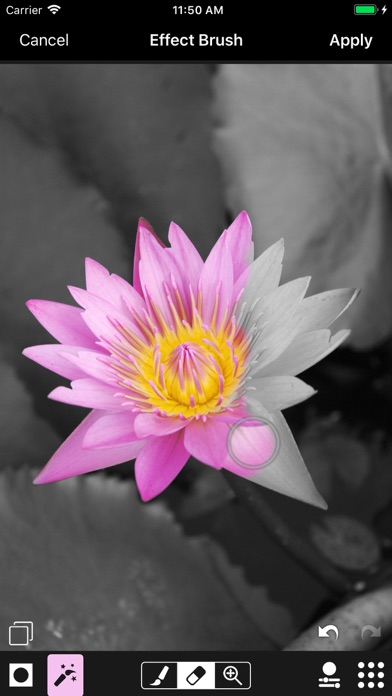
When editing, you can apply effects like film, light leaks, or a halftone effect filter to add unique touches to your photos. There are tools for cropping your images, adjusting brightness and contrast, and creating filter splash effects such as selective coloring to bring focus to your subjects.
ACDSee Pro gives you all the tools to elevate your photography, whether you are capturing, editing, or sharing. With features tailored for ease of use and optimal results, you can feel confident in creating and sharing beautiful photographs every time.
With the ACDSee Pro camera, you can take full advantage of your device’s capabilities. It supports RAW processing, allowing you to shoot in DNG format. You can also choose lossless TIFF or PNG format for your images, ensuring the best quality. The app gives you excellent manual exposure control so you can adjust focus and white balance. You’ll see real-time effects and adjustments as you shoot, making it easy to get the perfect shot. The HDR fusion technique helps you create high dynamic range images by combining three different exposures into one. You can also use various flash illumination modes, which include options for both the front and rear cameras.
Editing your photos is simple with the ACDSee Pro nondestructive photo editor. It allows for a range of image adjustments, including light EQ adjustment, tone EQ adjustment, and colour EQ adjustment. You can also fine-tune details like shadows and highlights, exposure, contrast, and vibrance. The app supports gradient masking techniques, which lets you apply edits selectively to parts of your image. Whether you want to add a skin smoothing filter or explore creative photo enhancements with black & white effects, ACDSee Pro has you covered.
If you enjoy combining multiple images, the collage maker tool makes it easy. Quickly bring together several photos into one layout for easy sharing. You can choose from over 100 photo sharing layouts to find one that suits your memories.
One standout feature is the exposure bracketing capability, which allows you to capture three different exposures at once. There’s also a video mode capture that lets you record special moments and apply real-time adjustments and filters while filming.
For even greater creative control, the shutter priority mode lets you set the shutter speed while the app automatically adjusts the ISO for the right exposure. The dual-axis level indicator helps you compose your shots with precise alignment so that everything looks just right.
When editing, you can apply effects like film, light leaks, or a halftone effect filter to add unique touches to your photos. There are tools for cropping your images, adjusting brightness and contrast, and creating filter splash effects such as selective coloring to bring focus to your subjects.
ACDSee Pro gives you all the tools to elevate your photography, whether you are capturing, editing, or sharing. With features tailored for ease of use and optimal results, you can feel confident in creating and sharing beautiful photographs every time.

iSewMe
Remy Woods
$0.99

The Christmas Gift List Pro
Denys Ievenko
$4.99
$2.99

Contacts Sync Pro
Playa Apps
$11.99
$9.99