
$1.99
$0.99
50% Off
Time Clock Helper
Ducky Planet LLC




About the App
Time Clock Helper is a user-friendly time tracking tool designed to help you quickly calculate how many hours you worked in a day using a standard time card. It simplifies the process of recording your hours, making it great for individuals who need to track their work time accurately.
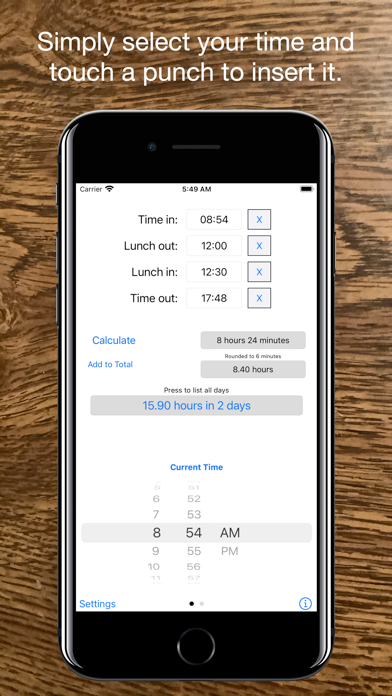
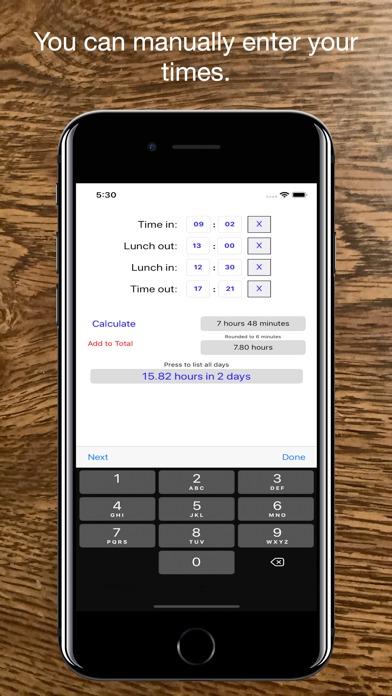
You can input your time in two easy ways. The first option uses scroll wheel input, allowing you to select a time and then tap the location where you want to enter that time. If you prefer manual input, you can swipe left or right to switch to manual entry mode. In this mode, simply tap the number you want to change and use the keyboard for quick time entry. You can press "next" to move to the next field or "done" to finish.
If you need to skip certain punches, such as a lunch punch, the app provides checkboxes next to times you want to disregard. This makes it easy to customize your entries based on your work routine.
Time Clock Helper now also supports recording total hours for multiple days, with a recorded days view that lets you see up to 400 entries. Adding time is straightforward; just press the add to total button, and your entry will be recorded. The add to total button will turn red if any changes are made to your punches, ensuring you always know when updates occur.
In the recorded days box, you can scroll up and down to visualize recorded days. If you ever need to delete recorded days, just tap on the entry and confirm the prompt. To reset total hours, you can press the clear all button at the bottom. If you want to share your tracked times, there's an option to e-mail recorded times directly from the app. When you're done, simply press "done" to return to the entry screen.
You can also customize your settings to fit your workplace time management needs. The app allows for rounding options, so if your workplace rounds to the nearest 6 minutes or a 15 minute increment, you can choose those in the app’s calculations. To change these options, press the settings button or navigate to your device settings and adjust accordingly.
Additionally, you can see the date the time was added by changing the show date option in settings. If you prefer, you can switch back to only display day numbers. The total time recorded can be shown in a decimal time format or in hours and minutes format by adjusting the settings to show as decimal.
Time Clock Helper is designed to be intuitive, so you can easily manage your time tracking needs. If you encounter any problems or have suggestions for improvements, please use the user feedback options to send an email. I will do my best to incorporate your feedback in future updates.
If you find Time Clock Helper useful, please take a moment to leave a review. Your feedback is greatly appreciated and helps improve the app for everyone!
You can input your time in two easy ways. The first option uses scroll wheel input, allowing you to select a time and then tap the location where you want to enter that time. If you prefer manual input, you can swipe left or right to switch to manual entry mode. In this mode, simply tap the number you want to change and use the keyboard for quick time entry. You can press "next" to move to the next field or "done" to finish.
If you need to skip certain punches, such as a lunch punch, the app provides checkboxes next to times you want to disregard. This makes it easy to customize your entries based on your work routine.
Time Clock Helper now also supports recording total hours for multiple days, with a recorded days view that lets you see up to 400 entries. Adding time is straightforward; just press the add to total button, and your entry will be recorded. The add to total button will turn red if any changes are made to your punches, ensuring you always know when updates occur.
In the recorded days box, you can scroll up and down to visualize recorded days. If you ever need to delete recorded days, just tap on the entry and confirm the prompt. To reset total hours, you can press the clear all button at the bottom. If you want to share your tracked times, there's an option to e-mail recorded times directly from the app. When you're done, simply press "done" to return to the entry screen.
You can also customize your settings to fit your workplace time management needs. The app allows for rounding options, so if your workplace rounds to the nearest 6 minutes or a 15 minute increment, you can choose those in the app’s calculations. To change these options, press the settings button or navigate to your device settings and adjust accordingly.
Additionally, you can see the date the time was added by changing the show date option in settings. If you prefer, you can switch back to only display day numbers. The total time recorded can be shown in a decimal time format or in hours and minutes format by adjusting the settings to show as decimal.
Time Clock Helper is designed to be intuitive, so you can easily manage your time tracking needs. If you encounter any problems or have suggestions for improvements, please use the user feedback options to send an email. I will do my best to incorporate your feedback in future updates.
If you find Time Clock Helper useful, please take a moment to leave a review. Your feedback is greatly appreciated and helps improve the app for everyone!

ytWrist – Videos on your Watch
Ameen Mody
$0.99

ConstruCalc Pro
Tresium Soluções
$3.49
$2.97
Today Planned: Daily Planner
Elaine Rocha
$7.99
$1.99