

$5.99
FREE
100% Off
Omnistat: System Monitor
Mathieu Bolard

About the App
Omnistat: System Monitor is an app designed to help you understand everything your device knows about itself. It brings together all the important information in one place, easily accessible through your widgets or on your Apple Watch.
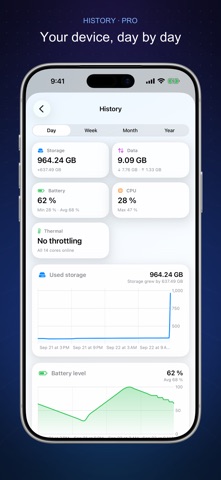
With Omnistat, you can track various aspects of your device over time. The app offers features like history and trends for storage, battery, memory, CPU, and data usage. You can chart this information by day, week, month, or even year. This data usage history helps you see how your device performs and can give you insights into its health.
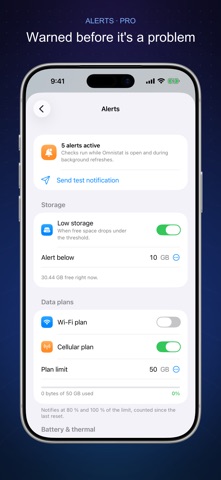
One of the useful aspects of Omnistat is its smart alerts for your device. It lets you know when storage is running low or when your data plan is at 80% and 100%. You will also receive alerts for overheating, whether your battery is full or low, and any unusual traffic. These alerts can help you take action before problems arise.
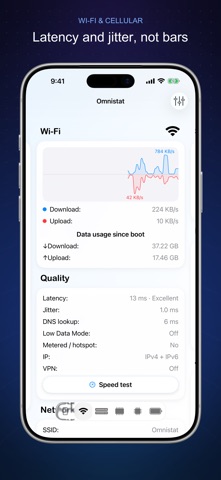
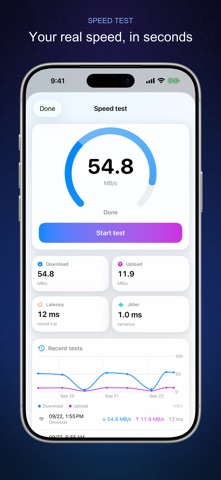
For speedy operations, the app includes a speed test feature. You can measure download and upload speeds, as well as latency and jitter. Each test is recorded, allowing you to check the history of your speed tests. This live speed testing ensures you always know your connection quality.
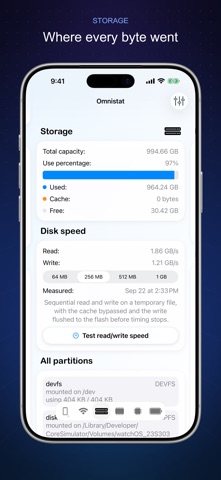
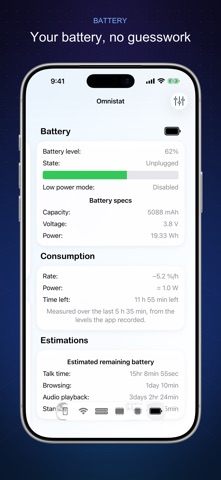
Additionally, the app offers a storage speed test. It shows the performance of your flash storage through sequential read and write speeds, with options to test various sample sizes from 64 MB to 1 GB. You can also monitor battery consumption, seeing the real drain or charge rate in percentage per hour and watts. This helps estimate battery life and shows how long it will take to recharge or deplete.
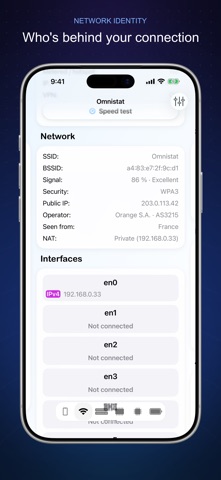
Omnistat gives you detailed network identity information. By displaying your public IP address, operator, country, and NAT type, alongside the SSID and BSSID, the app helps you understand your Wi-Fi signal strength and performance. You can even look into cellular network codes, making it easier to discover your carrier information.
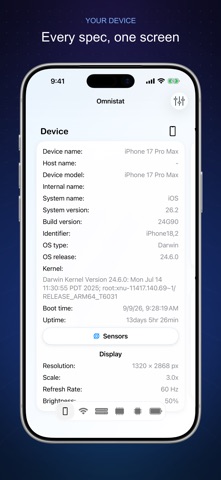
The app includes extensive details about your device. You can check your device name, model, and internal name, along with system details like kernel, uptime, screen resolution, scale, and refresh rate. For Wi-Fi, it shows security protocols, interfaces, and both IPv4 and IPv6 data usage details, including live speed, latency, jitter, and VPN status.
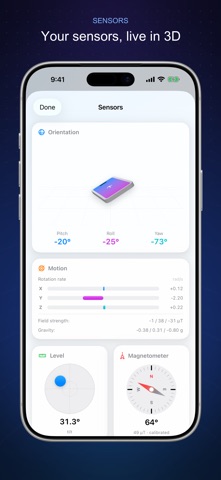
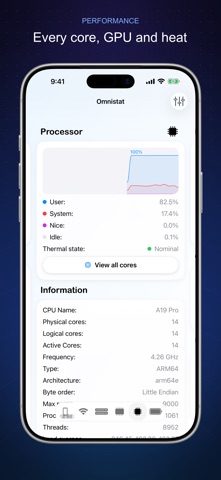
When it comes to memory, Omnistat provides live memory statistics, detailing total, compressed, and free RAM, as well as the page size and any memory faults and purges. This real-time CPU usage display shows each core’s workload, processor details, thermal state, and GPU usage by core. The app further supports various sensors, including 3D orientation sensors, a compass, a barometer, and a bubble level to track your surroundings.
The app is user-friendly and offers Apple Watch integration, widgets for your Lock Screen, and Control Center access. You can also use Siri shortcuts integration, making it easier to get the information you need quickly.
Omnistat Pro unlocks additional features, such as access to the full history and trends as well as the smart alerts. While the speed test is available for free, you can choose monthly or yearly subscriptions, with a 1-week free trial, or go for a one-time lifetime unlock. Payments are managed through your Apple Account, and subscriptions renew automatically unless cancelled at least 24 hours before the end of the current period.
With Omnistat: System Monitor, you get an all-in-one view of your device’s performance, keeping you informed and in control.
With Omnistat, you can track various aspects of your device over time. The app offers features like history and trends for storage, battery, memory, CPU, and data usage. You can chart this information by day, week, month, or even year. This data usage history helps you see how your device performs and can give you insights into its health.
One of the useful aspects of Omnistat is its smart alerts for your device. It lets you know when storage is running low or when your data plan is at 80% and 100%. You will also receive alerts for overheating, whether your battery is full or low, and any unusual traffic. These alerts can help you take action before problems arise.
For speedy operations, the app includes a speed test feature. You can measure download and upload speeds, as well as latency and jitter. Each test is recorded, allowing you to check the history of your speed tests. This live speed testing ensures you always know your connection quality.
Additionally, the app offers a storage speed test. It shows the performance of your flash storage through sequential read and write speeds, with options to test various sample sizes from 64 MB to 1 GB. You can also monitor battery consumption, seeing the real drain or charge rate in percentage per hour and watts. This helps estimate battery life and shows how long it will take to recharge or deplete.
Omnistat gives you detailed network identity information. By displaying your public IP address, operator, country, and NAT type, alongside the SSID and BSSID, the app helps you understand your Wi-Fi signal strength and performance. You can even look into cellular network codes, making it easier to discover your carrier information.
The app includes extensive details about your device. You can check your device name, model, and internal name, along with system details like kernel, uptime, screen resolution, scale, and refresh rate. For Wi-Fi, it shows security protocols, interfaces, and both IPv4 and IPv6 data usage details, including live speed, latency, jitter, and VPN status.
When it comes to memory, Omnistat provides live memory statistics, detailing total, compressed, and free RAM, as well as the page size and any memory faults and purges. This real-time CPU usage display shows each core’s workload, processor details, thermal state, and GPU usage by core. The app further supports various sensors, including 3D orientation sensors, a compass, a barometer, and a bubble level to track your surroundings.
The app is user-friendly and offers Apple Watch integration, widgets for your Lock Screen, and Control Center access. You can also use Siri shortcuts integration, making it easier to get the information you need quickly.
Omnistat Pro unlocks additional features, such as access to the full history and trends as well as the smart alerts. While the speed test is available for free, you can choose monthly or yearly subscriptions, with a 1-week free trial, or go for a one-time lifetime unlock. Payments are managed through your Apple Account, and subscriptions renew automatically unless cancelled at least 24 hours before the end of the current period.
With Omnistat: System Monitor, you get an all-in-one view of your device’s performance, keeping you informed and in control.
Barcode Scanner Keyboard PRO
Nikola Antonov
$5.99
FREE

조경수첩(PRO)
KIMJOONGSUB
$69.99
$33.99

CopyIt The Grid Drawing Method
Nigel Green
$19.99
$9.99