

$9.99
Free
100% Off
Klipped
Andrew Drake

About the App
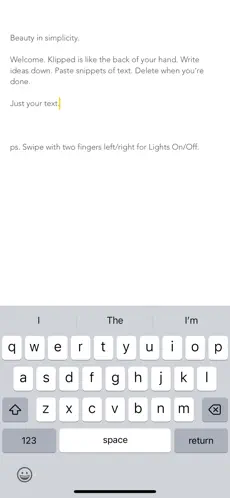
Klipped is a minimalist text editor built for speed, clarity, and focus. Designed for users who want to write without distractions, Klipped opens instantly and presents nothing but a clean canvas for your text. Whether you’re jotting down quick ideas, drafting notes, pasting temporary content, or using it as a scratchpad, the app stays out of your way so you can think and write freely.
At its core, Klipped embraces the idea of “just your text.” There are no folders, formatting menus, or unnecessary features to slow you down. You can write ideas, record appointments, paste copied text, jot reminders, or drop in code snippets—then delete everything when you’re done. It’s ideal for fleeting thoughts, temporary notes, and fast capture moments when opening a full note-taking app feels like overkill.
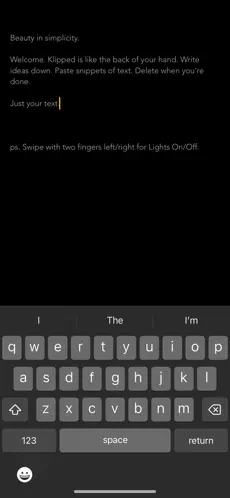
Despite its simplicity, Klipped includes thoughtful advanced features that enhance usability without clutter. Shake your device to undo or redo changes, and switch to a distraction-free Lights Off mode with a simple two-finger swipe. Auto-correct and spell-check options help keep writing clean, while auto-capitalization can be enabled or disabled based on personal preference.
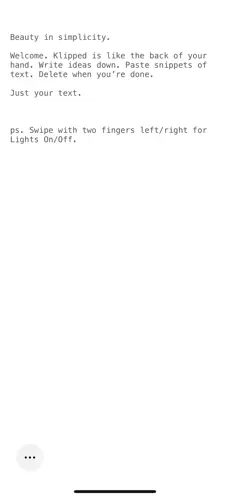
For developers and technical users, Klipped offers a coding mode with fixed-width text, making it easy to paste, review, or tweak code snippets. A high-contrast mode improves readability in different lighting conditions, ensuring the app remains comfortable to use during long writing sessions or quick edits on the go.
Klipped is designed for people who value speed, simplicity, and reliability. Writers, developers, students, and professionals alike can use it as a fast launchpad for thoughts without the friction of setup or organization. It’s not a replacement for full note systems—it’s the place where ideas start.
If you’re looking for a lightweight, instant-open text editor that prioritizes focus and usability over features you don’t need, Klipped delivers a clean and elegant writing experience—exactly when you need it.
At its core, Klipped embraces the idea of “just your text.” There are no folders, formatting menus, or unnecessary features to slow you down. You can write ideas, record appointments, paste copied text, jot reminders, or drop in code snippets—then delete everything when you’re done. It’s ideal for fleeting thoughts, temporary notes, and fast capture moments when opening a full note-taking app feels like overkill.
Despite its simplicity, Klipped includes thoughtful advanced features that enhance usability without clutter. Shake your device to undo or redo changes, and switch to a distraction-free Lights Off mode with a simple two-finger swipe. Auto-correct and spell-check options help keep writing clean, while auto-capitalization can be enabled or disabled based on personal preference.
For developers and technical users, Klipped offers a coding mode with fixed-width text, making it easy to paste, review, or tweak code snippets. A high-contrast mode improves readability in different lighting conditions, ensuring the app remains comfortable to use during long writing sessions or quick edits on the go.
Klipped is designed for people who value speed, simplicity, and reliability. Writers, developers, students, and professionals alike can use it as a fast launchpad for thoughts without the friction of setup or organization. It’s not a replacement for full note systems—it’s the place where ideas start.
If you’re looking for a lightweight, instant-open text editor that prioritizes focus and usability over features you don’t need, Klipped delivers a clean and elegant writing experience—exactly when you need it.

Mockup for Everything – Design
AUSTECH STUDIO
$8.99
FREE

iWriter Pro
Serpensoft Group
$5.99
$2.99
Voice Memos – SoundNote Pro
Newkline Co., Ltd.
$4.99
$1.99