

$29.99
Free
100% Off
Kiosk+
Wander Bit LLC

About the App
Kiosk+ is a powerful iPad kiosk mode solution designed to turn any website into a secure, full-screen kiosk browser. It transforms your tablet into a professional digital kiosk software system suitable for business, retail, events, and public environments. With its strong configuration tools, it serves as a complete tablet kiosk solution.
With Kiosk+, you can deploy a website to kiosk app environment in seconds. Simply set your starting website configuration and launch in kiosk mode automatically. The app locks the device into a secure web browsing mode that prevents users from navigating away.
Businesses use Kiosk+ for interactive restaurant menus, trade show visitor collection, museum interactive displays, and event registration kiosks. It works as a digital signage solution and sign-in forms app for meetings and corporate environments.
The app also functions as a meeting check-in system, survey kiosk app, and lead collection tool. Retail kiosk app deployments and self-service kiosk solutions benefit from its public access iPad app framework.
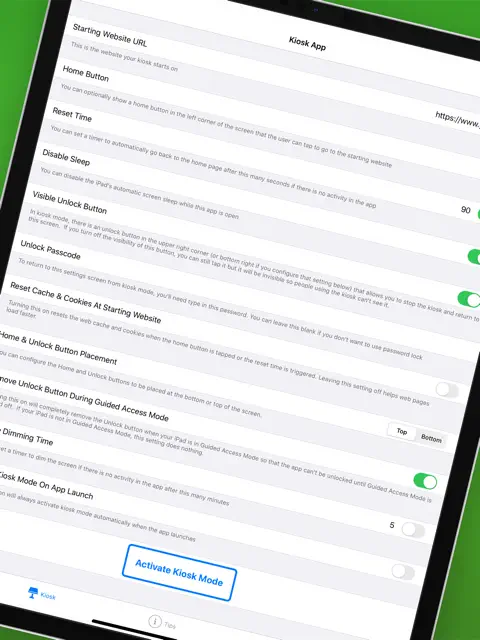
Security is a top priority in Kiosk+. The browser lockdown app prevents unwanted navigation with no-navigation browser mode enabled. You can configure visible unlock button, invisible unlock button, or remove unlock button entirely when Guided Access integration is active.
Password protected kiosk settings ensure only authorized users can exit kiosk mode. The password requirement adds an extra layer of kiosk security settings for corporate environments. This makes it suitable for enterprise kiosk solution deployments.
Kiosk+ includes inactivity timer reset and auto reset kiosk options. If the device is unused for a period, it returns automatically to the start page. The home button reset ensures the interface remains clean and controlled.
Administrators can disable iPad sleep mode during kiosk sessions. The auto-dimming screen timer activates when the kiosk is idle, preserving battery life while maintaining professionalism. These features enhance touchscreen interface control.
Cache and cookies reset features allow session reset on restart. This ensures privacy between users and makes it ideal for data capture kiosk and information booth software scenarios. Each session remains isolated and secure.
The app supports custom home button placement and on-screen button placement configuration. With custom user agent setting and web request customization, Kiosk+ adapts to specialized web app kiosk wrapper needs.
Remote management is simplified through mobile device management (MDM) support. Remote configuration via MDM allows IT teams to deploy and manage settings at scale. This makes it a reliable business kiosk software for corporate digital signage networks.
Kiosk+ works well for exhibition kiosk systems and web-based presentation kiosks. It allows auto-launch web page settings when the device powers on. This ensures seamless kiosk deployment tool functionality.
For point-of-sale kiosk setup or digital front desk system use, the app provides flexible configuration options. Public kiosk browser control keeps user interaction focused only on intended content.
The interface of Kiosk+ is designed for configurable kiosk interface customization. Whether used in retail, education, or enterprise environments, the settings are clear and adaptable.
Companies looking for a secure single app mode browser will find this solution effective. The secure web browsing mode keeps the device locked into its assigned purpose.
The app is currently rated 4.6 stars, reflecting strong user satisfaction and reliable performance. Many businesses appreciate its stability and wide feature set.
Even more exciting, Kiosk+ has undergone a major price reduction. Previously priced at $29.99, it is now available completely FREE for a limited time. This makes it an exceptional opportunity for businesses to deploy professional kiosk systems at no cost.
This limited-time free offer significantly increases accessibility for startups and small businesses. The value proposition is strong, especially considering its enterprise-level features.
Organizations can now implement interactive displays, event registration kiosks, or survey systems without upfront investment. The free promotion enhances its appeal as a digital kiosk software.
Kiosk+ stands out in the iOS kiosk app category by combining flexibility, security, and scalability. Its remote MDM capabilities and secure browser lockdown app functions make it enterprise-ready.
The ability to automatically activate kiosk mode when the app launches ensures smooth deployments. Auto-launch web page functionality simplifies setup for unattended environments.
From home automation control centers to corporate digital signage, the app adapts to diverse scenarios. Its touchscreen kiosk app structure makes it intuitive for both administrators and end users.
With its 4.6 rating and limited-time free download offer (reduced from $29.99), Kiosk+ presents a strong opportunity for anyone seeking a professional, secure, and configurable iPad kiosk mode solution.
With Kiosk+, you can deploy a website to kiosk app environment in seconds. Simply set your starting website configuration and launch in kiosk mode automatically. The app locks the device into a secure web browsing mode that prevents users from navigating away.
Businesses use Kiosk+ for interactive restaurant menus, trade show visitor collection, museum interactive displays, and event registration kiosks. It works as a digital signage solution and sign-in forms app for meetings and corporate environments.
The app also functions as a meeting check-in system, survey kiosk app, and lead collection tool. Retail kiosk app deployments and self-service kiosk solutions benefit from its public access iPad app framework.
Security is a top priority in Kiosk+. The browser lockdown app prevents unwanted navigation with no-navigation browser mode enabled. You can configure visible unlock button, invisible unlock button, or remove unlock button entirely when Guided Access integration is active.
Password protected kiosk settings ensure only authorized users can exit kiosk mode. The password requirement adds an extra layer of kiosk security settings for corporate environments. This makes it suitable for enterprise kiosk solution deployments.
Kiosk+ includes inactivity timer reset and auto reset kiosk options. If the device is unused for a period, it returns automatically to the start page. The home button reset ensures the interface remains clean and controlled.
Administrators can disable iPad sleep mode during kiosk sessions. The auto-dimming screen timer activates when the kiosk is idle, preserving battery life while maintaining professionalism. These features enhance touchscreen interface control.
Cache and cookies reset features allow session reset on restart. This ensures privacy between users and makes it ideal for data capture kiosk and information booth software scenarios. Each session remains isolated and secure.
The app supports custom home button placement and on-screen button placement configuration. With custom user agent setting and web request customization, Kiosk+ adapts to specialized web app kiosk wrapper needs.
Remote management is simplified through mobile device management (MDM) support. Remote configuration via MDM allows IT teams to deploy and manage settings at scale. This makes it a reliable business kiosk software for corporate digital signage networks.
Kiosk+ works well for exhibition kiosk systems and web-based presentation kiosks. It allows auto-launch web page settings when the device powers on. This ensures seamless kiosk deployment tool functionality.
For point-of-sale kiosk setup or digital front desk system use, the app provides flexible configuration options. Public kiosk browser control keeps user interaction focused only on intended content.
The interface of Kiosk+ is designed for configurable kiosk interface customization. Whether used in retail, education, or enterprise environments, the settings are clear and adaptable.
Companies looking for a secure single app mode browser will find this solution effective. The secure web browsing mode keeps the device locked into its assigned purpose.
The app is currently rated 4.6 stars, reflecting strong user satisfaction and reliable performance. Many businesses appreciate its stability and wide feature set.
Even more exciting, Kiosk+ has undergone a major price reduction. Previously priced at $29.99, it is now available completely FREE for a limited time. This makes it an exceptional opportunity for businesses to deploy professional kiosk systems at no cost.
This limited-time free offer significantly increases accessibility for startups and small businesses. The value proposition is strong, especially considering its enterprise-level features.
Organizations can now implement interactive displays, event registration kiosks, or survey systems without upfront investment. The free promotion enhances its appeal as a digital kiosk software.
Kiosk+ stands out in the iOS kiosk app category by combining flexibility, security, and scalability. Its remote MDM capabilities and secure browser lockdown app functions make it enterprise-ready.
The ability to automatically activate kiosk mode when the app launches ensures smooth deployments. Auto-launch web page functionality simplifies setup for unattended environments.
From home automation control centers to corporate digital signage, the app adapts to diverse scenarios. Its touchscreen kiosk app structure makes it intuitive for both administrators and end users.
With its 4.6 rating and limited-time free download offer (reduced from $29.99), Kiosk+ presents a strong opportunity for anyone seeking a professional, secure, and configurable iPad kiosk mode solution.

Sync Folders Pro
VADIM ZYBIN
$8.99
$4.99

Hours Clocker: Ai Time Tracker
Anass Damri
$3.99

Orderly Check Lists
Tekton Technologies (P) Ltd.
$1.99