

$7.99
$3.99
50% Off
AltiSpace 2
Igor Vasiliev

About the App
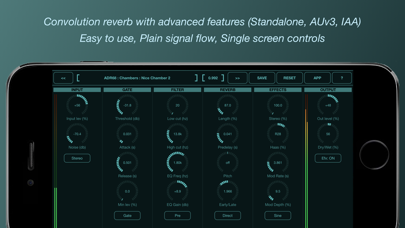
AltiSpace 2 is a powerful convolution reverb app designed to create realistic acoustic spaces or replicate the sound of famous reverb devices for your music tracks and mixes. This app uses impulse response files to simulate the reverberation of real-world spaces or equipment, ensuring a truly realistic sound. Unlike synthetic reverb options, convolution reverb is known for its stunning realism, making it a popular choice among audio creators.
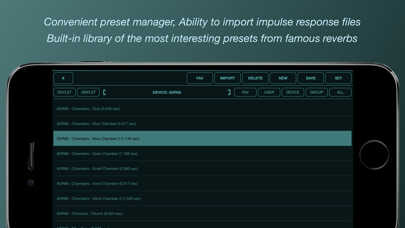
One of the standout features of AltiSpace 2 is its advanced reverb controls. With this app, you can load your own impulse response files or use a wide range of hardware reverb presets from its built-in preset library. You can also tweak various settings to customize your sound, including EQ settings that let you adjust high and low frequencies before or after the reverb effect.
AltiSpace 2 excels in its user-friendly interface. Everything you need is conveniently located on one screen, making it easy to start using right away. Even without additional settings, the app is ready to deliver immersive audio. However, if you want to dive deeper, you can adjust impulse response parameters to create your unique sound and save it as a new preset. The preset manager also makes it simple to organize and search through your sounds. You can mark favorite presets for quick access, adding to the overall preset manager convenience.
For those using MIDI controllers, AltiSpace 2 has robust MIDI controller support, including Bluetooth options. The app can operate with both mono and stereo inputs and can convert them to stereo, enhancing your audio experience. It also features dynamic noise addition, which helps make the reverb sound more organic and natural.
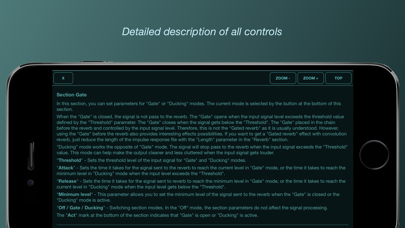
When it comes to controlling the reverb effect, AltiSpace 2 has innovative features like the rolling gate feature and ducker functionality. These allow you to manage when the reverb is activated based on a set threshold, giving you precise control over your audio. There’s also a reverb threshold setting that ensures you get the sound you want without overwhelming your mix.
With options for pre-delay time adjustment and modulation depth control, you can fine-tune your sound even more. The four-channel mode is particularly useful for achieving a better stereo ambience, while adjusting the stereo image ensures your mix feels full and balanced.
AltiSpace 2 also provides indicators for clipping prevention, helping to keep your sound clear and avoiding any distortion. The detailed parameter description within the app allows you to understand all the controls at your fingertips. This is particularly helpful for beginners who are just getting started or for seasoned pros looking to refine their work.
Additionally, AltiSpace 2 operates as a standalone application on iOS and macOS. Whether you’re using it on an iPhone, iPad, or Mac with an M1 chip (or later), you can enjoy its capabilities. The app can function as an Audio Unit plugin, which means it integrates well with digital audio workstations that support AUv3. This flexibility allows for seamless creativity in your music production process.
In summary, AltiSpace 2 is an iOS audio application that offers all the tools needed for crafting stunning reverb effects. With realistic reverb simulation and versatile features like reflective sound amplification, it helps elevate any mix to new heights. The app's capability to manipulate impulse responses and its large library of hardware reverb presets make it an essential tool for music creators looking to add depth and richness to their sound. For detailed information on everything AltiSpace offers, you can easily access its comprehensive guide directly within the app or through a PDF on the application’s website.
One of the standout features of AltiSpace 2 is its advanced reverb controls. With this app, you can load your own impulse response files or use a wide range of hardware reverb presets from its built-in preset library. You can also tweak various settings to customize your sound, including EQ settings that let you adjust high and low frequencies before or after the reverb effect.
AltiSpace 2 excels in its user-friendly interface. Everything you need is conveniently located on one screen, making it easy to start using right away. Even without additional settings, the app is ready to deliver immersive audio. However, if you want to dive deeper, you can adjust impulse response parameters to create your unique sound and save it as a new preset. The preset manager also makes it simple to organize and search through your sounds. You can mark favorite presets for quick access, adding to the overall preset manager convenience.
For those using MIDI controllers, AltiSpace 2 has robust MIDI controller support, including Bluetooth options. The app can operate with both mono and stereo inputs and can convert them to stereo, enhancing your audio experience. It also features dynamic noise addition, which helps make the reverb sound more organic and natural.
When it comes to controlling the reverb effect, AltiSpace 2 has innovative features like the rolling gate feature and ducker functionality. These allow you to manage when the reverb is activated based on a set threshold, giving you precise control over your audio. There’s also a reverb threshold setting that ensures you get the sound you want without overwhelming your mix.
With options for pre-delay time adjustment and modulation depth control, you can fine-tune your sound even more. The four-channel mode is particularly useful for achieving a better stereo ambience, while adjusting the stereo image ensures your mix feels full and balanced.
AltiSpace 2 also provides indicators for clipping prevention, helping to keep your sound clear and avoiding any distortion. The detailed parameter description within the app allows you to understand all the controls at your fingertips. This is particularly helpful for beginners who are just getting started or for seasoned pros looking to refine their work.
Additionally, AltiSpace 2 operates as a standalone application on iOS and macOS. Whether you’re using it on an iPhone, iPad, or Mac with an M1 chip (or later), you can enjoy its capabilities. The app can function as an Audio Unit plugin, which means it integrates well with digital audio workstations that support AUv3. This flexibility allows for seamless creativity in your music production process.
In summary, AltiSpace 2 is an iOS audio application that offers all the tools needed for crafting stunning reverb effects. With realistic reverb simulation and versatile features like reflective sound amplification, it helps elevate any mix to new heights. The app's capability to manipulate impulse responses and its large library of hardware reverb presets make it an essential tool for music creators looking to add depth and richness to their sound. For detailed information on everything AltiSpace offers, you can easily access its comprehensive guide directly within the app or through a PDF on the application’s website.

Tomofon
Klevgränd produkter AB
$28.99
$8.99

VAPoly16
Ryo Togawa
$14.99
$3.99
SessionBand Jazz 2
UK Music Apps Ltd
$8.99
$3.99