

$7.99
$4.99
38% Off
apeFilter
apeSoft

About the App
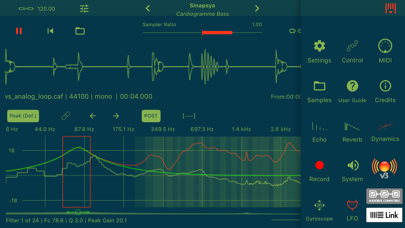
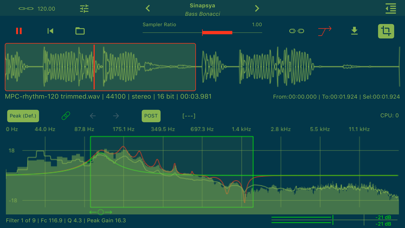
apeFilter is a powerful equalizer designed for both casual users and audio professionals. It uses advanced Biquad Cascade Filters to provide quick and effective sound adjustments. The app offers a user-friendly graphical interaction system that helps you design a precise and smooth frequency response. With up to 36 Peaks Filters, you can easily manipulate sound to meet your needs.
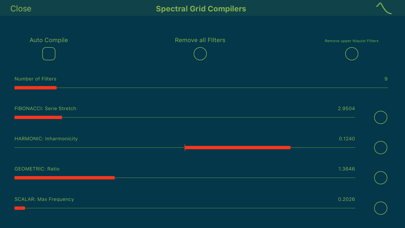
One of the standout features of apeFilter is its Spectral Grid Compilers. These compilers enhance the complexity and coherence of the filters' bandwidth space, giving you better control over your audio design. You can create your own pitch space using four different construction criteria: Fibonacci Construction, Harmonic Construction, Geometric Construction, and Scalar Construction. This means you can set up your audio environment exactly how you want it.
apeFilter also supports various audio methods, making it easy to sculpt your sound. You can work with the embedded sampler feature or use it live with Audiobus or Inter-App Audio Input. This flexibility allows you to integrate apeFilter with other apps seamlessly. Among its many effects, you'll find an outstanding ClassicVerb that enriches your audio experience.
The app includes support for AudioUnit V3 FX and Inter-App Audio FX, ensuring compatibility with a wide range of music-making tools. It works with Audiobus Full for smooth interaction across applications, and Ableton Link Integration allows for easy synchronization with other software. If you need to connect external devices, apeFilter provides robust audio interface support. You can even use the microphone input functionality to capture sounds directly.
For further customization, apeFilter features 72 Peak Filters within its Spectral Grid Compilers. These include common filters such as Lowpass Filter, Hipass Filter, Bandpass Filter, Notch Filter, Lowshelf Filter, and Hishelf Filter. You can also manipulate filters using MIDI Note On/Off messages, which help control the frequency and gain of the filters.
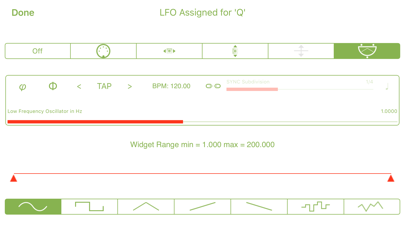
The app’s Control Manager LFO allows you to adjust parameters dynamically, adding an extra layer of flexibility to your sound creation. For advanced users, it supports 14-bit NRPN Controllers through Midibus, Virtual Midi, and Network connections, giving you even more control over your audio setup.
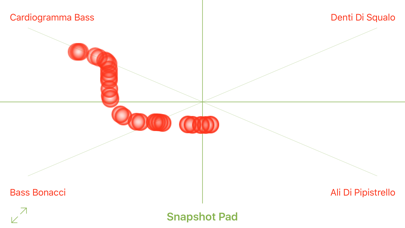
apeFilter comes with a File Manager functionality, making it easy to share audio files via iTunes, Dropbox Audio Sharing, and AudioCopy Files Support. This means you can quickly import or export your audio creations without hassle. The Snapshot Presets Morphing Pad helps you save and switch between different setups effortlessly.
Once you're happy with your sound, you can apply Post FX Chain features, including a Stereo Delay Effect and a Dynamic Compressor Expander. These tools contribute to creating a polished final audio product.
In summary, apeFilter is a versatile sound sculpting tool that provides a fast and efficient way to design your audio with detailed frequency manipulation and a range of powerful features. Whether you are a musician or an audio engineer, apeFilter gives you the tools you need to create high-quality sound tailored to your vision.
One of the standout features of apeFilter is its Spectral Grid Compilers. These compilers enhance the complexity and coherence of the filters' bandwidth space, giving you better control over your audio design. You can create your own pitch space using four different construction criteria: Fibonacci Construction, Harmonic Construction, Geometric Construction, and Scalar Construction. This means you can set up your audio environment exactly how you want it.
apeFilter also supports various audio methods, making it easy to sculpt your sound. You can work with the embedded sampler feature or use it live with Audiobus or Inter-App Audio Input. This flexibility allows you to integrate apeFilter with other apps seamlessly. Among its many effects, you'll find an outstanding ClassicVerb that enriches your audio experience.
The app includes support for AudioUnit V3 FX and Inter-App Audio FX, ensuring compatibility with a wide range of music-making tools. It works with Audiobus Full for smooth interaction across applications, and Ableton Link Integration allows for easy synchronization with other software. If you need to connect external devices, apeFilter provides robust audio interface support. You can even use the microphone input functionality to capture sounds directly.
For further customization, apeFilter features 72 Peak Filters within its Spectral Grid Compilers. These include common filters such as Lowpass Filter, Hipass Filter, Bandpass Filter, Notch Filter, Lowshelf Filter, and Hishelf Filter. You can also manipulate filters using MIDI Note On/Off messages, which help control the frequency and gain of the filters.
The app’s Control Manager LFO allows you to adjust parameters dynamically, adding an extra layer of flexibility to your sound creation. For advanced users, it supports 14-bit NRPN Controllers through Midibus, Virtual Midi, and Network connections, giving you even more control over your audio setup.
apeFilter comes with a File Manager functionality, making it easy to share audio files via iTunes, Dropbox Audio Sharing, and AudioCopy Files Support. This means you can quickly import or export your audio creations without hassle. The Snapshot Presets Morphing Pad helps you save and switch between different setups effortlessly.
Once you're happy with your sound, you can apply Post FX Chain features, including a Stereo Delay Effect and a Dynamic Compressor Expander. These tools contribute to creating a polished final audio product.
In summary, apeFilter is a versatile sound sculpting tool that provides a fast and efficient way to design your audio with detailed frequency manipulation and a range of powerful features. Whether you are a musician or an audio engineer, apeFilter gives you the tools you need to create high-quality sound tailored to your vision.
Groic : Listen music togther
Sambhav Jain
$0.99
BST100 V2 Super Overdrive
Nembrini Audio
$19.99
$9.99

BeatCutter
Igor Vasiliev
$15.99
$9.99