

$5.99
$2.29
62% Off
MSafe – Pro
Codfishworks






About the App
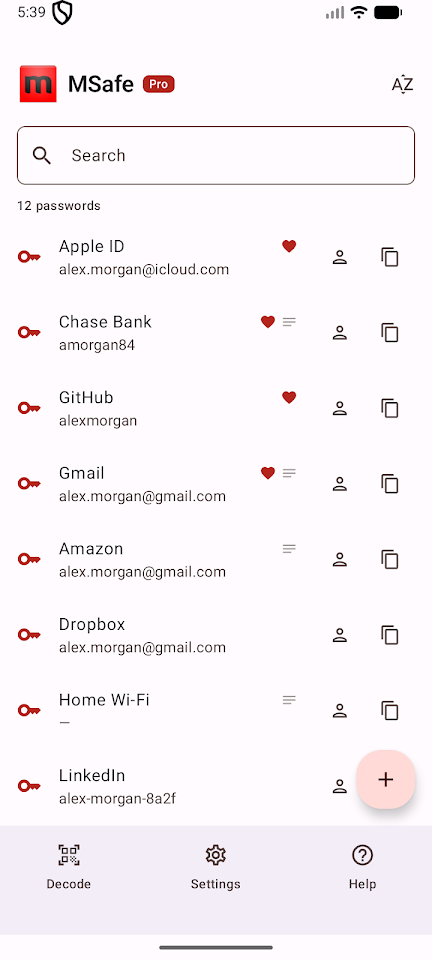
mSafe is a password manager designed for those who want full control over their sensitive information. This app offers offline password storage, meaning your precious data stays on your phone and is secured with AES-256 encryption. There are no servers to worry about because mSafe doesn’t operate any. You won’t need to create an account, verify your email, or sync data with the cloud. In fact, the app doesn’t even request network permissions, making it impossible to connect to the internet.
Why choose to use mSafe offline? While cloud password managers might seem convenient, they come with risks. A single breach at the provider can compromise countless vaults at once. mSafe gives you control over your data instead of relying on a potentially vulnerable provider.
The security features of mSafe work entirely offline. Each credential is protected with AES-256-GCM encryption, and the app utilizes master password security for added peace of mind. It employs PBKDF2-SHA256 with 600,000 iterations to derive the key from your master password. For added security, every entry is assigned a fresh random initialization vector, meaning that even identical passwords will encrypt into different outputs. If someone tries to guess your master password, the vault wipe feature will activate after ten failed attempts. There are no unlock bypasses, recovery emails, or back doors, ensuring your data is safe. Biometric unlock, supported by the Android Keystore, serves as a convenient way to access your vault, while your master password is always available as a fallback.
You can manage your backups easily with mSafe. The app allows you to export any credential or even your entire vault as a QR code PDF. Once you have this printed, you can store it securely in a drawer. mSafe also enables NFC tag backups, so you can write a credential to an NFC tag and tap a phone to restore it later. You can export the vault as an encrypted .msafe file to move between devices without connecting to the internet. Everything is user-controlled, meaning you decide when and where your backups are stored.
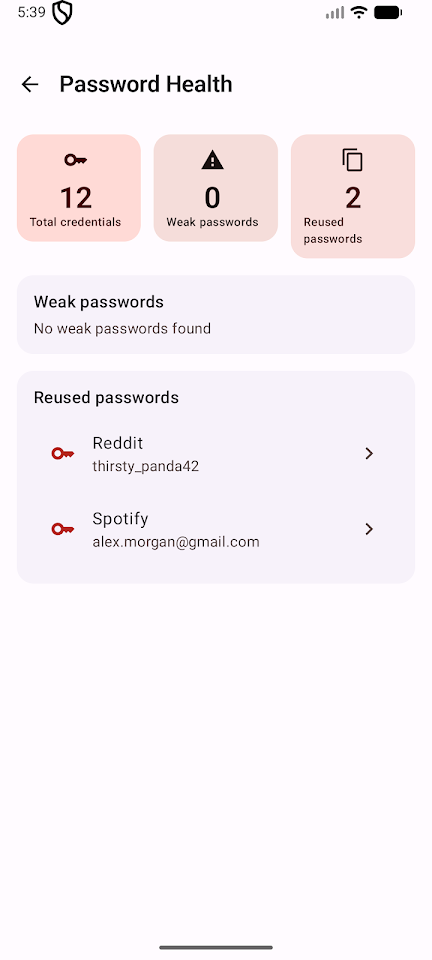
Built for real-life usage, mSafe includes a password generator that features a live entropy meter. You can adjust the length and character classes of your passwords until you achieve the desired strength. The password health dashboard will flag weak passwords and help detect password reuse across services, paving the way for secure password storage. With Android Autofill support, you can fill in credentials in apps and browsers with just one tap. The app’s Material 3 design offers both light and dark themes that follow your device's settings. You also have the option to control the auto-lock timeout or even disable it completely.
The free version of mSafe is genuinely functional. It allows you to store up to 25 credentials, which is enough for most people's regularly used accounts. There are no ads or trial limitations. The Pro version comes with a simple, one-time purchase that removes the cap on credential storage. This means no features are held hostage, and you won’t have to worry about subscription fees.
mSafe is built with privacy in mind. It will never request network access, as the necessary permissions for internet access aren’t even declared in the app. You won’t have to create accounts, share your email, or verify a phone number. The app does not embed analytics, crash reporters, or tracking SDKs, nor will it show ads or upload your vault to a server—because there are no servers. The only way your vault can leave your phone is if you explicitly export it, and even these exports are encrypted for your security.
Regarding permissions, mSafe requires access to the camera only when you scan a QR code for import. It uses NFC permissions only when reading or writing a tag, and biometric access is optional for fingerprint unlock. Autofill settings are only activated when you turn them on in your Android system settings.
mSafe is ideal for anyone looking for a password management solution that operates like a physical notebook—secure and entirely your own. The app is straightforward, featuring a vault, a lock, and simple ways to back up your information. With mSafe, you get an offline authentication solution designed for your personal needs, making password management simplified and secure.
Why choose to use mSafe offline? While cloud password managers might seem convenient, they come with risks. A single breach at the provider can compromise countless vaults at once. mSafe gives you control over your data instead of relying on a potentially vulnerable provider.
The security features of mSafe work entirely offline. Each credential is protected with AES-256-GCM encryption, and the app utilizes master password security for added peace of mind. It employs PBKDF2-SHA256 with 600,000 iterations to derive the key from your master password. For added security, every entry is assigned a fresh random initialization vector, meaning that even identical passwords will encrypt into different outputs. If someone tries to guess your master password, the vault wipe feature will activate after ten failed attempts. There are no unlock bypasses, recovery emails, or back doors, ensuring your data is safe. Biometric unlock, supported by the Android Keystore, serves as a convenient way to access your vault, while your master password is always available as a fallback.
You can manage your backups easily with mSafe. The app allows you to export any credential or even your entire vault as a QR code PDF. Once you have this printed, you can store it securely in a drawer. mSafe also enables NFC tag backups, so you can write a credential to an NFC tag and tap a phone to restore it later. You can export the vault as an encrypted .msafe file to move between devices without connecting to the internet. Everything is user-controlled, meaning you decide when and where your backups are stored.
Built for real-life usage, mSafe includes a password generator that features a live entropy meter. You can adjust the length and character classes of your passwords until you achieve the desired strength. The password health dashboard will flag weak passwords and help detect password reuse across services, paving the way for secure password storage. With Android Autofill support, you can fill in credentials in apps and browsers with just one tap. The app’s Material 3 design offers both light and dark themes that follow your device's settings. You also have the option to control the auto-lock timeout or even disable it completely.
The free version of mSafe is genuinely functional. It allows you to store up to 25 credentials, which is enough for most people's regularly used accounts. There are no ads or trial limitations. The Pro version comes with a simple, one-time purchase that removes the cap on credential storage. This means no features are held hostage, and you won’t have to worry about subscription fees.
mSafe is built with privacy in mind. It will never request network access, as the necessary permissions for internet access aren’t even declared in the app. You won’t have to create accounts, share your email, or verify a phone number. The app does not embed analytics, crash reporters, or tracking SDKs, nor will it show ads or upload your vault to a server—because there are no servers. The only way your vault can leave your phone is if you explicitly export it, and even these exports are encrypted for your security.
Regarding permissions, mSafe requires access to the camera only when you scan a QR code for import. It uses NFC permissions only when reading or writing a tag, and biometric access is optional for fingerprint unlock. Autofill settings are only activated when you turn them on in your Android system settings.
mSafe is ideal for anyone looking for a password management solution that operates like a physical notebook—secure and entirely your own. The app is straightforward, featuring a vault, a lock, and simple ways to back up your information. With mSafe, you get an offline authentication solution designed for your personal needs, making password management simplified and secure.

Ultimate Car Audio App
Thomas VanSlambrouck
$1.99

ActionPad: Mac/PC Pro Controls
Andrew Arpasi
$3.99
$1.99

Strongbox Zero
Phoebe Code Limited
$99.99
$49.99