

$9.99
$2.99
70% Off
Health App to Strava Sync
Bickster LLC


About the App
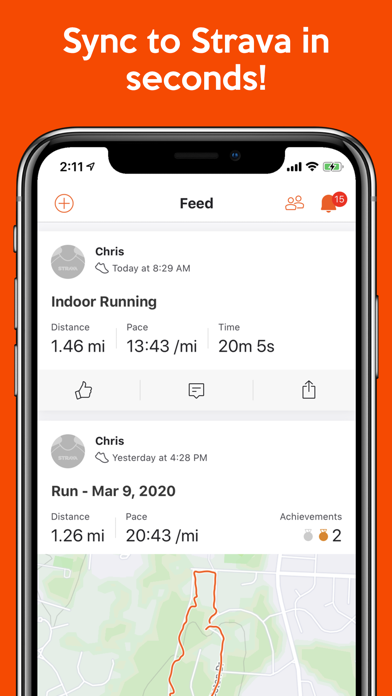
With the Health App to Strava Sync, you can quickly upload your data from Apple Health to Strava in just seconds. Once your data is synced, you can easily view your fitness information either through the Strava app or on your Strava.com account.
This app is designed to help anyone looking to track their fitness activities, whether you enjoy running, cycling, swimming, or weight training. Health App to Strava Sync can sync up to six specific health fields, which means you can customize it to only sync the data most relevant to you. If you have other health data fields you’d like the app to support, we welcome your feedback and encourage you to reach out to us at support@bickster.com.
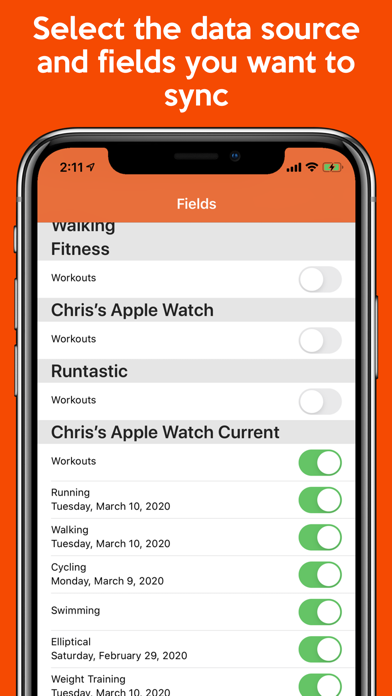
The app makes it easy for users to manage their fitness data. You can choose from multiple sources to sync with—including your iPhone, Apple Watch, and Garmin watches. This makes it convenient to keep all your fitness tracking applications in sync. You can also bring in data from other workout apps that sync with Apple Health, ensuring a complete picture of your fitness journey.
When using Health App to Strava Sync, the background data syncing allows your Apple Health data to be uploaded to Strava multiple times throughout the day. The auto-sync feature may take a few days to work smoothly, as iOS manages this based on user behavior. Please note that for privacy reasons, iOS will not perform an auto-sync if your phone is locked, which might lead to some auto-sync delays.
It's also important to know that your Apple Watch doesn't always remain perfectly up-to-date with Apple Health on your iPhone, which can cause slight discrepancies in your Strava dashboard. To ensure both your Apple Watch and Strava dashboard are in sync, simply launch the Apple Activity app on your phone before using our app. It's not a requirement but can help push your watch to sync up with your phone quickly. By the end of the day, your Apple Watch will sync with Apple Health, and all your data should align with your Strava account.
For a seamless data transfer, we recommend reading the data sync instructions before getting started. If you encounter any sync issues or have questions, reach out to us at support@bickster.com or click the "App Support" button in the App Store. We are here to help!
Using Health App to Strava Sync is straightforward. Here’s how to get started:
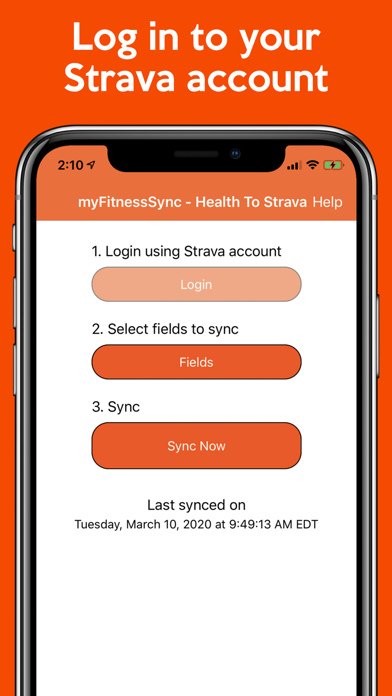
1. Sign into your Strava.com account through the Health App to Strava Sync.
2. Select the fitness fields you want to sync with your Strava account.
3. Hit the "Sync Now" button to begin uploading your Apple Health data.
Rest assured, Health App to Strava Sync will not overwrite any data you already have in your Strava account. We respect your data and prioritize data overwrite protection.
Keep in mind that keeping GPS running in the background can drain your battery. However, our tests have shown that the app uses only about 1% or less of your battery while it is active in the background.
We appreciate your interest in Health App to Strava Sync, and we are eager to hear from you! If you have any feedback or would like to request new features, please feel free to email us. Your input helps us improve the app for everyone.
This app is designed to help anyone looking to track their fitness activities, whether you enjoy running, cycling, swimming, or weight training. Health App to Strava Sync can sync up to six specific health fields, which means you can customize it to only sync the data most relevant to you. If you have other health data fields you’d like the app to support, we welcome your feedback and encourage you to reach out to us at support@bickster.com.
The app makes it easy for users to manage their fitness data. You can choose from multiple sources to sync with—including your iPhone, Apple Watch, and Garmin watches. This makes it convenient to keep all your fitness tracking applications in sync. You can also bring in data from other workout apps that sync with Apple Health, ensuring a complete picture of your fitness journey.
When using Health App to Strava Sync, the background data syncing allows your Apple Health data to be uploaded to Strava multiple times throughout the day. The auto-sync feature may take a few days to work smoothly, as iOS manages this based on user behavior. Please note that for privacy reasons, iOS will not perform an auto-sync if your phone is locked, which might lead to some auto-sync delays.
It's also important to know that your Apple Watch doesn't always remain perfectly up-to-date with Apple Health on your iPhone, which can cause slight discrepancies in your Strava dashboard. To ensure both your Apple Watch and Strava dashboard are in sync, simply launch the Apple Activity app on your phone before using our app. It's not a requirement but can help push your watch to sync up with your phone quickly. By the end of the day, your Apple Watch will sync with Apple Health, and all your data should align with your Strava account.
For a seamless data transfer, we recommend reading the data sync instructions before getting started. If you encounter any sync issues or have questions, reach out to us at support@bickster.com or click the "App Support" button in the App Store. We are here to help!
Using Health App to Strava Sync is straightforward. Here’s how to get started:
1. Sign into your Strava.com account through the Health App to Strava Sync.
2. Select the fitness fields you want to sync with your Strava account.
3. Hit the "Sync Now" button to begin uploading your Apple Health data.
Rest assured, Health App to Strava Sync will not overwrite any data you already have in your Strava account. We respect your data and prioritize data overwrite protection.
Keep in mind that keeping GPS running in the background can drain your battery. However, our tests have shown that the app uses only about 1% or less of your battery while it is active in the background.
We appreciate your interest in Health App to Strava Sync, and we are eager to hear from you! If you have any feedback or would like to request new features, please feel free to email us. Your input helps us improve the app for everyone.
75 Soft: Reset
Compilery Software LLC
$4.99
$3.99

VisionCare – Eye Exams
Manita Trakansirorut
$0.99

Apnea Tables Freediving Coach
Aleh Rabchuk
$4.99
$3.99