
$5.99
$2.99
50% Off
WOV : creative textures
K-Devices

About the App
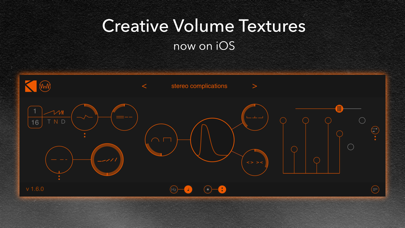
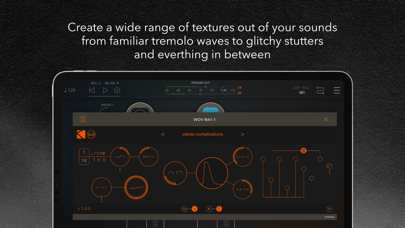
WOV for iOS is a versatile AUv3 effect designed to help you create a wide range of unique textures from your sounds. Whether you want familiar tremolo waves or glitchy stutters, WOV provides the tools you need for exciting texture creation. You can start right away with inspiring presets by Richard Devine and Stèv, which are included to spark your creativity.
To use WOV, you need an AUv3 host app like Garageband, AUM, Cubasis, Modstep, or Beatmaker 3. This means it works well in environments designed for audio production, giving you flexibility in how you integrate it into your projects.
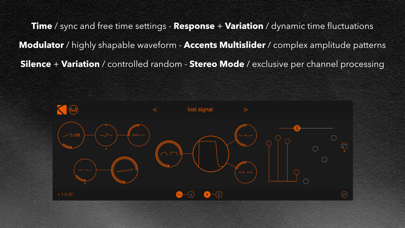
The Rate Section of WOV allows you to determine the speed at which it operates. You can set the rate control in Hz or in sync with the beats of your host app. There's a simple switch at the bottom center of WOV that lets you toggle between these two modes. While you can set a static rate, there's much more to explore. The bipolar response knob adjusts how WOV's rate reacts to the volume of incoming signals. Additionally, a bipolar variation control offers the ability to introduce randomized variation to the rate, ranging from half of the set rate to twice that rate.
In the Depth Section, you can set the level of modulation over the dry signal. Adjusting this control allows WOV to gradually transition from subtle effects to a strong, repeating gate effect. The feature called Silence also adds randomness to your sounds, increasing the chances of cycles having zero amplitude.
The Waveform Section is where you can customize the tremolo effect. WOV stands out because it allows for waveform customization beyond traditional stock options. The Wave knob lets you morph between a quasi-sine shape and a rounded-off square shape. The Peak control works as an attack control for the waveform, allowing for either a sharp attack or a gradual rise to the peak. Another control, the Warp knob, modifies the waveform by squeezing or expanding it, affecting the sound's length. When the Wave control is fully set to a square shape, Warp functions as a duty cycle control.
WOV also features an eight-step sequencer. This multislider adjusts the relative accent value for each beat of the rate. You can choose between two to eight steps in length. There’s a button that offsets the accents in the right channel compared to the left, and this requires that stereo placement is enabled for the best effect.
To get a wider sound, WOV lets you decide whether to maintain the stereo placement of your original input signal or to apply a stereo offset to the output. Enabling the Stereo switch has a direct impact on how the response, silence, and sequencer behave, resulting in a richer audio experience.
WOV encourages a more musical application of its controls. Instead of exact readouts, you will find symbols on the controls. This encourages you to go by feel and let your ears guide you to the right knob positions. However, if you prefer precision, you can click on any parameter to view and edit it in the upper-right corner.
By default, WOV uses visual label icons for controls. If you prefer text labels, there is an option to switch between the symbols and text in the lower-right corner.
In conclusion, WOV is a powerful and creative tool offering features like audio plugin customization, dynamic audio manipulation, and various sound modulation techniques. Its ability to adjust to your specific needs makes it a valuable addition to any music production workflow, whether you are using it for basic effects or more complex creative uses.
To use WOV, you need an AUv3 host app like Garageband, AUM, Cubasis, Modstep, or Beatmaker 3. This means it works well in environments designed for audio production, giving you flexibility in how you integrate it into your projects.
The Rate Section of WOV allows you to determine the speed at which it operates. You can set the rate control in Hz or in sync with the beats of your host app. There's a simple switch at the bottom center of WOV that lets you toggle between these two modes. While you can set a static rate, there's much more to explore. The bipolar response knob adjusts how WOV's rate reacts to the volume of incoming signals. Additionally, a bipolar variation control offers the ability to introduce randomized variation to the rate, ranging from half of the set rate to twice that rate.
In the Depth Section, you can set the level of modulation over the dry signal. Adjusting this control allows WOV to gradually transition from subtle effects to a strong, repeating gate effect. The feature called Silence also adds randomness to your sounds, increasing the chances of cycles having zero amplitude.
The Waveform Section is where you can customize the tremolo effect. WOV stands out because it allows for waveform customization beyond traditional stock options. The Wave knob lets you morph between a quasi-sine shape and a rounded-off square shape. The Peak control works as an attack control for the waveform, allowing for either a sharp attack or a gradual rise to the peak. Another control, the Warp knob, modifies the waveform by squeezing or expanding it, affecting the sound's length. When the Wave control is fully set to a square shape, Warp functions as a duty cycle control.
WOV also features an eight-step sequencer. This multislider adjusts the relative accent value for each beat of the rate. You can choose between two to eight steps in length. There’s a button that offsets the accents in the right channel compared to the left, and this requires that stereo placement is enabled for the best effect.
To get a wider sound, WOV lets you decide whether to maintain the stereo placement of your original input signal or to apply a stereo offset to the output. Enabling the Stereo switch has a direct impact on how the response, silence, and sequencer behave, resulting in a richer audio experience.
WOV encourages a more musical application of its controls. Instead of exact readouts, you will find symbols on the controls. This encourages you to go by feel and let your ears guide you to the right knob positions. However, if you prefer precision, you can click on any parameter to view and edit it in the upper-right corner.
By default, WOV uses visual label icons for controls. If you prefer text labels, there is an option to switch between the symbols and text in the lower-right corner.
In conclusion, WOV is a powerful and creative tool offering features like audio plugin customization, dynamic audio manipulation, and various sound modulation techniques. Its ability to adjust to your specific needs makes it a valuable addition to any music production workflow, whether you are using it for basic effects or more complex creative uses.

FAC Chorus
Frédéric Corvest
$9.99
$6.99
Steel Guitar PRO
Yonac Inc.
$9.99
$2.49

PSA1000 Jr
Nembrini Audio
$14.99
$8.99