

$0.99
FREE
100% Off
TVAirScreen
翔宇 孙



About the App
With TVAirScreen, you can pass the remote instead of your phone. This app makes it easy to enjoy your photos on a big screen with your Apple TV. Save everyone from crowding around a small phone screen. With TVAirScreen, your pictures can be displayed for the whole room to see while browsing is simple with the Siri Remote.
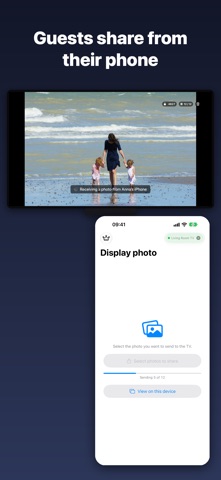
One of the best parts of TVAirScreen is that it requires no setup. There are no accounts to create and no Apple ID needed. Your iPhone connects directly to your Apple TV. This means that your guests can easily share their own photos without needing access to your settings.
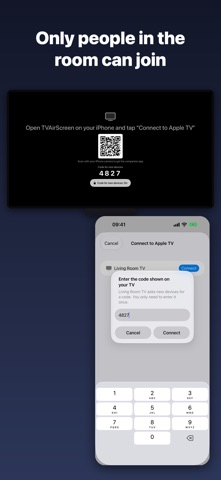
When a new phone wants to connect, your TV will show a 4-digit code. The phone just enters this code once, and then it remembers it for future connections. This way, phones that already connect to your TV will continue to work without any hassle.
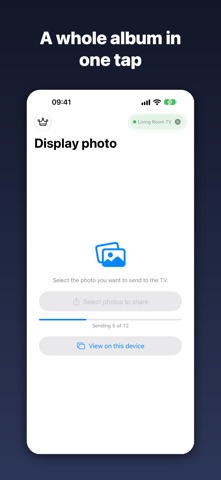
You’ll love how easy it is to share photos with TVAirScreen. You can send a whole album at once, and the photos will appear in the order you selected. Plus, the instant slideshow feature lets you press Play/Pause on the Siri Remote, creating a looping slideshow quickly. Browsing photos is a breeze, as you can swipe left and right on the big screen.
TVAirScreen also allows you to share directly from Photos, Files, or even Safari through a dedicated share button on iPhone. You can send PDFs to your TV too, with every page turning into a slide. This feature is perfect for sharing sheet music, lessons, or multimedia presentations. You have the option to pick photos from your library or take new ones on the spot.
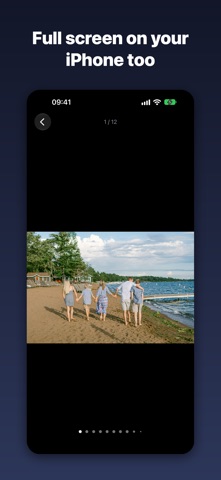
While connected, your iPhone will stay awake, ensuring the show goes on without interruptions. You can view photos and PDFs in full screen on your iPhone, giving you the ability to use pinch-to-zoom functionality for closer looks at the details.
TVAirScreen is perfect for all kinds of moments. Imagine viewing holiday photos with the grandparents while relaxing on the couch, or letting every guest share their shots at parties, weddings, and reunions. If you just got home from a trip, use TVAirScreen for quick travel slideshow presentations in the evening. It’s also great in classrooms for presentations or sharing music during band rehearsal or church services. Plus, it can be used in holiday rentals, allowing your guests to share their own photos easily.
Getting started with TVAirScreen is simple and free. You can send up to 5 photos at a time without needing any account. If you want to send unlimited photo batches or PDFs, you can unlock the Pro version with a one-time purchase—there are no subscriptions to worry about. If you purchased TVAirScreen before it became free, your Pro access is included.
To begin, just install TVAirScreen on your Apple TV or scan the QR code it displays. Open TVAirScreen on your iPhone, tap "Connect to Apple TV," and then enter the code shown on your TV the first time you connect. After that, choose your photos, and watch them appear on the screen.
TVAirScreen requires the app to be installed on your Apple TV for everything to work seamlessly. Enjoy easy photo sharing and create memorable viewing party experiences with TVAirScreen today!
One of the best parts of TVAirScreen is that it requires no setup. There are no accounts to create and no Apple ID needed. Your iPhone connects directly to your Apple TV. This means that your guests can easily share their own photos without needing access to your settings.
When a new phone wants to connect, your TV will show a 4-digit code. The phone just enters this code once, and then it remembers it for future connections. This way, phones that already connect to your TV will continue to work without any hassle.
You’ll love how easy it is to share photos with TVAirScreen. You can send a whole album at once, and the photos will appear in the order you selected. Plus, the instant slideshow feature lets you press Play/Pause on the Siri Remote, creating a looping slideshow quickly. Browsing photos is a breeze, as you can swipe left and right on the big screen.
TVAirScreen also allows you to share directly from Photos, Files, or even Safari through a dedicated share button on iPhone. You can send PDFs to your TV too, with every page turning into a slide. This feature is perfect for sharing sheet music, lessons, or multimedia presentations. You have the option to pick photos from your library or take new ones on the spot.
While connected, your iPhone will stay awake, ensuring the show goes on without interruptions. You can view photos and PDFs in full screen on your iPhone, giving you the ability to use pinch-to-zoom functionality for closer looks at the details.
TVAirScreen is perfect for all kinds of moments. Imagine viewing holiday photos with the grandparents while relaxing on the couch, or letting every guest share their shots at parties, weddings, and reunions. If you just got home from a trip, use TVAirScreen for quick travel slideshow presentations in the evening. It’s also great in classrooms for presentations or sharing music during band rehearsal or church services. Plus, it can be used in holiday rentals, allowing your guests to share their own photos easily.
Getting started with TVAirScreen is simple and free. You can send up to 5 photos at a time without needing any account. If you want to send unlimited photo batches or PDFs, you can unlock the Pro version with a one-time purchase—there are no subscriptions to worry about. If you purchased TVAirScreen before it became free, your Pro access is included.
To begin, just install TVAirScreen on your Apple TV or scan the QR code it displays. Open TVAirScreen on your iPhone, tap "Connect to Apple TV," and then enter the code shown on your TV the first time you connect. After that, choose your photos, and watch them appear on the screen.
TVAirScreen requires the app to be installed on your Apple TV for everything to work seamlessly. Enjoy easy photo sharing and create memorable viewing party experiences with TVAirScreen today!

NoteAfloat – Fast sticky notes
NoteAfloat Labs
$3.49
$2.09

Unit Converter & Currency tool
FOMICHEV DENIS
$0.99

Cut Calculator
Bugfoot Studios LLC
$7.99
$1.99