
$1.99
FREE
100% Off
Tap DJ – Mix & Scratch Music
Laan Labs

About the App
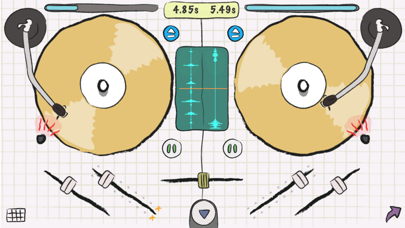
Tap DJ is a fun and easy-to-use pocket DJ app designed for your iPhone and iPod. It lets you scratch music, mix tracks, and add exciting effects to create your own unique sounds. You can start by loading up your favorite music or choosing from a preloaded sample library to kick off your DJ-ing adventure.
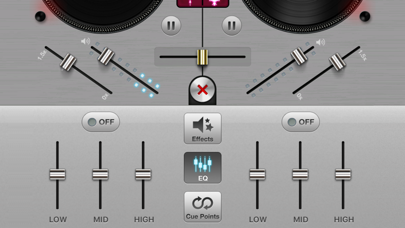
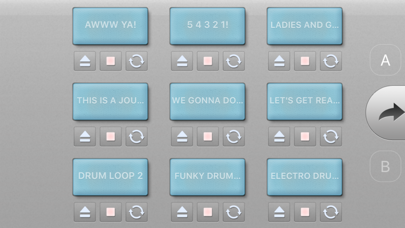
With Tap DJ, you get many fantastic features. There’s integrated iTunes library access that makes it simple to find and use your favorite songs. You can also enjoy FX and a 3-Band Equalizer for each deck, giving you the ability to tweak your sound just the way you like it. The app includes a 9 Pad Sampler, allowing you to incorporate samples into your mixes easily.
If you're looking to enhance your mixing skills, Tap DJ offers 3 loopable cue points per deck, which helps you keep your beats tight and on time. You can even record mixes to save your creations or use voice recording to add your own commentary or sounds. The app features GyroScratch Technology, making it easier to scratch music with a realistic feel.
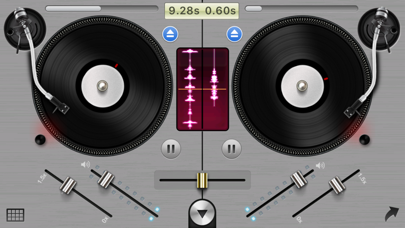
Tap DJ also includes three customizable DJ skins, so you can make the app look and feel like your own. You can integrate USB tracks and import music through WiFi or your iPod for even more options. The stunning realistic turntable interface provides a familiar setting for anyone who loves DJ-ing and allows for live waveform views for precise mixing.
Whether you’re just starting out or you’re an experienced DJ, Tap DJ is perfect for everyone. With advanced DJ tools and features that you would typically find in desktop DJ apps that can cost as much as $50, you have everything you need in one handy app.
Tap DJ also allows you to discover new music by viewing top mixes shared by other users. This makes it easy to find inspiration and explore different genres. Whether you’re into mixing and scratching or looking for a simple music recording app, Tap DJ has got you covered.
So, if you’re ready to take your DJ skills to the next level, give Tap DJ a try! If you love the app, please leave a review to help others discover it too. For demo videos and more information, you can visit http://tap.dj. If you have any feature requests, feel free to email us at labs@laan.com. Don’t forget to follow us on Twitter @laanlabs for the latest updates about Tap DJ!
With Tap DJ, you get many fantastic features. There’s integrated iTunes library access that makes it simple to find and use your favorite songs. You can also enjoy FX and a 3-Band Equalizer for each deck, giving you the ability to tweak your sound just the way you like it. The app includes a 9 Pad Sampler, allowing you to incorporate samples into your mixes easily.
If you're looking to enhance your mixing skills, Tap DJ offers 3 loopable cue points per deck, which helps you keep your beats tight and on time. You can even record mixes to save your creations or use voice recording to add your own commentary or sounds. The app features GyroScratch Technology, making it easier to scratch music with a realistic feel.
Tap DJ also includes three customizable DJ skins, so you can make the app look and feel like your own. You can integrate USB tracks and import music through WiFi or your iPod for even more options. The stunning realistic turntable interface provides a familiar setting for anyone who loves DJ-ing and allows for live waveform views for precise mixing.
Whether you’re just starting out or you’re an experienced DJ, Tap DJ is perfect for everyone. With advanced DJ tools and features that you would typically find in desktop DJ apps that can cost as much as $50, you have everything you need in one handy app.
Tap DJ also allows you to discover new music by viewing top mixes shared by other users. This makes it easy to find inspiration and explore different genres. Whether you’re into mixing and scratching or looking for a simple music recording app, Tap DJ has got you covered.
So, if you’re ready to take your DJ skills to the next level, give Tap DJ a try! If you love the app, please leave a review to help others discover it too. For demo videos and more information, you can visit http://tap.dj. If you have any feature requests, feel free to email us at labs@laan.com. Don’t forget to follow us on Twitter @laanlabs for the latest updates about Tap DJ!
MRH810 V2 Lead Series
Nembrini Audio
$19.99
$9.99

NoiseSpace
Igor Vasiliev
$15.99
$9.99

Iconica Sketch – Orchestra app
Steinberg Media Technologies GmbH
$26.99
$19.99