

$9.99
$5.99
40% Off
SideNotes Mobile
Apptorium




About the App
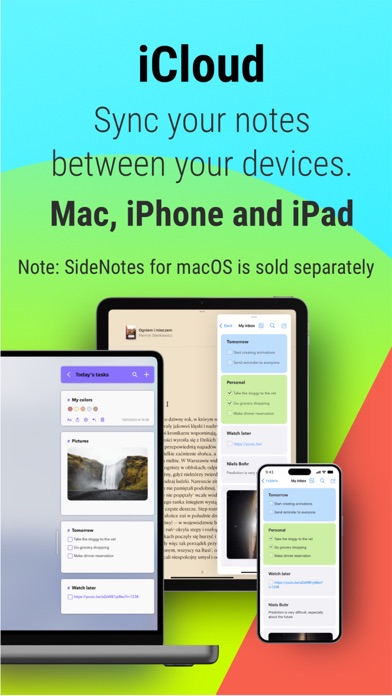
SideNotes Mobile is a fast notes app designed for both iPhone and iPad users. With this app, you can quickly capture notes, tasks, links, and snippets within seconds. Thanks to iCloud sync, you can access your notes across all your devices seamlessly.
The latest update, Version 1.2, brings exciting new features to enhance your experience. There is now a new editor that supports hidden Markdown markup, similar to what you find in SideNotes for macOS. The app also sports a refreshed Liquid Glass interface that adds a sleek look. Another helpful addition is the note folding feature, which allows you to keep your notes organized. You can also pin notes and folders for easy access.
Rearranging your notes is a breeze with simple drag-and-drop reordering, and the new contextual menu options make it easier to format your content. You will find additional formatting options that allow for better customization of your notes. The “Add Note” action button is now integrated for easy access on your iPhone.
SideNotes Mobile now supports multiple languages, including Chinese (Simplified), French, German, Italian, Japanese, Korean, Polish, and Spanish. This means more people can use the app comfortably in their preferred language. The update also includes various UI polish improvements, bug fixes, and overall quality enhancements to make your experience smoother.
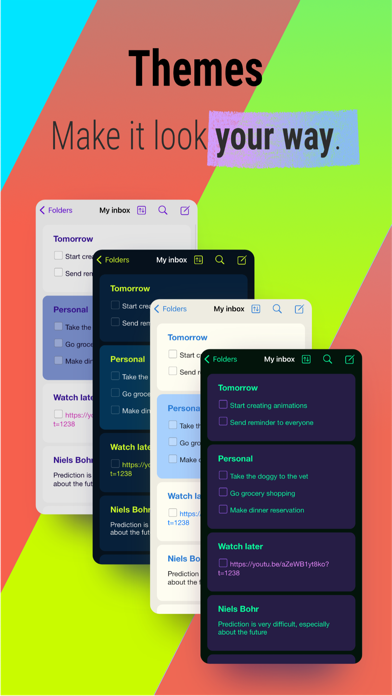
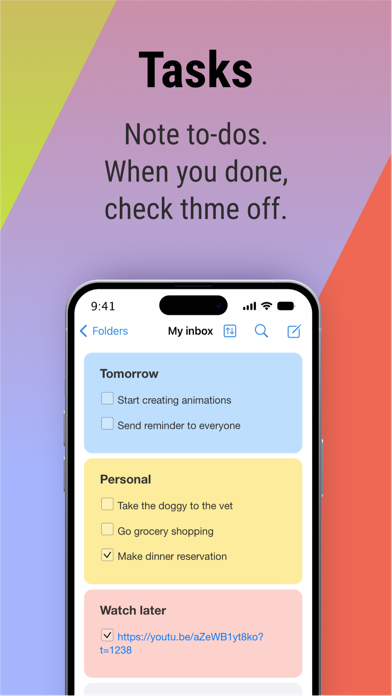
The core features of SideNotes Mobile set it apart as an effective iOS notes app. The iCloud sync ensures that all your notes are accessible across your iPhone, iPad, and Mac. You can personalize your notes with customizable themes and note colors. Furthermore, task management tools such as tasks and checklists help you stay organized in your daily work.
The app allows for easy folder organization and offers quick search functionality to help you find notes fast. You can also use note and folder URLs for quick access from other apps. The optimized text settings make it comfortable to write and read, enhancing your overall efficiency in note-taking.
SideNotes Mobile operates on a one-time purchase model, requiring payment only when a new major version is released—there are no subscriptions involved. This adds a level of simplicity and cost-effectiveness.
Keep in mind that SideNotes Mobile serves as a companion app for SideNotes for macOS, which is sold separately. It’s an excellent choice for anyone in need of efficient note-taking solutions that work seamlessly across devices. Whether you’re capturing snippets or managing tasks, SideNotes Mobile is designed to support you in your daily activities while providing a user-friendly interface and a range of helpful features.
The latest update, Version 1.2, brings exciting new features to enhance your experience. There is now a new editor that supports hidden Markdown markup, similar to what you find in SideNotes for macOS. The app also sports a refreshed Liquid Glass interface that adds a sleek look. Another helpful addition is the note folding feature, which allows you to keep your notes organized. You can also pin notes and folders for easy access.
Rearranging your notes is a breeze with simple drag-and-drop reordering, and the new contextual menu options make it easier to format your content. You will find additional formatting options that allow for better customization of your notes. The “Add Note” action button is now integrated for easy access on your iPhone.
SideNotes Mobile now supports multiple languages, including Chinese (Simplified), French, German, Italian, Japanese, Korean, Polish, and Spanish. This means more people can use the app comfortably in their preferred language. The update also includes various UI polish improvements, bug fixes, and overall quality enhancements to make your experience smoother.
The core features of SideNotes Mobile set it apart as an effective iOS notes app. The iCloud sync ensures that all your notes are accessible across your iPhone, iPad, and Mac. You can personalize your notes with customizable themes and note colors. Furthermore, task management tools such as tasks and checklists help you stay organized in your daily work.
The app allows for easy folder organization and offers quick search functionality to help you find notes fast. You can also use note and folder URLs for quick access from other apps. The optimized text settings make it comfortable to write and read, enhancing your overall efficiency in note-taking.
SideNotes Mobile operates on a one-time purchase model, requiring payment only when a new major version is released—there are no subscriptions involved. This adds a level of simplicity and cost-effectiveness.
Keep in mind that SideNotes Mobile serves as a companion app for SideNotes for macOS, which is sold separately. It’s an excellent choice for anyone in need of efficient note-taking solutions that work seamlessly across devices. Whether you’re capturing snippets or managing tasks, SideNotes Mobile is designed to support you in your daily activities while providing a user-friendly interface and a range of helpful features.

Night Web Browser by Alex
Apps by Alex AB
$0.99

Selene: Shift Calendar
Jiawen Sun
$2.99

Revisits – Service Reports
Francisco Landero
$4.99