

$4.99
$3.99
20% Off
ScaleBud – AUv3 MIDI Keyboard
Cem Olcay


About the App
ScaleBud is a handy music theory tool designed for composers, artists, and learners alike. This app offers more than 40 popular scales to help you explore different sounds and styles. ScaleBud comes with both an AUv3 plugin and a standalone app, providing flexibility for all your music-making needs.
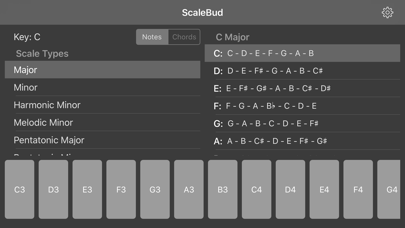
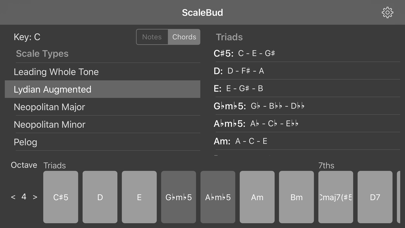
The interface of ScaleBud is simple and user-friendly, allowing you to easily choose the scale and key you want to work with. On the left side, you’ll find a note mode selector and a chord mode selector. On the right side, the app displays the scale notes or chord triads that you can work with. In note mode, you can quickly jump between notes in the selected scale by selecting them from the list. When you switch to chord mode, you can see various options like 7th chords, 9th chords, 11th chords, and 13th chords for each note in the scale. The keyboard makes it easy to jump between these chords simply by pressing the one you want to play. Additionally, in chord mode, you can set the octave for the chords directly from the left side of the keyboard.
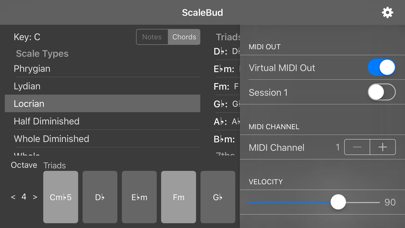
ScaleBud supports CoreMIDI, allowing you to control audio apps on your iOS, Mac, or PC. To use this feature, just open the settings menu and choose the MIDI output destination. You can also utilize Audiobus MIDI sending and filtering. With the Audiobus 3 app, you can send MIDI just like in a regular CoreMIDI setup. In Audiobus MIDI Filter mode, ScaleBud can filter out off-scale notes in note mode. In chord mode, it can even play the corresponding chord for each note, acting like a chorder.
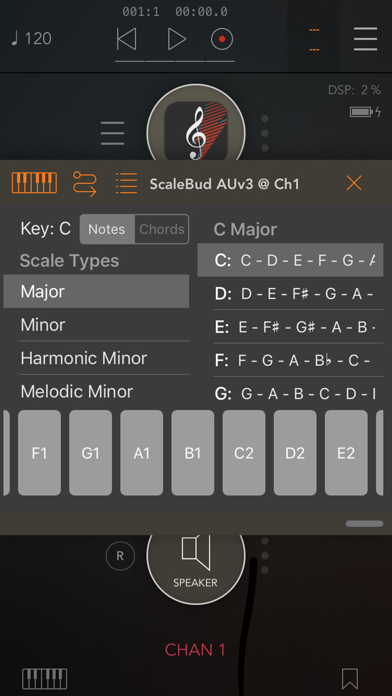
You can easily integrate ScaleBud with various Audio Unit version 3 hosts like Audiobus 3, AUM, Cubasis 2, Beat Maker 3, apeMatrix, and Sequencism. As an audio unit plugin, ScaleBud maps and filters your MIDI input to the MIDI output you choose while sending the notes or chords you've pressed from its keyboard. In chord mode, you can select any type of chord from the list, allowing ScaleBud to generate chords automatically. For example, if you press a 7th chord, it will produce 7th chords for every note you send from your MIDI keyboard.
Additionally, ScaleBud includes several presets, but you can save your custom presets when using supported hosts. This feature makes it easy to jump between the keys, scales, and chords you want to work with. It's important to note that ScaleBud is not an audio app; it only creates or filters MIDI data from your input and sends it to output. It does not generate any sounds in any mode.
If you encounter any issues or want to suggest improvements, you can provide feedback for bug reports or feature requests in the Support section of the settings menu. ScaleBud requires iOS 10.0 or later for the standalone app and iOS 11.0 or later for the AUv3 plugin with a supporting host.
Furthermore, ScaleBud offers open source components on GitHub. You're welcome to explore these options, fork the projects, send a pull request to improve them, or open an issue to share your thoughts. The project links include MusicTheory GitHub, MIDIEventKit GitHub, and ALKit GitHub for more resources.
With ScaleBud, you have a powerful tool for MIDI control, quick note selection, MIDI data manipulation, and overall exploration of music theory concepts. Whether you’re a beginner or an experienced musician, ScaleBud helps you discover the endless possibilities within music creation.
The interface of ScaleBud is simple and user-friendly, allowing you to easily choose the scale and key you want to work with. On the left side, you’ll find a note mode selector and a chord mode selector. On the right side, the app displays the scale notes or chord triads that you can work with. In note mode, you can quickly jump between notes in the selected scale by selecting them from the list. When you switch to chord mode, you can see various options like 7th chords, 9th chords, 11th chords, and 13th chords for each note in the scale. The keyboard makes it easy to jump between these chords simply by pressing the one you want to play. Additionally, in chord mode, you can set the octave for the chords directly from the left side of the keyboard.
ScaleBud supports CoreMIDI, allowing you to control audio apps on your iOS, Mac, or PC. To use this feature, just open the settings menu and choose the MIDI output destination. You can also utilize Audiobus MIDI sending and filtering. With the Audiobus 3 app, you can send MIDI just like in a regular CoreMIDI setup. In Audiobus MIDI Filter mode, ScaleBud can filter out off-scale notes in note mode. In chord mode, it can even play the corresponding chord for each note, acting like a chorder.
You can easily integrate ScaleBud with various Audio Unit version 3 hosts like Audiobus 3, AUM, Cubasis 2, Beat Maker 3, apeMatrix, and Sequencism. As an audio unit plugin, ScaleBud maps and filters your MIDI input to the MIDI output you choose while sending the notes or chords you've pressed from its keyboard. In chord mode, you can select any type of chord from the list, allowing ScaleBud to generate chords automatically. For example, if you press a 7th chord, it will produce 7th chords for every note you send from your MIDI keyboard.
Additionally, ScaleBud includes several presets, but you can save your custom presets when using supported hosts. This feature makes it easy to jump between the keys, scales, and chords you want to work with. It's important to note that ScaleBud is not an audio app; it only creates or filters MIDI data from your input and sends it to output. It does not generate any sounds in any mode.
If you encounter any issues or want to suggest improvements, you can provide feedback for bug reports or feature requests in the Support section of the settings menu. ScaleBud requires iOS 10.0 or later for the standalone app and iOS 11.0 or later for the AUv3 plugin with a supporting host.
Furthermore, ScaleBud offers open source components on GitHub. You're welcome to explore these options, fork the projects, send a pull request to improve them, or open an issue to share your thoughts. The project links include MusicTheory GitHub, MIDIEventKit GitHub, and ALKit GitHub for more resources.
With ScaleBud, you have a powerful tool for MIDI control, quick note selection, MIDI data manipulation, and overall exploration of music theory concepts. Whether you’re a beginner or an experienced musician, ScaleBud helps you discover the endless possibilities within music creation.

Verve – Felt Piano App & AUv3
Steinberg Media Technologies GmbH
$19.99
$14.99

BLEASS Sidekick
BLEASS
$6.99
$3.99

6144 equalizer by DDMF
Christian Siedschlag
$9.99
$4.99