
$14.99
$6.99
53% Off
Neon Audio Editor
4Pockets.com

About the App
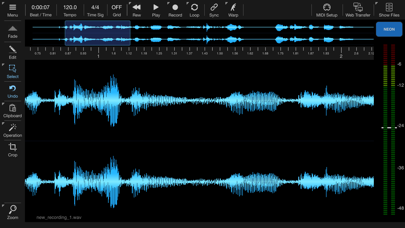
Neon Audio Editor is a lightweight digital audio editor and recording plugin that works with any AUv3 host. It's easy to use and supports most major iOS file formats. With Neon, you can quickly drag and drop audio between plugins, making your workflow smoother.
The app allows you to import audio from a file or the system clipboard. You can also record incoming audio directly, giving you flexibility in how you create and manage your sound. As a digital audio editor, it offers typical functionalities, but what makes Neon special is its ability to edit samples at extreme zoom levels. This lets you work on details that might be missed in other editors.
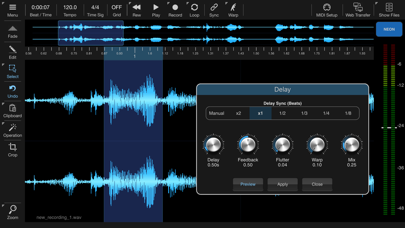
Neon includes built-in effects that can enhance your audio. You can apply these effects to the entire file or just a selection. Before applying any effect, you're able to preview and tweak it to get the exact sound you want. This feature gives you control over your sound and ensures that your edits meet your expectations.
One unique feature of Neon is its clip launcher functionality. This means you can use it within an AUv3 host to remotely trigger one-shot samples or looped samples. The Warp function is particularly helpful, as it can adjust the tempo of a clip to match the host without affecting the pitch. This is great for maintaining the integrity of the sound while syncing to other tracks.
If you want to manipulate audio further, Neon has an audio slicing feature. This allows you to cut samples into multiple slices, which can then be played back using a MIDI controller. With configurable MIDI support, you can set up your controls to suit your needs.
Neon’s auto start trigger level feature helps you manage recordings efficiently. You can set maximum recording lengths, whether in beats or seconds, perfect for creating flawless loops. Additionally, you can drag and drop selections between apps, making it easy to work with your audio files.
In terms of exporting, Neon gives you several options. You can export your audio to WAV, M4A, MP3, and FLAC formats. The warp and time-stretch functionality also assist in syncing your sound to the host, ensuring everything plays nicely together.
The app also features a Media Bay file manager for organizing your clips. This makes finding and managing your audio much easier. You can even set short names and colors in AUM to keep your workspace organized.
Neon supports multiple instances running, which allows you to work on several projects at once without any hassle. For those needing precise audio levels, the LUFS measurement tool is built-in, helping you monitor loudness levels effectively.
One important thing to note is that Neon has a recording time limit of 15 minutes due to memory restrictions as an AUv3 plugin. This is something to keep in mind while working on longer projects.
Overall, Neon Audio Editor combines powerful editing capabilities with a user-friendly interface, making it a great choice for anyone looking to create and edit audio on iOS. Whether you're a musician, sound designer, or just getting started, Neon provides the tools needed to bring your audio ideas to life.
The app allows you to import audio from a file or the system clipboard. You can also record incoming audio directly, giving you flexibility in how you create and manage your sound. As a digital audio editor, it offers typical functionalities, but what makes Neon special is its ability to edit samples at extreme zoom levels. This lets you work on details that might be missed in other editors.
Neon includes built-in effects that can enhance your audio. You can apply these effects to the entire file or just a selection. Before applying any effect, you're able to preview and tweak it to get the exact sound you want. This feature gives you control over your sound and ensures that your edits meet your expectations.
One unique feature of Neon is its clip launcher functionality. This means you can use it within an AUv3 host to remotely trigger one-shot samples or looped samples. The Warp function is particularly helpful, as it can adjust the tempo of a clip to match the host without affecting the pitch. This is great for maintaining the integrity of the sound while syncing to other tracks.
If you want to manipulate audio further, Neon has an audio slicing feature. This allows you to cut samples into multiple slices, which can then be played back using a MIDI controller. With configurable MIDI support, you can set up your controls to suit your needs.
Neon’s auto start trigger level feature helps you manage recordings efficiently. You can set maximum recording lengths, whether in beats or seconds, perfect for creating flawless loops. Additionally, you can drag and drop selections between apps, making it easy to work with your audio files.
In terms of exporting, Neon gives you several options. You can export your audio to WAV, M4A, MP3, and FLAC formats. The warp and time-stretch functionality also assist in syncing your sound to the host, ensuring everything plays nicely together.
The app also features a Media Bay file manager for organizing your clips. This makes finding and managing your audio much easier. You can even set short names and colors in AUM to keep your workspace organized.
Neon supports multiple instances running, which allows you to work on several projects at once without any hassle. For those needing precise audio levels, the LUFS measurement tool is built-in, helping you monitor loudness levels effectively.
One important thing to note is that Neon has a recording time limit of 15 minutes due to memory restrictions as an AUv3 plugin. This is something to keep in mind while working on longer projects.
Overall, Neon Audio Editor combines powerful editing capabilities with a user-friendly interface, making it a great choice for anyone looking to create and edit audio on iOS. Whether you're a musician, sound designer, or just getting started, Neon provides the tools needed to bring your audio ideas to life.
MidiStep
4Pockets.com
$14.99
$7.99

Yukawa – AUv3 Plug-in Effect
iceWorks, Inc.
$5.00
$4.00

Speldosa
Klevgränd produkter AB
$9.99
$4.99