

$4.99
FREE
100% Off
MultiTrack DAW
Harmonicdog

About the App
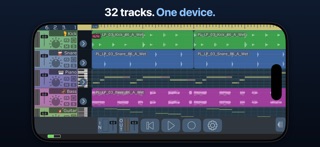
MultiTrack DAW brings the power of a digital audio workstation right to your fingertips. Launched in 2009, this app has been a go-to for recording on iPhone, and the latest version 7 has made it even better. Now, you can enjoy all 32 audio tracks, making it perfect for musicians and producers alike.
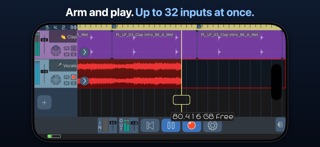
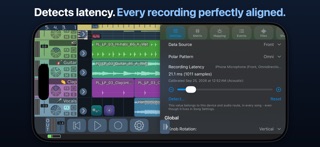
With MultiTrack DAW, you can record using the built-in mic, a USB multichannel interface, or even AUv3 instruments and Inter-App Audio instruments. This means you can capture up to 32 inputs at once. The app provides auto input monitoring, ensuring that you hear what you record. Plus, it features latency compensation, which you can adjust by tapping Detect or setting it manually. This way, your recorded audio aligns seamlessly with what you heard during the recording.
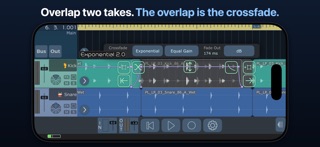
One of the great features of MultiTrack DAW is its editing capabilities. Nothing you record gets overwritten, so a take will survive interruptions like a call or a lost interface. You can work with regions that point directly to the audio, which means slicing and trimming never affects the original file. Additionally, regions can overlap. This overlapping allows for crossfade audio regions, letting you blend two takes smoothly. You can simply drag one region over another to mix them effectively. With eight curve shapes available for your fades, you have creative control right at your fingertips.
Tempo automation is available, allowing you to change time signatures wherever needed. You can also automate the tempo itself. Draw ramps and curves to control the tempo, with audio, MIDI, and Ableton Link following along in real time.
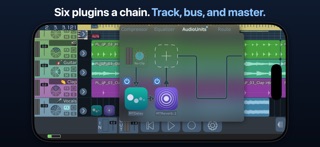
Mixing is a breeze with MultiTrack DAW. You can use up to six AUv3 or Inter-App Audio plugins on each track, as well as on the master bus. The app also features four send buses, which can be set to pre- or post-fader. You have EQ and compressors built into every part of your mix, along with bundled delay and reverb effects. If you need to manage CPU resources, you can freeze a track to help with performance.
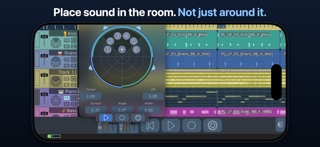
For those working with surround sound support, MultiTrack DAW doesn't fall short. It includes formats like Stereo, Quad, LCRS, and even more complex layouts like 5.1 and 7.1. The panner feature ensures clear sound placement, keeping audio distinct with at least 24 dB between neighboring speakers. If you switch a speaker off, its share gets redistributed rather than lost.
MIDI capabilities let you play AUv3 instruments from your hardware controllers or other apps. You can record every note, including loops, with MIDI Matrix routing available for flexibility. You can even import Standard MIDI Files with their tempo maps. If you unlock all features, you gain access to piano-roll editing, where you can easily draw notes right under your finger.
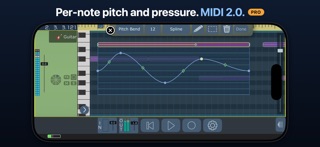
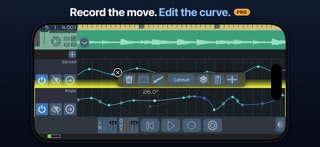
Automation in MultiTrack DAW is detailed and user-friendly. You can draw or record automation for volume, mute, pan, EQ, and more. With MIDI 2.0 integration, each note can have its own pitch bend and pressure, adding nuance to your music creation.
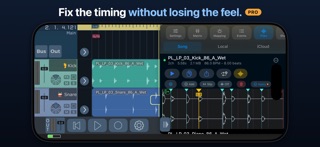
When it comes to pitch manipulation, the app allows you to shift up to two octaves in either direction, keeping the sound quality intact. You can also explore time stretching and warp editing. Place markers to correct BPM and loop while you audition your changes.
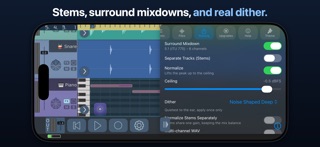
Exporting your projects is simple, with options to save in several formats, including WAV, MP3, FLAC, and Apple Lossless. You can choose to normalize audio to a ceiling between -6 to 0 dBFS. The app also provides real-time dither settings applied carefully after sample rate conversion. You can export the entire song, just a loop, individual stems, or even a surround mixdown.
Projects can be stored in iCloud, allowing you to easily drag audio, MIDI, and presets in and out of the app via Wi-Fi. You do not need an account or have to worry about analytics or tracking.
MultiTrack DAW supports a range of audio formats, including 16-bit, 24-bit, and 32-bit float recording at various sample rates from 44.1 to 192 kHz. It allows hosting AUv3, Inter-App Audio, and external MIDI Clock support, along with hardware and Network MIDI options.
The app includes a free trial subscription, which lets you explore before committing. If you have previously purchased extra tracks, your investment turns into free months of access to unlock all features at a discounted price.
With all these tools, MultiTrack DAW is equipped to handle your audio recording and mixing needs, giving you professional capabilities in a simple, user-friendly format. Whether you're a beginner or a seasoned musician, this app provides everything you need to create high-quality music straight from your iPhone.
With MultiTrack DAW, you can record using the built-in mic, a USB multichannel interface, or even AUv3 instruments and Inter-App Audio instruments. This means you can capture up to 32 inputs at once. The app provides auto input monitoring, ensuring that you hear what you record. Plus, it features latency compensation, which you can adjust by tapping Detect or setting it manually. This way, your recorded audio aligns seamlessly with what you heard during the recording.
One of the great features of MultiTrack DAW is its editing capabilities. Nothing you record gets overwritten, so a take will survive interruptions like a call or a lost interface. You can work with regions that point directly to the audio, which means slicing and trimming never affects the original file. Additionally, regions can overlap. This overlapping allows for crossfade audio regions, letting you blend two takes smoothly. You can simply drag one region over another to mix them effectively. With eight curve shapes available for your fades, you have creative control right at your fingertips.
Tempo automation is available, allowing you to change time signatures wherever needed. You can also automate the tempo itself. Draw ramps and curves to control the tempo, with audio, MIDI, and Ableton Link following along in real time.
Mixing is a breeze with MultiTrack DAW. You can use up to six AUv3 or Inter-App Audio plugins on each track, as well as on the master bus. The app also features four send buses, which can be set to pre- or post-fader. You have EQ and compressors built into every part of your mix, along with bundled delay and reverb effects. If you need to manage CPU resources, you can freeze a track to help with performance.
For those working with surround sound support, MultiTrack DAW doesn't fall short. It includes formats like Stereo, Quad, LCRS, and even more complex layouts like 5.1 and 7.1. The panner feature ensures clear sound placement, keeping audio distinct with at least 24 dB between neighboring speakers. If you switch a speaker off, its share gets redistributed rather than lost.
MIDI capabilities let you play AUv3 instruments from your hardware controllers or other apps. You can record every note, including loops, with MIDI Matrix routing available for flexibility. You can even import Standard MIDI Files with their tempo maps. If you unlock all features, you gain access to piano-roll editing, where you can easily draw notes right under your finger.
Automation in MultiTrack DAW is detailed and user-friendly. You can draw or record automation for volume, mute, pan, EQ, and more. With MIDI 2.0 integration, each note can have its own pitch bend and pressure, adding nuance to your music creation.
When it comes to pitch manipulation, the app allows you to shift up to two octaves in either direction, keeping the sound quality intact. You can also explore time stretching and warp editing. Place markers to correct BPM and loop while you audition your changes.
Exporting your projects is simple, with options to save in several formats, including WAV, MP3, FLAC, and Apple Lossless. You can choose to normalize audio to a ceiling between -6 to 0 dBFS. The app also provides real-time dither settings applied carefully after sample rate conversion. You can export the entire song, just a loop, individual stems, or even a surround mixdown.
Projects can be stored in iCloud, allowing you to easily drag audio, MIDI, and presets in and out of the app via Wi-Fi. You do not need an account or have to worry about analytics or tracking.
MultiTrack DAW supports a range of audio formats, including 16-bit, 24-bit, and 32-bit float recording at various sample rates from 44.1 to 192 kHz. It allows hosting AUv3, Inter-App Audio, and external MIDI Clock support, along with hardware and Network MIDI options.
The app includes a free trial subscription, which lets you explore before committing. If you have previously purchased extra tracks, your investment turns into free months of access to unlock all features at a discounted price.
With all these tools, MultiTrack DAW is equipped to handle your audio recording and mixing needs, giving you professional capabilities in a simple, user-friendly format. Whether you're a beginner or a seasoned musician, this app provides everything you need to create high-quality music straight from your iPhone.

Pure Upright – Virtual Piano
e-instruments lab GmbH
$29.99
$14.99

ExoSphere
Igor Vasiliev
$14.99
$9.99

Audio Unit Player
Loop-Sessions.LLC.
$0.99