

$9.99
FREE
100% Off
MovieSpirit – Movie Maker Pro
多智 吴



About the App
With MovieSpirit - Movie Maker Pro, you pay once and can use it forever. This app allows you to create and upgrade your movie-making skills throughout your life after just one download.
If you want to share exciting and memorable moments or dream of becoming a director, producer, or actor, MovieSpirit makes it all possible. This app empowers you to express your creativity by combining various media materials like videos, photos, music, and text. You can even record your voice and add finger graffiti to your projects.
MovieSpirit gives you the tools to edit your content seamlessly. You can crop, split, merge, cut, transform, flip, and scale your media clips. The app supports video editing with features like picture-in-picture effect, allowing for unlimited track layers. You can adjust the video ratio to fit your needs and use a scalable timeline for detailed editing frame by frame.
Want to get creative with your videos? You can add different masks, such as line masks and circle masks, to hide or show parts of your video. The app also offers video background removal and chroma key compositing to enhance your projects. With up to 50 special effects—including options like blur, snow, and fireworks—you will have plenty of choices to bring your vision to life.
You can speed up or slow down your clips with fast-forward and slow-motion effects. The text-to-voice function allows you to add narration in different languages easily. You can even rotate your videos 360 degrees or use various image blending modes to create unique looks.
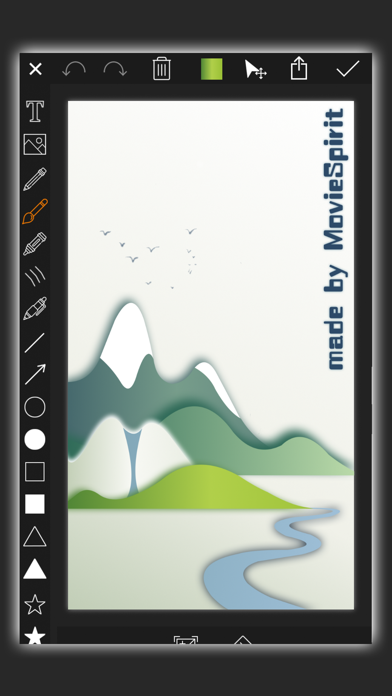
In addition, MovieSpirit features a free music library filled with sound effects and styles. You can extract audio from videos, add music right from your computer or iTunes, or record your own voice. Create finger graffiti directly on your film using custom shape tools, including lines, curves, and shapes like stars or hearts.
You can choose custom background colors, apply animation effects, and adjust brightness to make your videos pop. With high-resolution video output, you’ll create stunning content ready for sharing. You can save and share your movies directly on social media platforms like Facebook, Instagram, and Twitter.
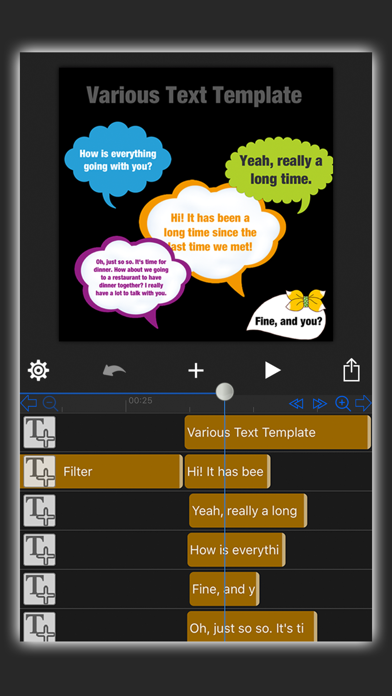
MovieSpirit also guides you with helpful video tutorials to get you started. Whether you are transforming video clips or creating GIF animations, this mobile editing app accommodates your needs. You can also use custom intro titles to add a personal touch to your videos and apply various filter effects to enhance your visuals.
For those who love experimenting, you can deform your videos and photos into unique shapes. Add motion points to make video, photo, or text elements move, zoom, and rotate together. Enjoy real-time previews as you edit, ensuring everything looks just right before you finalize your work.
If you encounter any issues or have feedback, don’t hesitate to reach out. We are dedicated to your satisfaction and are here to support you with all your movie-making needs using MovieSpirit.
If you want to share exciting and memorable moments or dream of becoming a director, producer, or actor, MovieSpirit makes it all possible. This app empowers you to express your creativity by combining various media materials like videos, photos, music, and text. You can even record your voice and add finger graffiti to your projects.
MovieSpirit gives you the tools to edit your content seamlessly. You can crop, split, merge, cut, transform, flip, and scale your media clips. The app supports video editing with features like picture-in-picture effect, allowing for unlimited track layers. You can adjust the video ratio to fit your needs and use a scalable timeline for detailed editing frame by frame.
Want to get creative with your videos? You can add different masks, such as line masks and circle masks, to hide or show parts of your video. The app also offers video background removal and chroma key compositing to enhance your projects. With up to 50 special effects—including options like blur, snow, and fireworks—you will have plenty of choices to bring your vision to life.
You can speed up or slow down your clips with fast-forward and slow-motion effects. The text-to-voice function allows you to add narration in different languages easily. You can even rotate your videos 360 degrees or use various image blending modes to create unique looks.
In addition, MovieSpirit features a free music library filled with sound effects and styles. You can extract audio from videos, add music right from your computer or iTunes, or record your own voice. Create finger graffiti directly on your film using custom shape tools, including lines, curves, and shapes like stars or hearts.
You can choose custom background colors, apply animation effects, and adjust brightness to make your videos pop. With high-resolution video output, you’ll create stunning content ready for sharing. You can save and share your movies directly on social media platforms like Facebook, Instagram, and Twitter.
MovieSpirit also guides you with helpful video tutorials to get you started. Whether you are transforming video clips or creating GIF animations, this mobile editing app accommodates your needs. You can also use custom intro titles to add a personal touch to your videos and apply various filter effects to enhance your visuals.
For those who love experimenting, you can deform your videos and photos into unique shapes. Add motion points to make video, photo, or text elements move, zoom, and rotate together. Enjoy real-time previews as you edit, ensuring everything looks just right before you finalize your work.
If you encounter any issues or have feedback, don’t hesitate to reach out. We are dedicated to your satisfaction and are here to support you with all your movie-making needs using MovieSpirit.

Photo Perspective Pro
永亮 潘
$2.99
$0.99

Golden Hour
Applorium Ltd
$2.99

Priime: Photo & Video Editor
ARTHUR CHANG
$2.99