
$7.99
$3.99
50% Off
mKer
Axart Labs OU


About the App
mKer is a versatile MIDI app designed primarily as a step sequencer. While it can be used as a stand-alone application, it is most effective when used as an AUv3 plugin within an AU Host app like AUM, Audiobus, or Cubasis. It's important to note that mKer does not produce sound by itself; instead, it needs to be connected to an audio source that can receive MIDI signals.
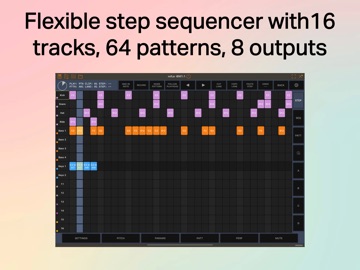
As a MIDI step sequencer, mKer offers a wide range of features to help you create complex musical patterns. With 8 MIDI outputs, you can control multiple instruments at once. You can access up to 64 patterns, each containing 16 lanes per pattern. Each lane is independent, allowing for step sizes ranging from 1 to 32, and the steps can be adjusted from 1/64 to 256 beats.
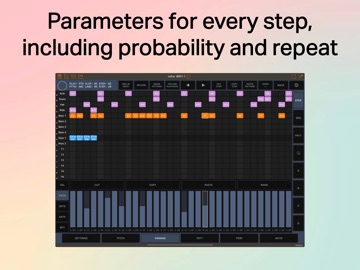
Within each lane, every step can play different musical notes. You can choose to play a single note, an interval with two notes, or even a chord that includes three or four notes. The flexibility doesn’t stop there; mKer allows you to modify each lane with various parameters, including play cycles, skip cycles, and play offset cycles. You also have options for pitch, velocity control, and probability settings, which let you customize how each note is played. There are even swing effects for added groove and a rachet effect for unique rhythmic patterns.
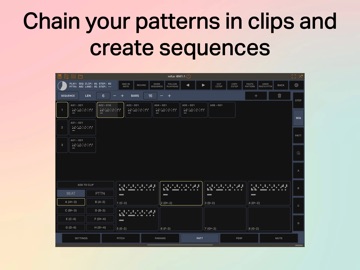
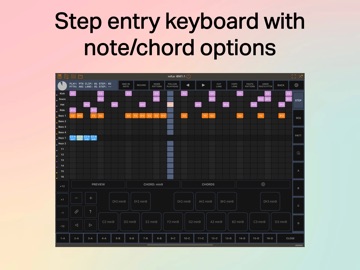
The app features a flexible editor that enhances your workflow. This includes a step entry keyboard and parameter sliders, making it easy to input and adjust settings. You also have access to 32 clips, where each clip can have between 1 to 8 steps, and you can set each step to repeat up to 128 times.
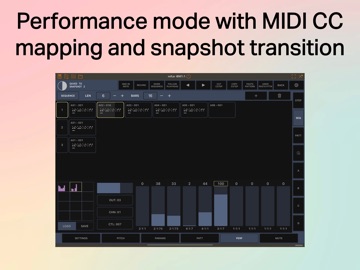
mKer offers three different clip play modes: Pattern, Clip, and Sequence, providing you with multiple ways to arrange and play your compositions. The performance tab is another standout feature, with 10 fully assignable MIDI sliders that give you hands-on control. Additionally, there is a snapshots bank that allows you to save 12 different setups and use the morphing function to smoothly transition between them.
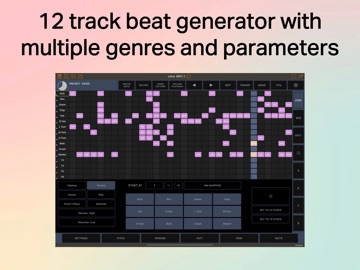
For those looking to incorporate drum sounds, mKer also includes a 12-track beat generator with options across six genres. You can adjust parameters like density and intensity, along with GM beat mapping for convenience.
With real-time recording capabilities, mKer makes it simple to capture your musical ideas as they happen. Whether you're a musician or a producer, mKer provides the tools you need to craft intricate MIDI sequences, making it an essential part of your music production setup.
As a MIDI step sequencer, mKer offers a wide range of features to help you create complex musical patterns. With 8 MIDI outputs, you can control multiple instruments at once. You can access up to 64 patterns, each containing 16 lanes per pattern. Each lane is independent, allowing for step sizes ranging from 1 to 32, and the steps can be adjusted from 1/64 to 256 beats.
Within each lane, every step can play different musical notes. You can choose to play a single note, an interval with two notes, or even a chord that includes three or four notes. The flexibility doesn’t stop there; mKer allows you to modify each lane with various parameters, including play cycles, skip cycles, and play offset cycles. You also have options for pitch, velocity control, and probability settings, which let you customize how each note is played. There are even swing effects for added groove and a rachet effect for unique rhythmic patterns.
The app features a flexible editor that enhances your workflow. This includes a step entry keyboard and parameter sliders, making it easy to input and adjust settings. You also have access to 32 clips, where each clip can have between 1 to 8 steps, and you can set each step to repeat up to 128 times.
mKer offers three different clip play modes: Pattern, Clip, and Sequence, providing you with multiple ways to arrange and play your compositions. The performance tab is another standout feature, with 10 fully assignable MIDI sliders that give you hands-on control. Additionally, there is a snapshots bank that allows you to save 12 different setups and use the morphing function to smoothly transition between them.
For those looking to incorporate drum sounds, mKer also includes a 12-track beat generator with options across six genres. You can adjust parameters like density and intensity, along with GM beat mapping for convenience.
With real-time recording capabilities, mKer makes it simple to capture your musical ideas as they happen. Whether you're a musician or a producer, mKer provides the tools you need to craft intricate MIDI sequences, making it an essential part of your music production setup.

NoInputMixer
Igor Vasiliev
$15.99
$9.99
Crystalline – Baby Audio
Baby Audio Inc.
$29.99
$17.99

SessionBand Rock 1
UK Music Apps Ltd
$8.99
$3.99