
$1.49
FREE
100% Off
Minka Dark – Icon Pack
GomoTheGom


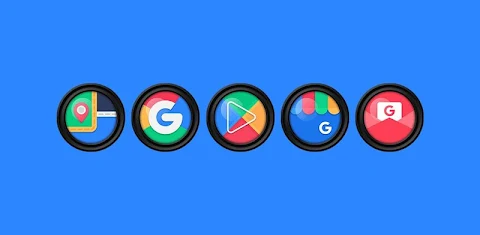
About the App
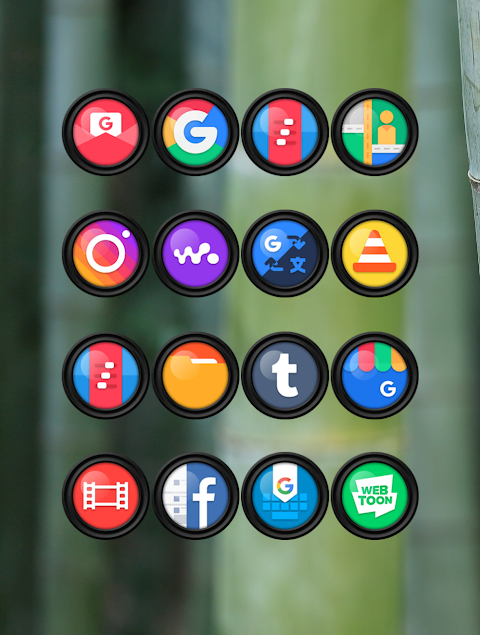
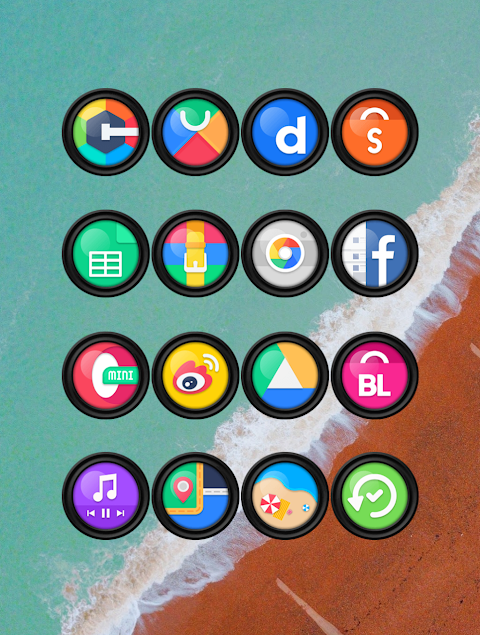
Minka Dark Icon Pack is a fantastic tool for personalizing your Android device. If you want to give your home screen a fresh look, this app has what you need. With over 6000 icons, you can easily find the perfect design to fit your style. Plus, the HD icon resolution of 192x192px ensures that your icons will look sharp and vibrant.
To apply the Minka Dark Icon Pack, simply follow these easy steps. First, open the Minka Dark Icon Pack app on your device. Next, navigate to the Apply Icon Pack screen. You'll see a list of supported launchers, including popular options like Nova Launcher and Evie Launcher. If you have Nova Launcher installed, just select it, and the app will automatically apply the icons for you.
If you don't see your launcher in the app, don’t worry! You can also apply the Minka Dark Icon Pack directly from your launcher’s settings. For example, if you are using the Sony Xperia Home Launcher, there’s a different way to apply the icon pack. To do this, long-press on your main screen and open the settings. Scroll down to the appearance icon setting and choose the Minka Dark Icon Pack. After that, your Sony Xperia will display the stylish icons.
Please note that the Minka Dark Icon Pack is supported on Sony Xperia Home Launcher version 10.0.A.0.8 or higher. This icon pack also works with many other launchers, such as Apex Launcher, ADW Launcher, ABC Launcher, Next Launcher, Holo Launcher, Lucid Launcher, M Launcher, Action Launcher, Aviate Launcher, Smart Launcher, Go Launcher, and Zero Launcher. However, keep in mind that Go Launcher and Zero Launcher do not support icon masking.
One of the great features of Minka Dark Icon Pack is the Icon Request Feature. If you can’t find the icon you want, you can request new ones, ensuring that your personalization needs are met. The pack also includes 40 HD wallpapers to complement your new icons, letting you create a cohesive look for your home screen. Additionally, you’ll find alternate icons within the app, allowing for even more variety.
When it comes to customization, Minka Dark Icon Pack makes Android customization easy and fun. It allows for visual style enhancements that truly reflect your personality. Whether you’re a fan of unique icon designs or simply want better organization on your home screen, this app offers mobile personalization options that are simple to use.
The installation steps are straightforward, ensuring that anyone, regardless of their tech skills, can apply this icon pack without any hassle. You can navigate easily through the launcher settings, allowing you to find the right options for a tailored experience. With Minka Dark, you are not just changing icons; you are transforming your entire user interface.
Stay connected with the design community for updates and more by following Minka Dark on platforms like Google+, Instagram, and Twitter. Special thanks to Dani Mahardika for creating the Candybar Dashboard, which helps in managing icon packs like this one.
In summary, Minka Dark Icon Pack is perfect for anyone looking to refresh their Android experience. With a wide selection of icons and wallpapers, easy application steps, and support for various launchers, it enhances your home screen’s look effortlessly. Enjoy the freedom to customize and bring a touch of personal flair to your device.
To apply the Minka Dark Icon Pack, simply follow these easy steps. First, open the Minka Dark Icon Pack app on your device. Next, navigate to the Apply Icon Pack screen. You'll see a list of supported launchers, including popular options like Nova Launcher and Evie Launcher. If you have Nova Launcher installed, just select it, and the app will automatically apply the icons for you.
If you don't see your launcher in the app, don’t worry! You can also apply the Minka Dark Icon Pack directly from your launcher’s settings. For example, if you are using the Sony Xperia Home Launcher, there’s a different way to apply the icon pack. To do this, long-press on your main screen and open the settings. Scroll down to the appearance icon setting and choose the Minka Dark Icon Pack. After that, your Sony Xperia will display the stylish icons.
Please note that the Minka Dark Icon Pack is supported on Sony Xperia Home Launcher version 10.0.A.0.8 or higher. This icon pack also works with many other launchers, such as Apex Launcher, ADW Launcher, ABC Launcher, Next Launcher, Holo Launcher, Lucid Launcher, M Launcher, Action Launcher, Aviate Launcher, Smart Launcher, Go Launcher, and Zero Launcher. However, keep in mind that Go Launcher and Zero Launcher do not support icon masking.
One of the great features of Minka Dark Icon Pack is the Icon Request Feature. If you can’t find the icon you want, you can request new ones, ensuring that your personalization needs are met. The pack also includes 40 HD wallpapers to complement your new icons, letting you create a cohesive look for your home screen. Additionally, you’ll find alternate icons within the app, allowing for even more variety.
When it comes to customization, Minka Dark Icon Pack makes Android customization easy and fun. It allows for visual style enhancements that truly reflect your personality. Whether you’re a fan of unique icon designs or simply want better organization on your home screen, this app offers mobile personalization options that are simple to use.
The installation steps are straightforward, ensuring that anyone, regardless of their tech skills, can apply this icon pack without any hassle. You can navigate easily through the launcher settings, allowing you to find the right options for a tailored experience. With Minka Dark, you are not just changing icons; you are transforming your entire user interface.
Stay connected with the design community for updates and more by following Minka Dark on platforms like Google+, Instagram, and Twitter. Special thanks to Dani Mahardika for creating the Candybar Dashboard, which helps in managing icon packs like this one.
In summary, Minka Dark Icon Pack is perfect for anyone looking to refresh their Android experience. With a wide selection of icons and wallpapers, easy application steps, and support for various launchers, it enhances your home screen’s look effortlessly. Enjoy the freedom to customize and bring a touch of personal flair to your device.
DADAM95: Stylish Analog Watch
DADAM Watch Faces
$1.49
$0.19
Orange – Icon Pack
Panoto Gomo
$0.99
$0.29

GlassDot Widgets For KWGT
Zeffi Setups
$1.49
$0.99