
$0.99
FREE
100% Off
Live CC
Possibility Outpost Inc.

About the App
If you have hearing problems, Live CC is here to help. This mobile transcription app is designed specifically for the hearing impaired, providing real-time transcription of live speech to text. It's perfect for anyone who needs assistance understanding conversations in everyday situations, whether you're chatting with a friend or speaking to a barista at your local café.
Let me share a story. My Aunt Joy, a wonderful woman, once posted on Facebook, wondering why no one had created an app for the hearing impaired. She envisioned being able to point her phone at someone speaking, and instantly see their words appear on the screen. That inspired me to create Live CC!
Using Live CC is straightforward. Imagine you're in a busy café and struggling to understand what someone is saying. First, point your iPhone's built-in microphone or, for better clarity, an external microphone like the Rode VideoMic Me towards the person speaking. You can start Live CC in two simple ways: by saying "Hey Siri, transcribe" or by tapping the app icon and then selecting "Start Listening." Once you do this, the app will begin displaying what the person says in real-time.
How effective is Live CC? While it’s not perfect, most users find it helpful enough to grasp what people are saying. Aunt Joy tried it out and was impressed. She shared feedback about how well it worked during her interactions, saying, "Even with the app replacing words, we can still get the gist of the conversation."
Live CC utilizes the Apple speech service, which transcribes speech in near real-time. However, the service only processes one minute of speech at a time, meaning there will be a transcription pause after each minute. This pause allows for more accurate text display, so don’t be alarmed when the text changes as new words are spoken.
For the best results, having a strong internet connection is crucial, as Live CC relies on cloud services. Additionally, positioning the microphone towards the speaker can significantly improve transcription accuracy. If you want even better audio clarity, consider using an external microphone, as the built-in microphone can sometimes fall short.
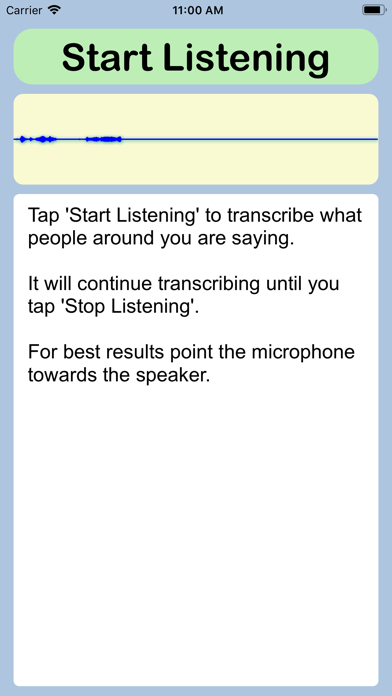
The user interface is designed to be friendly and easy to use. Simply tap "Start Listening" to begin the transcription process. You can read what’s being said in the window below the button; the transcribed text continues to scroll as conversations unfold. Just remember that it takes a few seconds to kick off, so you may want to start it shortly before you need the speech-to-text conversion.
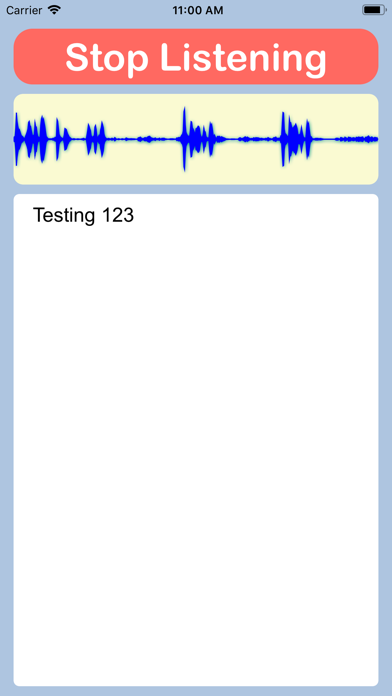
When you’re finished, it’s just as easy to stop the transcription—just hit the "Stop Listening" button. It’s a simple process, and with the Siri shortcut, it feels almost magical. If you want to set up this feature, there's a helpful video on the Live CC website that can guide you through the process.
Unlike many apps that require ongoing subscription fees, Live CC is offered for a one-time purchase. After that, you can use it without any hidden costs.
I truly hope Live CC can assist you in achieving immediate understanding and enhancing everyday communication, just like it has for my Aunt Joy. Whether you’re trying to communicate in crowded spaces, learn during meetings, or simply engage with others, Live CC is your accessible communication tool for navigating the world of conversation.
Let me share a story. My Aunt Joy, a wonderful woman, once posted on Facebook, wondering why no one had created an app for the hearing impaired. She envisioned being able to point her phone at someone speaking, and instantly see their words appear on the screen. That inspired me to create Live CC!
Using Live CC is straightforward. Imagine you're in a busy café and struggling to understand what someone is saying. First, point your iPhone's built-in microphone or, for better clarity, an external microphone like the Rode VideoMic Me towards the person speaking. You can start Live CC in two simple ways: by saying "Hey Siri, transcribe" or by tapping the app icon and then selecting "Start Listening." Once you do this, the app will begin displaying what the person says in real-time.
How effective is Live CC? While it’s not perfect, most users find it helpful enough to grasp what people are saying. Aunt Joy tried it out and was impressed. She shared feedback about how well it worked during her interactions, saying, "Even with the app replacing words, we can still get the gist of the conversation."
Live CC utilizes the Apple speech service, which transcribes speech in near real-time. However, the service only processes one minute of speech at a time, meaning there will be a transcription pause after each minute. This pause allows for more accurate text display, so don’t be alarmed when the text changes as new words are spoken.
For the best results, having a strong internet connection is crucial, as Live CC relies on cloud services. Additionally, positioning the microphone towards the speaker can significantly improve transcription accuracy. If you want even better audio clarity, consider using an external microphone, as the built-in microphone can sometimes fall short.
The user interface is designed to be friendly and easy to use. Simply tap "Start Listening" to begin the transcription process. You can read what’s being said in the window below the button; the transcribed text continues to scroll as conversations unfold. Just remember that it takes a few seconds to kick off, so you may want to start it shortly before you need the speech-to-text conversion.
When you’re finished, it’s just as easy to stop the transcription—just hit the "Stop Listening" button. It’s a simple process, and with the Siri shortcut, it feels almost magical. If you want to set up this feature, there's a helpful video on the Live CC website that can guide you through the process.
Unlike many apps that require ongoing subscription fees, Live CC is offered for a one-time purchase. After that, you can use it without any hidden costs.
I truly hope Live CC can assist you in achieving immediate understanding and enhancing everyday communication, just like it has for my Aunt Joy. Whether you’re trying to communicate in crowded spaces, learn during meetings, or simply engage with others, Live CC is your accessible communication tool for navigating the world of conversation.

Garden Planner: Niwa
Gabriele Pala
$5.99

TimeSignal Alarm clock
hideo nakamura
$0.49

Away ~ Nature Sounds to Sleep
Franz Bruckhoff
$7.99
$3.99