

$1.99
FREE
100% Off
iMonitor: System Monitor
UniversalWind

About the App
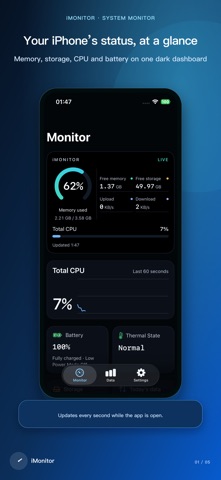
iMonitor: System Monitor is your go-to app for checking your iPhone's status at a glance. It provides a clean, dark interface that shows you the information that matters most right now. You can easily open the dashboard to take a quick look at your device's performance. Plus, with Home Screen and Lock Screen widgets, you can keep your device status clearly visible at all times.
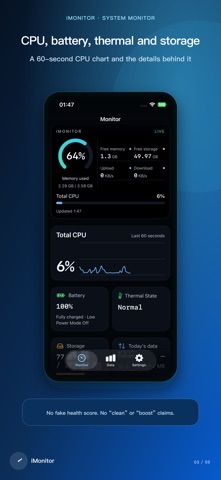
With iMonitor, you can effortlessly monitor your device's status. See CPU activity monitoring to understand how your iPhone is performing. You can also check the available memory status and ensure you have enough free storage. The app helps you stay informed about battery level tracking and tells you the charging state indicator, so you always know if your device is charging or not.
The 60-second CPU chart lets you follow CPU activity in real-time. You can also keep an eye on the Low Power Mode status, device uptime tracking, device model identification, and system version information to stay updated on your iPhone's health. When iMonitor stays open, it refreshes the upload and download rates every second, so you have the latest information at your fingertips.
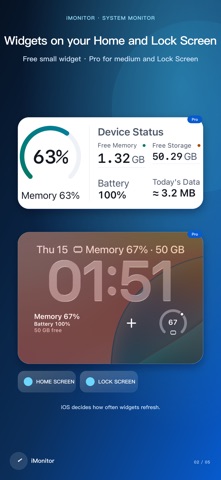
For those who love customizing their phone, iMonitor offers various device status widgets. You can use a small Home Screen widget for quick access to memory, storage, and battery information for free. If you upgrade to the Pro version, you’ll gain access to medium and panoramic Home Screen widgets, as well as Lock Screen widgets. The Pro version also includes StandBy support features and allows you to choose from custom color themes, making it easy to integrate monitoring into your daily life. The widgets show the latest snapshot of your iPhone status, but keep in mind that iOS controls when they refresh.
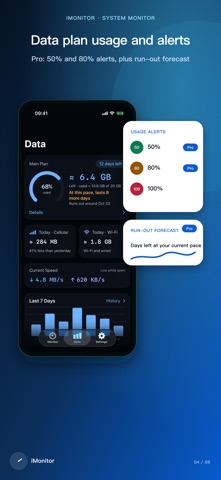
iMonitor also comes with useful data plan tools. You can review your cellular and Wi-Fi usage for today and your billing cycle, helping you keep track of your data. Set one plan and calibrate against your carrier, which allows you to monitor your last 7 days usage for free. Upgrading to Pro adds options like custom usage thresholds, usage forecasts, multiple plans, and even one year of historical data tracking. You can also take advantage of chart export capabilities and export your data as a CSV file for detailed analysis.
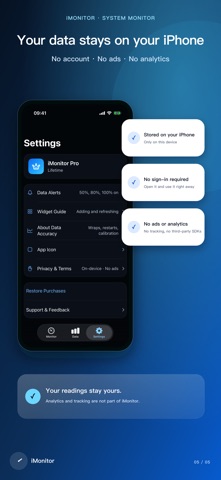
Privacy is a key focus of iMonitor. Your monitoring data and plan settings remain on your device, ensuring they stay private. There’s no need for an account and you won’t see any ads while using it. iMonitor uses no analytics, tracking, or third-party SDKs, guaranteeing a seamless experience without compromising your privacy.
Keep in mind that traffic totals shown in iMonitor are estimates based on samples available to iOS apps. Device restarts and long gaps between samples can lead to missing usage data. For accurate billing, always treat your carrier's records as the final word.
With iMonitor: System Monitor, you have a lightweight monitoring dashboard that gives you a snapshot of your device's status whenever you need it. Enjoy peace of mind knowing that you’re well-informed about your iPhone's performance and usage, all while enjoying a user-centric, privacy-focused tool.
With iMonitor, you can effortlessly monitor your device's status. See CPU activity monitoring to understand how your iPhone is performing. You can also check the available memory status and ensure you have enough free storage. The app helps you stay informed about battery level tracking and tells you the charging state indicator, so you always know if your device is charging or not.
The 60-second CPU chart lets you follow CPU activity in real-time. You can also keep an eye on the Low Power Mode status, device uptime tracking, device model identification, and system version information to stay updated on your iPhone's health. When iMonitor stays open, it refreshes the upload and download rates every second, so you have the latest information at your fingertips.
For those who love customizing their phone, iMonitor offers various device status widgets. You can use a small Home Screen widget for quick access to memory, storage, and battery information for free. If you upgrade to the Pro version, you’ll gain access to medium and panoramic Home Screen widgets, as well as Lock Screen widgets. The Pro version also includes StandBy support features and allows you to choose from custom color themes, making it easy to integrate monitoring into your daily life. The widgets show the latest snapshot of your iPhone status, but keep in mind that iOS controls when they refresh.
iMonitor also comes with useful data plan tools. You can review your cellular and Wi-Fi usage for today and your billing cycle, helping you keep track of your data. Set one plan and calibrate against your carrier, which allows you to monitor your last 7 days usage for free. Upgrading to Pro adds options like custom usage thresholds, usage forecasts, multiple plans, and even one year of historical data tracking. You can also take advantage of chart export capabilities and export your data as a CSV file for detailed analysis.
Privacy is a key focus of iMonitor. Your monitoring data and plan settings remain on your device, ensuring they stay private. There’s no need for an account and you won’t see any ads while using it. iMonitor uses no analytics, tracking, or third-party SDKs, guaranteeing a seamless experience without compromising your privacy.
Keep in mind that traffic totals shown in iMonitor are estimates based on samples available to iOS apps. Device restarts and long gaps between samples can lead to missing usage data. For accurate billing, always treat your carrier's records as the final word.
With iMonitor: System Monitor, you have a lightweight monitoring dashboard that gives you a snapshot of your device's status whenever you need it. Enjoy peace of mind knowing that you’re well-informed about your iPhone's performance and usage, all while enjoying a user-centric, privacy-focused tool.

PaperTrail: TaskPaper Client
gingerbeardman
$19.99
$14.99

iVerify Basic
iVerify
$0.99

Tape Measure Calculator Pro
Bugfoot Studios LLC
$3.99
$1.99