

$0.99
$0.69
30% Off
iGlass Dark OS 26 Icon Pack
PizzApp Design




About the App
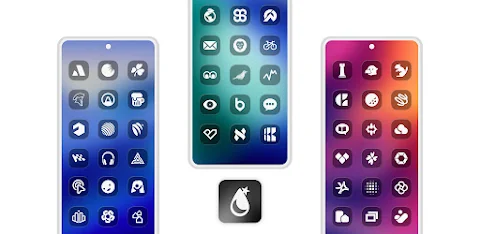
The iGlass Dark OS 26 Icon Pack is here to transform your home screen with stylish dark-transparent icons. These icons feature a rounded-rectangle shape and a liquid finish design that gives them a modern and bold look. The semi-transparent icons pair beautifully with bright or blurred wallpaper, adding depth to your Android device while maintaining a clean, futuristic style.
With more than 25,000 iGlass Dark icons included, this icon pack offers a complete customization solution for your Android device. It covers over 45,000 themed apps, including popular categories like themed Google Apps, themed system apps, themed social apps, themed media apps, and themed games apps. You will find a wide range of beautiful app icons within this pack.
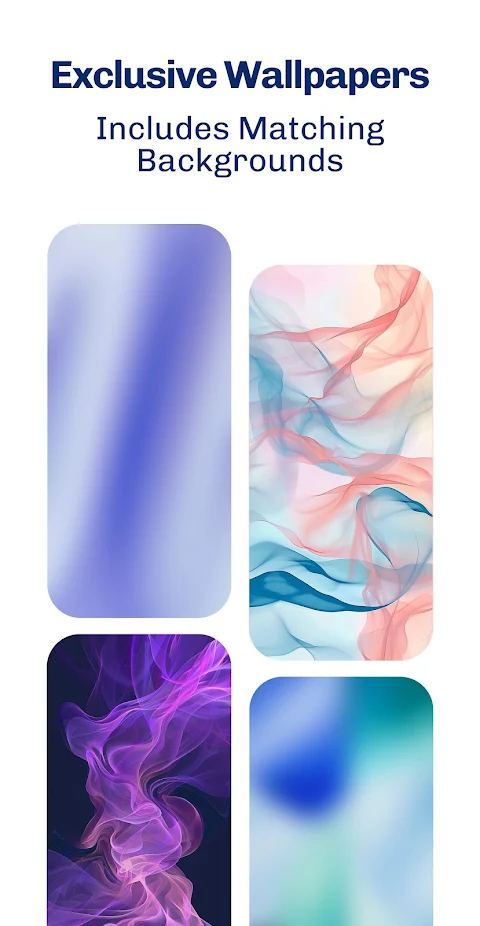
One of the standout features of the iGlass Dark OS 26 Icon Pack is its exclusive liquid wallpapers. These wallpapers complement the icons perfectly. Additionally, the pack supports dynamic calendars, making it even more functional for users who want quick access to their schedules.
The Material You dashboard is user-friendly, making it easy for everyone to navigate. If you come across an icon that remains unthemed or needs an update, the icon masking feature helps provide a solution. You can also take advantage of the icon requests support feature, allowing you to ask for specific icons to be added in future updates, whether you're using the free or premium option. Regular updates ensure that you always have access to new icons.
To get started with the iGlass Dark OS 26 Icon Pack, you need to install a compatible third-party launcher. This can include popular options such as Action Launcher support, ADW Launcher support, and Nova Launcher support. You can also use it with Samsung One UI and many other launchers. Once you install a compatible launcher, simply open the icon pack app, tap on apply, or select it in your launcher settings to start your Android home screen makeover.
For those who want to delve deeper, an installation guide is included in the app. If you have any questions, the FAQ section will provide answers to many common queries. If you still need help, feel free to reach out through the contact options provided.
The iGlass Dark OS 26 Icon Pack is a perfect choice for anyone looking to enhance their Android device with customizable app icons. Its beautiful icon designs and thoughtful features make it an excellent tool for a sleek and modern setup. Enjoy a fresh look on your device while keeping everything organized and stylish!
With more than 25,000 iGlass Dark icons included, this icon pack offers a complete customization solution for your Android device. It covers over 45,000 themed apps, including popular categories like themed Google Apps, themed system apps, themed social apps, themed media apps, and themed games apps. You will find a wide range of beautiful app icons within this pack.
One of the standout features of the iGlass Dark OS 26 Icon Pack is its exclusive liquid wallpapers. These wallpapers complement the icons perfectly. Additionally, the pack supports dynamic calendars, making it even more functional for users who want quick access to their schedules.
The Material You dashboard is user-friendly, making it easy for everyone to navigate. If you come across an icon that remains unthemed or needs an update, the icon masking feature helps provide a solution. You can also take advantage of the icon requests support feature, allowing you to ask for specific icons to be added in future updates, whether you're using the free or premium option. Regular updates ensure that you always have access to new icons.
To get started with the iGlass Dark OS 26 Icon Pack, you need to install a compatible third-party launcher. This can include popular options such as Action Launcher support, ADW Launcher support, and Nova Launcher support. You can also use it with Samsung One UI and many other launchers. Once you install a compatible launcher, simply open the icon pack app, tap on apply, or select it in your launcher settings to start your Android home screen makeover.
For those who want to delve deeper, an installation guide is included in the app. If you have any questions, the FAQ section will provide answers to many common queries. If you still need help, feel free to reach out through the contact options provided.
The iGlass Dark OS 26 Icon Pack is a perfect choice for anyone looking to enhance their Android device with customizable app icons. Its beautiful icon designs and thoughtful features make it an excellent tool for a sleek and modern setup. Enjoy a fresh look on your device while keeping everything organized and stylish!
Mohawk Watch Face
amoledwatchfaces™
$0.99
$0.30
Cuties – Icon Pack
PhunktasticDesigns
$1.49
$1.04

PER27 Digital Watch Face
PERSONA Watch Face
$2.99
Free