

$12.99
$9.99
23% Off
GraphNCalc84 – for TI-84 Plus
Di Venisco UG (haftungsbeschrankt)

About the App
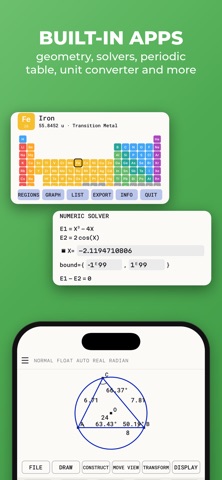
GraphNCalc84 - for TI-84 Plus is a powerful graphing calculator designed to make math easier for everyone, especially high school and college students. With this app, you can graph and investigate functions, solve equations, work with statistics, and handle matrices—all in one place. It is the perfect educational tool for students who want to enhance their math skills.
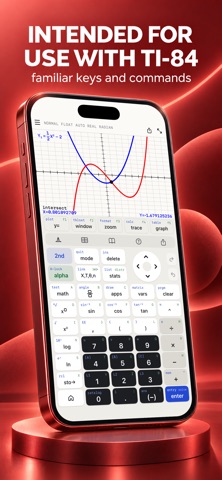
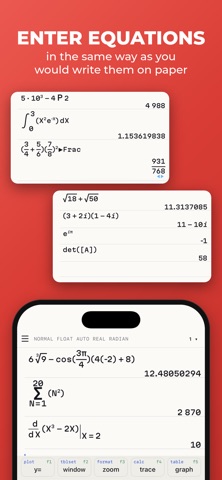
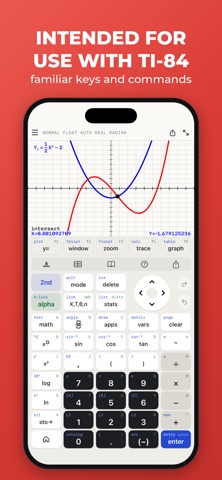
One of the great features of GraphNCalc84 is its familiar keyboard and command syntax. This means you won’t need to learn how to use a new calculator. If you’ve used physical graphing calculators before, you'll feel right at home with this app. It's also an advanced scientific calculator that lets you enter calculations in natural textbook format. You can perform basic arithmetic functions like addition, subtraction, multiplication, and division easily.
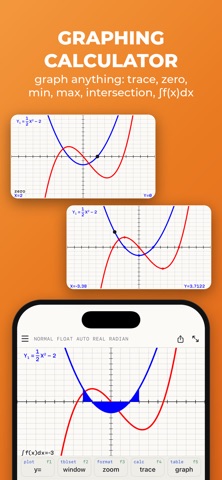
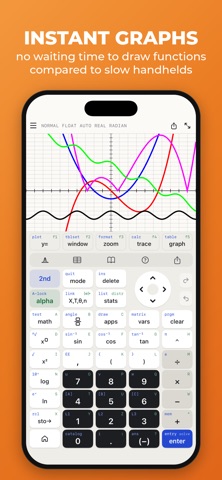
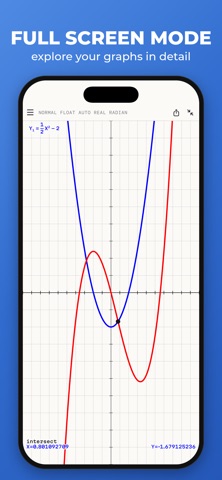
GraphNCalc84 shines when it comes to graphing. You can graph multiple functions at once, and each function can be displayed in a different color. The app allows you to add lines, horizontals, verticals, and tangents to your graph. You can trace the coordinates of your functions using your finger or the arrow keys. This makes it easy to calculate values such as the zero of the function, maximum values, minimum values, intersections of functions, and even derivatives.
The high-resolution graphs in GraphNCalc84 allow for a clear and detailed visual representation of your functions. You can zoom in and out of the graphing window settings, as well as set the X and Y coordinates to get exactly the view you need. Finding integrals and coloring the area under functions is straightforward, enhancing your function investigation experience.
If you need to work with matrices, the app offers a matrix calculator that makes it easy. You can perform matrix arithmetic, such as addition, subtraction, multiplication, and even powers of a matrix. You can also enter matrices directly on the calculator interface or store them for later use. The app supports tasks like calculating the determinant, performing matrix inversion, and putting matrices into reduced row-echelon form. This is especially useful for solving linear equation systems.
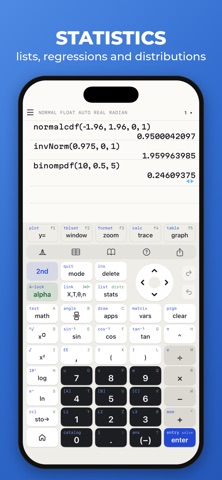
For statistics operations, GraphNCalc84 includes powerful features. You can work with data lists for all basic and trigonometric operations. Using the statistics list editor, you can enter lists quickly and efficiently. The app allows you to perform both 1-variable and 2-variable statistics so that you can investigate your data thoroughly. This includes finding minimums, maximums, means, medians, sums, products, standard deviations, and variances. You can also perform regressions to find best-fit lines, including Linear, Quadratic, Cubic, Quartic, and Exponential regressions, making it easy to analyze trends in your data.
The app also covers various distributions, including normal, Poisson, and binomial distributions. These functions are useful for higher-level statistics classes, ensuring that you have the necessary tools for your academic work.
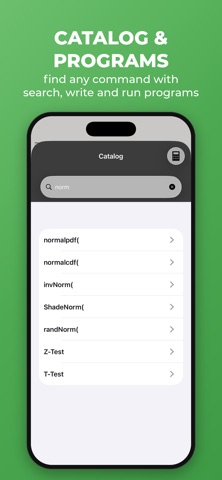
Getting started with GraphNCalc84 is simple, thanks to its easy-to-understand tutorial. The app also features a full catalog of all commands, complete with syntax, examples, and possible error messages. This resource will help you get over any learning curve you might face. Whenever you need to look up math terms, you can tap on highlighted terms to read their definitions right away.
Recommended by teachers, GraphNCalc84 is a valuable resource for math classes covering pre-algebra, algebra 1 and 2, pre-calculus, calculus, and statistics. You can count on it for SAT test preparation and AP test preparedness. While your phone might not be permitted during some tests, you can still use this app for homework and then borrow a physical calculator from your school for the actual test.
In summary, GraphNCalc84 - for TI-84 Plus is more than just a regular calculator. Whether you are grappling with complex equations or tackling statistics, this app is designed to support your learning journey. With its range of features—including advanced scientific capabilities, matrix functions, and robust graphing—you’ll find it an indispensable companion for your studies in high school and college mathematics.
One of the great features of GraphNCalc84 is its familiar keyboard and command syntax. This means you won’t need to learn how to use a new calculator. If you’ve used physical graphing calculators before, you'll feel right at home with this app. It's also an advanced scientific calculator that lets you enter calculations in natural textbook format. You can perform basic arithmetic functions like addition, subtraction, multiplication, and division easily.
GraphNCalc84 shines when it comes to graphing. You can graph multiple functions at once, and each function can be displayed in a different color. The app allows you to add lines, horizontals, verticals, and tangents to your graph. You can trace the coordinates of your functions using your finger or the arrow keys. This makes it easy to calculate values such as the zero of the function, maximum values, minimum values, intersections of functions, and even derivatives.
The high-resolution graphs in GraphNCalc84 allow for a clear and detailed visual representation of your functions. You can zoom in and out of the graphing window settings, as well as set the X and Y coordinates to get exactly the view you need. Finding integrals and coloring the area under functions is straightforward, enhancing your function investigation experience.
If you need to work with matrices, the app offers a matrix calculator that makes it easy. You can perform matrix arithmetic, such as addition, subtraction, multiplication, and even powers of a matrix. You can also enter matrices directly on the calculator interface or store them for later use. The app supports tasks like calculating the determinant, performing matrix inversion, and putting matrices into reduced row-echelon form. This is especially useful for solving linear equation systems.
For statistics operations, GraphNCalc84 includes powerful features. You can work with data lists for all basic and trigonometric operations. Using the statistics list editor, you can enter lists quickly and efficiently. The app allows you to perform both 1-variable and 2-variable statistics so that you can investigate your data thoroughly. This includes finding minimums, maximums, means, medians, sums, products, standard deviations, and variances. You can also perform regressions to find best-fit lines, including Linear, Quadratic, Cubic, Quartic, and Exponential regressions, making it easy to analyze trends in your data.
The app also covers various distributions, including normal, Poisson, and binomial distributions. These functions are useful for higher-level statistics classes, ensuring that you have the necessary tools for your academic work.
Getting started with GraphNCalc84 is simple, thanks to its easy-to-understand tutorial. The app also features a full catalog of all commands, complete with syntax, examples, and possible error messages. This resource will help you get over any learning curve you might face. Whenever you need to look up math terms, you can tap on highlighted terms to read their definitions right away.
Recommended by teachers, GraphNCalc84 is a valuable resource for math classes covering pre-algebra, algebra 1 and 2, pre-calculus, calculus, and statistics. You can count on it for SAT test preparation and AP test preparedness. While your phone might not be permitted during some tests, you can still use this app for homework and then borrow a physical calculator from your school for the actual test.
In summary, GraphNCalc84 - for TI-84 Plus is more than just a regular calculator. Whether you are grappling with complex equations or tackling statistics, this app is designed to support your learning journey. With its range of features—including advanced scientific capabilities, matrix functions, and robust graphing—you’ll find it an indispensable companion for your studies in high school and college mathematics.

Pictello Visual Stories
AssistiveWare
$19.99
$9.99

Prepare Aviation Maintenance
yousef mankoulah
$4.99

StretchBuddy
Youngsang Doh
$1.99