
$1.99
$1.39
30% Off
FTP Server
Banana Studio


About the App
FTP Server is a powerful application designed for your Android device that allows you to run an FTP Server. With this tool, you can easily share and access files over the Internet. This capability is often referred to as WiFi file transfer or wireless file management.
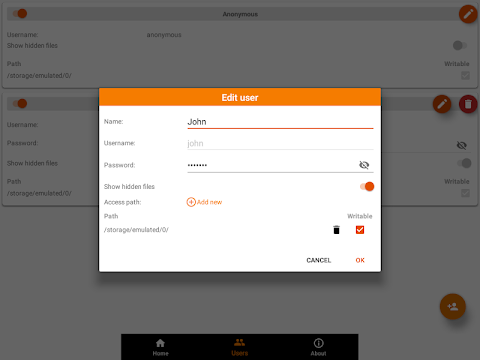
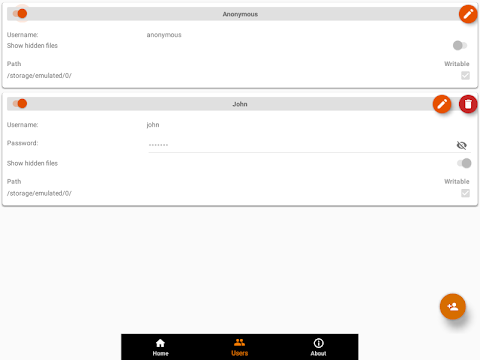
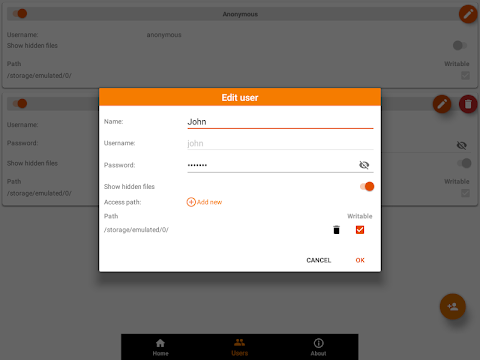
The FTP Server supports multiple FTP users, including anonymous users. This means you can set different permissions for each user. For instance, you can allow access to hidden files or manage the access paths for each user. Users can have access to any folder in your internal storage or external SD card, and you can define whether they have read-only access or full write access.
The application supports both active file transfer and passive file transfer modes, making it possible to handle multiple transfers at the same time. It also features automatic port opening, ensuring that you can access your files from anywhere on Earth. For detailed information about compatible routers, you can check the Help section within the app.
One of the standout features of FTP Server is its Tasker integration, which allows you to set up actions for automation. For example, you can set the server to automatically start when you connect to a specific WiFi network. The application can also be configured to automatically start on boot, making it convenient to use.
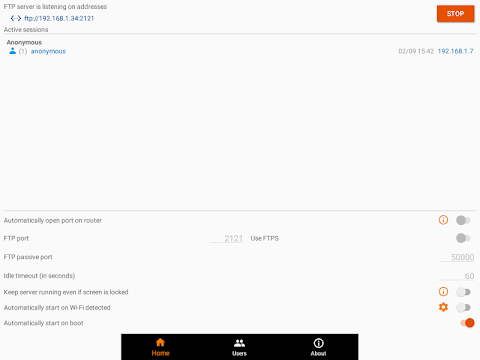
The user interface includes several screens. On the Home screen, you can manage server configurations easily. You’ll find options to start or stop the server, monitor connected clients, and change various settings like port number or idle timeout. The user management functionalities let you enable or disable users and manage access paths for each individual.
FTP Server works with various clients across platforms. You can access your server using Windows FTP clients, Mac OS FTP clients, or Linux FTP clients. Some tested clients include FileZilla, Windows Explorer, Finder for Mac OS, and Total Commander on Android. You can even use web browser access for read-only tasks with browsers like Chrome, Firefox, and Edge.
When it comes to passive ports, the range typically starts from the default port number 50000. If UPnP is enabled, it extends to 50128, while with UPnP disabled, the range goes up to 50256. Users should be aware of doze mode issues, as the application may not function optimally if this mode is active. It’s a good idea to add the app to the whitelist to avoid disruptions.
To function properly, FTP Server requires certain permissions. The WRITE_EXTERNAL_STORAGE permission is essential for accessing files on your device. Additionally, it needs the INTERNET, ACCESS_NETWORK_STATE, and ACCESS_WIFI_STATE permissions for connectivity. If you want the server to automatically start when your device detects a WiFi connection, you’ll also need to grant the coarse location permission, especially on Android P and above.
For any issues, feature requests, or feedback, you can reach out via the support email provided in the app. It’s important to note that negative comments may not help in resolving problems effectively.
With FTP Server, you can enjoy seamless file access from everywhere, making it an essential tool for anyone needing efficient file management on their Android devices.
The FTP Server supports multiple FTP users, including anonymous users. This means you can set different permissions for each user. For instance, you can allow access to hidden files or manage the access paths for each user. Users can have access to any folder in your internal storage or external SD card, and you can define whether they have read-only access or full write access.
The application supports both active file transfer and passive file transfer modes, making it possible to handle multiple transfers at the same time. It also features automatic port opening, ensuring that you can access your files from anywhere on Earth. For detailed information about compatible routers, you can check the Help section within the app.
One of the standout features of FTP Server is its Tasker integration, which allows you to set up actions for automation. For example, you can set the server to automatically start when you connect to a specific WiFi network. The application can also be configured to automatically start on boot, making it convenient to use.
The user interface includes several screens. On the Home screen, you can manage server configurations easily. You’ll find options to start or stop the server, monitor connected clients, and change various settings like port number or idle timeout. The user management functionalities let you enable or disable users and manage access paths for each individual.
FTP Server works with various clients across platforms. You can access your server using Windows FTP clients, Mac OS FTP clients, or Linux FTP clients. Some tested clients include FileZilla, Windows Explorer, Finder for Mac OS, and Total Commander on Android. You can even use web browser access for read-only tasks with browsers like Chrome, Firefox, and Edge.
When it comes to passive ports, the range typically starts from the default port number 50000. If UPnP is enabled, it extends to 50128, while with UPnP disabled, the range goes up to 50256. Users should be aware of doze mode issues, as the application may not function optimally if this mode is active. It’s a good idea to add the app to the whitelist to avoid disruptions.
To function properly, FTP Server requires certain permissions. The WRITE_EXTERNAL_STORAGE permission is essential for accessing files on your device. Additionally, it needs the INTERNET, ACCESS_NETWORK_STATE, and ACCESS_WIFI_STATE permissions for connectivity. If you want the server to automatically start when your device detects a WiFi connection, you’ll also need to grant the coarse location permission, especially on Android P and above.
For any issues, feature requests, or feedback, you can reach out via the support email provided in the app. It’s important to note that negative comments may not help in resolving problems effectively.
With FTP Server, you can enjoy seamless file access from everywhere, making it an essential tool for anyone needing efficient file management on their Android devices.

TA Rail
29Tech.co
$5.99
$3.09

Aura144
LIN WEITING
$0.99
Duplicate File Cleaner
Neelam Govind Bhanushali
$1.29