

$3.99
$2.99
25% Off
FAir for FlashAir
杨 李



About the App
FAir for FlashAir is a handy app that lets you quickly browse and download pictures and files from your wireless FlashAir SD card. It works seamlessly with FlashAir W-02, W-03, and W-04 models, ensuring you can access your media with ease.
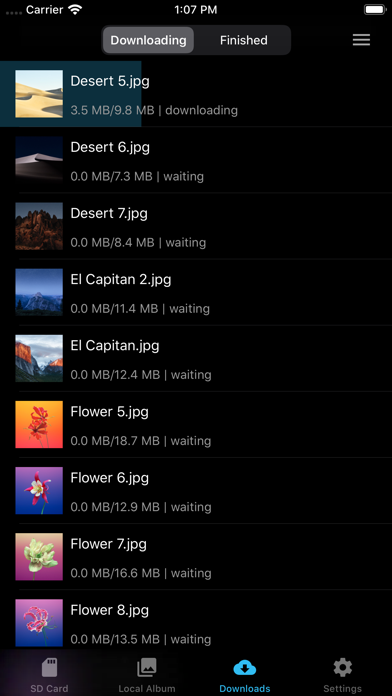
The app is fully compatible with iOS 13, and it also supports dark mode, making it comfortable to use in various lighting conditions. One of the standout features of FAir for FlashAir is its independent download management system. This means that even if you close the app or lose your connection, your download record won’t be lost. You can easily manage your downloads with batch download features that let you see download speed and edit or delete tasks as needed.
When you’re ready to download, FAir for FlashAir allows you to save files to a local folder within the app. From there, you can further filter and save your files to a separate album, where you can even configure the album's file name. If you want high-quality images, you can generate HD thumbnails or download the original images, which are exactly as you captured them with your camera.
Selecting photos is simple too; you can choose all photos at once, slide to select multiple images, or select photos based on time groups. The app also includes an auto refresh feature, ensuring your library stays updated, and you can set it to auto download new photos and videos automatically.
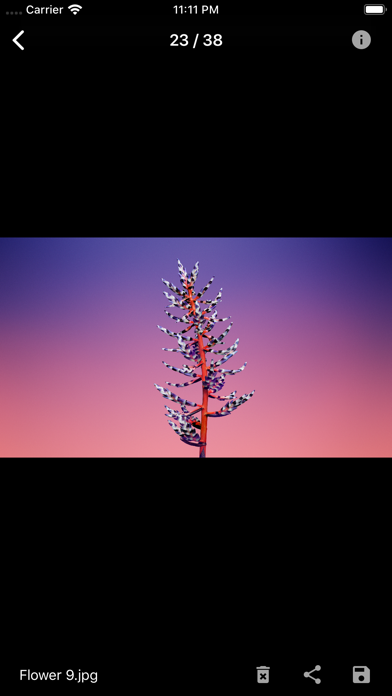
Viewing your pictures is easy with FAir for FlashAir. Photos can be displayed in the default view or grouped by date, depending on your preference. The app offers format filtering options, allowing you to see specific file types like JPG or RAW. You can also choose to load only the pictures in the DCIM folder or view all images on the card.
FAir for FlashAir gives you the ability to manage picture file name visibility and even display a no download flag for files that haven’t been downloaded yet. You can configure how many pictures are shown per line and decide whether to view them as thumbnails or in full size. For videos, you will enjoy smooth video previews and can also view complete EXIF information for your images.
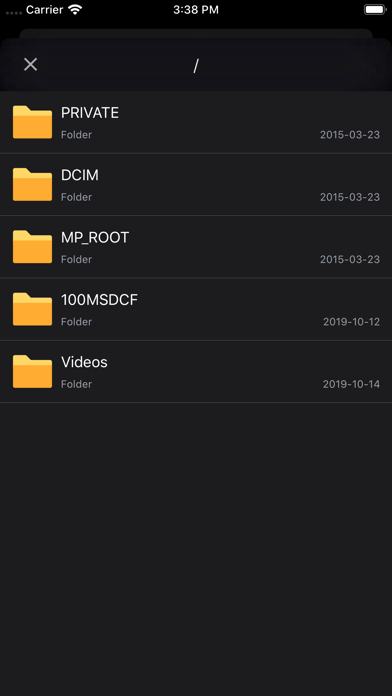
The app provides full file system operations, letting you explore and manage all files on your FlashAir SD card easily. If you work with RAW files, the raw preview capability enables you to view them using JPG previews that share the same name.
Setting up your FlashAir is straightforward. You can configure the FlashAir SSID and manage the Wi-Fi password right within the app. There’s even a feature for mastercode management, so you can keep your device secure. You can check the remaining space on your FlashAir and view its MAC address, combining both FlashAir and cellular network connectivity.
FAir for FlashAir allows you to open files in other apps for even more flexibility. If you ever face issues, the app has a complete operation guide and a problem feedback channel to help you out. You can also clear the picture cache to save space on your device and prevent the app from taking up too much storage.
With its efficient picture selection capabilities and various display options, FAir for FlashAir is designed to enhance your experience and make managing your media files easier. Whether you're a photographer needing to organize images or just someone wanting quick access to your media, this app has you covered.
The app is fully compatible with iOS 13, and it also supports dark mode, making it comfortable to use in various lighting conditions. One of the standout features of FAir for FlashAir is its independent download management system. This means that even if you close the app or lose your connection, your download record won’t be lost. You can easily manage your downloads with batch download features that let you see download speed and edit or delete tasks as needed.
When you’re ready to download, FAir for FlashAir allows you to save files to a local folder within the app. From there, you can further filter and save your files to a separate album, where you can even configure the album's file name. If you want high-quality images, you can generate HD thumbnails or download the original images, which are exactly as you captured them with your camera.
Selecting photos is simple too; you can choose all photos at once, slide to select multiple images, or select photos based on time groups. The app also includes an auto refresh feature, ensuring your library stays updated, and you can set it to auto download new photos and videos automatically.
Viewing your pictures is easy with FAir for FlashAir. Photos can be displayed in the default view or grouped by date, depending on your preference. The app offers format filtering options, allowing you to see specific file types like JPG or RAW. You can also choose to load only the pictures in the DCIM folder or view all images on the card.
FAir for FlashAir gives you the ability to manage picture file name visibility and even display a no download flag for files that haven’t been downloaded yet. You can configure how many pictures are shown per line and decide whether to view them as thumbnails or in full size. For videos, you will enjoy smooth video previews and can also view complete EXIF information for your images.
The app provides full file system operations, letting you explore and manage all files on your FlashAir SD card easily. If you work with RAW files, the raw preview capability enables you to view them using JPG previews that share the same name.
Setting up your FlashAir is straightforward. You can configure the FlashAir SSID and manage the Wi-Fi password right within the app. There’s even a feature for mastercode management, so you can keep your device secure. You can check the remaining space on your FlashAir and view its MAC address, combining both FlashAir and cellular network connectivity.
FAir for FlashAir allows you to open files in other apps for even more flexibility. If you ever face issues, the app has a complete operation guide and a problem feedback channel to help you out. You can also clear the picture cache to save space on your device and prevent the app from taking up too much storage.
With its efficient picture selection capabilities and various display options, FAir for FlashAir is designed to enhance your experience and make managing your media files easier. Whether you're a photographer needing to organize images or just someone wanting quick access to your media, this app has you covered.

All That Remains: Part 1
Glitch Games
$2.99
$0.99

Ace Attorney Spirit of Justice
CAPCOM
$0.99
$0.49

stashy
Daniel Goletz
$7.99