

$1.49
$0.75
50% Off
Engine Watch Face
amoledwatchfaces™




About the App
Engine Watch Face is designed specifically for Wear OS API 28+ devices, making it a great choice for those with compatible smartwatches. However, it’s important to note that this watch face is not suitable for rectangular watches.
This app is powered by Watch Face Format, allowing for a quality experience and flexible design. If you're looking for a fun offer, check out the buy one get one offer available at amoledwatchfaces.com/bogo.
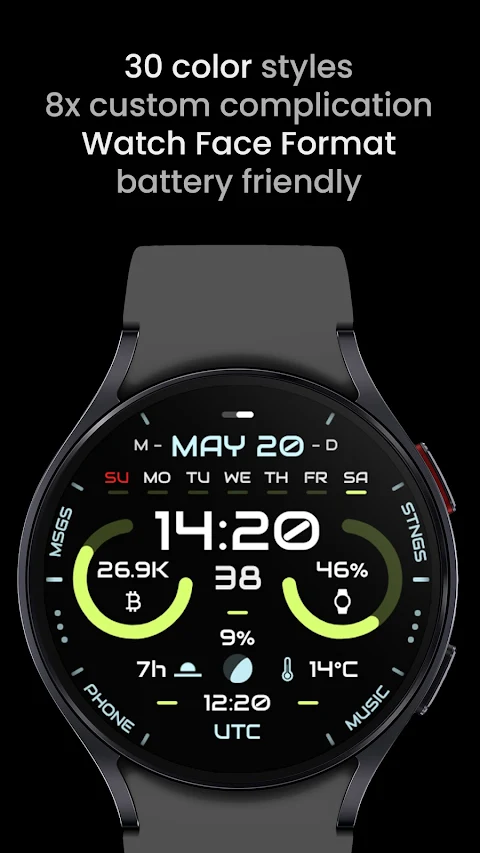
The Engine Watch Face features a true black background that enhances visibility while saving battery life. With a high resolution display, users can enjoy sharp and clear visuals. The watch face supports multiple color styles, letting you customize the look to match your mood or outfit.
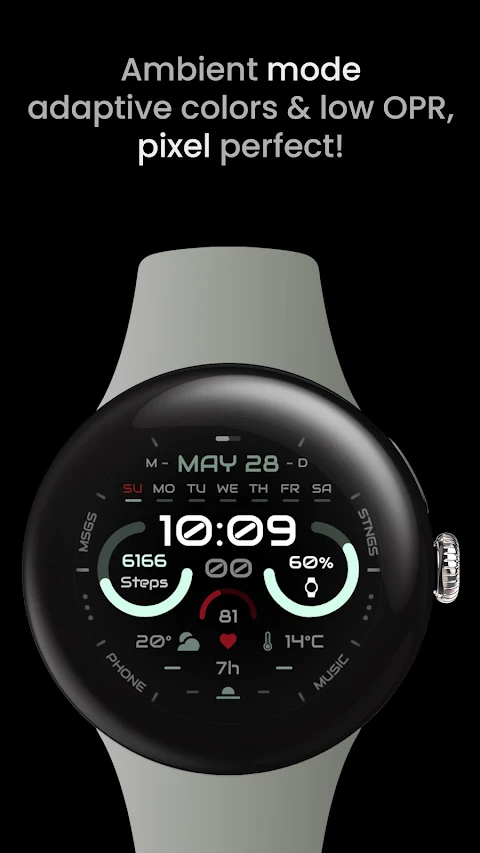
You can use this watch face without worrying about draining your battery, as it is designed to be battery friendly. If you like tracking your health, the Engine Watch Face provides optional heart rate measurements through its integrated features. For users who want high-quality designs, the app uses PNGQuant optimized layers for a sleek finish.
One of the standout features of the Engine Watch Face is its ability to support 8x custom complications, along with app shortcuts integration. This means you can easily access your favorite apps with just a tap. The ambient mode is unique as well, providing adaptive color styles and a low OPR mode to help maintain battery life while still being visually pleasing.
When it comes to customization, Engine Watch Face allows for theme customization, giving you 30 different themes to choose from. You can also explore index tint options, adding extra flair with colors or grey tones. The app offers AOD settings, so you can personalize the display when your watch is in always-on mode.
If you're not interested in heart rate measurements, you can replace this feature with a custom complication of your choice. In such cases, make sure to set the specific complication provider to 'None.' If you choose not to use the heart rate feature, you can disable the sensor permission settings for added convenience.
For those who need help or have issues, there’s an installation troubleshooting guide available at amoledwatchfaces.com/guide. You can also reach out for support by emailing support@amoledwatchfaces.com. Additionally, join our live support group on Telegram for real-time discussions and assistance at t.me/amoledwatchfaces.
Don't forget to sign up for our newsletter at amoledwatchfaces.com/contact#newsletter so you can stay updated on the latest features and offers. Engine Watch Face is an excellent choice for anyone looking to enhance their smartwatch experience with vibrant, customizable watch faces. Enjoy the combination of functionality and style along with the convenience of added features tailored to your needs.
This app is powered by Watch Face Format, allowing for a quality experience and flexible design. If you're looking for a fun offer, check out the buy one get one offer available at amoledwatchfaces.com/bogo.
The Engine Watch Face features a true black background that enhances visibility while saving battery life. With a high resolution display, users can enjoy sharp and clear visuals. The watch face supports multiple color styles, letting you customize the look to match your mood or outfit.
You can use this watch face without worrying about draining your battery, as it is designed to be battery friendly. If you like tracking your health, the Engine Watch Face provides optional heart rate measurements through its integrated features. For users who want high-quality designs, the app uses PNGQuant optimized layers for a sleek finish.
One of the standout features of the Engine Watch Face is its ability to support 8x custom complications, along with app shortcuts integration. This means you can easily access your favorite apps with just a tap. The ambient mode is unique as well, providing adaptive color styles and a low OPR mode to help maintain battery life while still being visually pleasing.
When it comes to customization, Engine Watch Face allows for theme customization, giving you 30 different themes to choose from. You can also explore index tint options, adding extra flair with colors or grey tones. The app offers AOD settings, so you can personalize the display when your watch is in always-on mode.
If you're not interested in heart rate measurements, you can replace this feature with a custom complication of your choice. In such cases, make sure to set the specific complication provider to 'None.' If you choose not to use the heart rate feature, you can disable the sensor permission settings for added convenience.
For those who need help or have issues, there’s an installation troubleshooting guide available at amoledwatchfaces.com/guide. You can also reach out for support by emailing support@amoledwatchfaces.com. Additionally, join our live support group on Telegram for real-time discussions and assistance at t.me/amoledwatchfaces.
Don't forget to sign up for our newsletter at amoledwatchfaces.com/contact#newsletter so you can stay updated on the latest features and offers. Engine Watch Face is an excellent choice for anyone looking to enhance their smartwatch experience with vibrant, customizable watch faces. Enjoy the combination of functionality and style along with the convenience of added features tailored to your needs.
DADAM40: Classic Dial
DADAM Watch Faces
$1.49
$0.75
WIN Classic Army MOD WatchFace
WinWatchfaces
$0.99
$0.50

Ares Black: Dark Icon Pack
One4Studio
$3.49
$1.75