
$1.99
FREE
100% Off
Data Widget: remaining data
大胜 纪

About the App
With Data Widget: remaining data, you can easily see how much data you have left in your monthly data plan. It helps you track your data usage throughout the cycle and warns you if you might go over your limit. You can view this information right on your Home Screen, Lock Screen, or even your Apple Watch, allowing you to stay informed at a glance. There are optional data usage alerts that notify you when you reach 80% of your limit or when you’re about to run out.
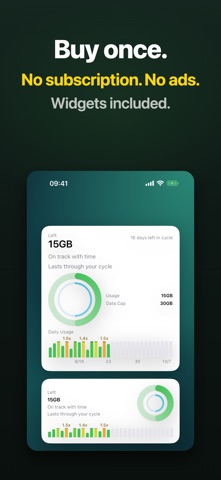
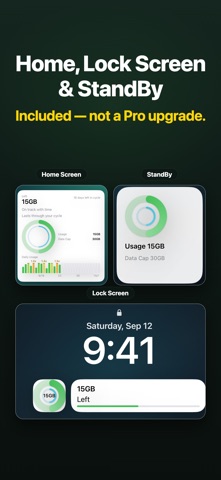
The app is a one-time purchase, meaning you pay once and get everything included — there are no subscriptions or hidden fees later. You won't have to worry about ads either. All the features, like widgets for your Home Screen, Lock Screen, and StandBy, come with the app without extra costs.
One key feature of Data Widget is that it follows your specific plan date and not the usual billing date that most carrier apps require. You can set it to total cellular bytes on your device against the cap you choose, whether that’s a monthly, weekly, or custom billing cycle. You can even calibrate the app to match the number on your bill, ensuring your data tracking is as accurate as possible. If your plan allows for data rollover, the app can carry over any unused data into your new cycle.
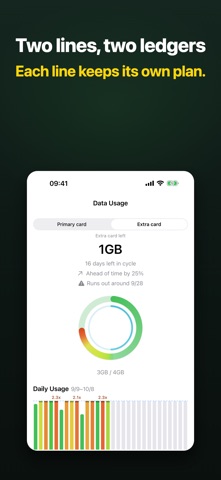
For those using dual SIM or eSIM setups, Data Widget supports managing both lines together or individually. This is especially useful if you have a travel eSIM. It seamlessly works with both 5G and LTE cellular interfaces, guaranteeing that you get the most accurate tracking for your data usage.
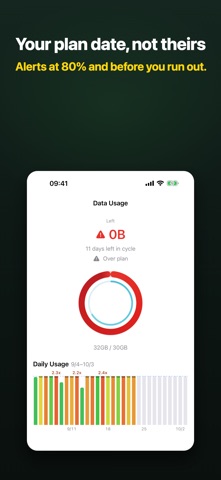
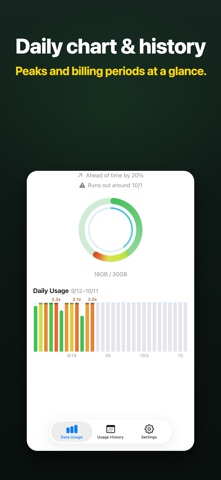
When it comes to understanding your data usage pace, the app provides a clear visual indicator. You can see how much data you have remaining and how quickly you're using it. The app’s Home Screen will show you the percentage left and even an estimation of how many days you have at your current usage rate. Additionally, there’s a daily usage chart so you can identify any spikes in data usage over time.
One of the best parts of Data Widget is that you can check your data usage without having to open the app. The widgets display your remaining data in large, easy-to-read numbers. They refresh frequently, ensuring you always see the most recent information. The Apple Watch complications give you similar data at a glance on your wrist.
If you’re concerned about reaching your data limit, you can set optional alerts at 80%, 90%, or for when you’re running out of data. This feature helps with data overage prevention, letting you manage your usage more effectively. The app also allows you to receive alerts when your data usage is ahead of schedule.
Privacy is a major focus with Data Widget. There are no ads or tracking of your location, and you won’t be asked to log in with your carrier account. Since the app calculates totals on your device, your results may differ from what you see in Settings due to factors like VPN usage or Personal Hotspot connections. The app explains these differences in the Settings section, where it also provides guidance on usage calibration to align your data with your plan.
To use Data Widget, you need iOS 17 or later. If you want to take advantage of the Apple Watch integration, watchOS 10 or later is needed. The app is designed primarily for iPhones but can also count data on cellular models of the iPad.
In summary, Data Widget: remaining data is your go-to solution for easy data tracking, ensuring you’re always aware of your usage, and helping to prevent any unexpected overages.
Planimeter Pro for map measure
忠 张
$3.99

MTG Trades
Michael Wybrow
$6.99
Free

blitzerfunk: Speed Cameras
Digital Learning GmbH
$1.99