

$14.99
FREE
100% Off
DART Sim Remote
STAR CPR San Diego

About the App
With the DART Sim Remote, you can easily control your DART Sim iPad app using your iPhone, another iPad, iPad Mini, or iPod Touch. This feature provides a convenient way to manage your DART ECG Simulator and Defib Simulator from a second device.
To use the DART Sim Remote effectively, you will need to purchase the Bluetooth connection feature within the app. Without this feature, the remote control function will not work.
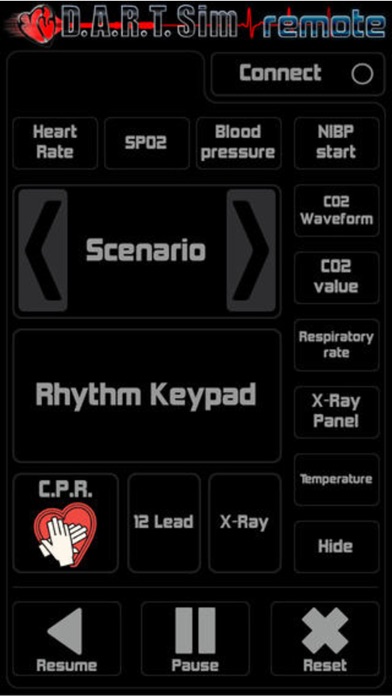
Once everything is set up, you can control various aspects of your simulation. You can manage heart rate control, change rhythms remotely, and monitor SPO2 levels. The app also allows for blood pressure measurement, including the NIBP start function. You can easily display CO2 values and analyze CO2 waveforms as well.
Tracking respirations is straightforward, and you can control the X-Ray panel as needed. The DART Sim Remote also provides a display X-Ray button function to enhance your experience. If you need to work with the 12 Lead ECG display, it is just a tap away. Temperature monitoring can also be handled through the app.
For CPR training, you can visualize the CPR waveform and use the metronome for CPR to help maintain the correct rhythm. Additionally, you can select and run your custom scenarios or make use of pre-set scenarios with ease. The app lets you advance or reverse scenarios, giving you full control over the training process.
If you need to display or hide the rhythm keypad, that functionality is available as well. You can pause, resume, and reset your sessions with handy buttons designed for easy use. The connect button allows for seamless integration between devices.
The DART Sim Remote is not only versatile but also compatible with multiple devices, including iPhones, iPads, iPad Minis, and iPod Touches. This level of compatibility makes it a great tool for anyone involved in medical simulation training.
Your feedback is essential to us, so please don’t hesitate to reach out with any comments or suggestions. We appreciate your input as we strive to improve your experience with the DART Sim Remote.
Thank you for choosing DART Sim Inc.
To use the DART Sim Remote effectively, you will need to purchase the Bluetooth connection feature within the app. Without this feature, the remote control function will not work.
Once everything is set up, you can control various aspects of your simulation. You can manage heart rate control, change rhythms remotely, and monitor SPO2 levels. The app also allows for blood pressure measurement, including the NIBP start function. You can easily display CO2 values and analyze CO2 waveforms as well.
Tracking respirations is straightforward, and you can control the X-Ray panel as needed. The DART Sim Remote also provides a display X-Ray button function to enhance your experience. If you need to work with the 12 Lead ECG display, it is just a tap away. Temperature monitoring can also be handled through the app.
For CPR training, you can visualize the CPR waveform and use the metronome for CPR to help maintain the correct rhythm. Additionally, you can select and run your custom scenarios or make use of pre-set scenarios with ease. The app lets you advance or reverse scenarios, giving you full control over the training process.
If you need to display or hide the rhythm keypad, that functionality is available as well. You can pause, resume, and reset your sessions with handy buttons designed for easy use. The connect button allows for seamless integration between devices.
The DART Sim Remote is not only versatile but also compatible with multiple devices, including iPhones, iPads, iPad Minis, and iPod Touches. This level of compatibility makes it a great tool for anyone involved in medical simulation training.
Your feedback is essential to us, so please don’t hesitate to reach out with any comments or suggestions. We appreciate your input as we strive to improve your experience with the DART Sim Remote.
Thank you for choosing DART Sim Inc.
3D Anatomy
Education Mobile
$2.99

The Jacobson Flare
Jacobson Flare Pty Ltd
$49.99
$39.99

Dividing Fractions
Sergey Malugin
$1.99
$0.20