

$16.99
$9.99
41% Off
Cubase iC Pro
Steinberg Media Technologies GmbH




About the App
Cubase iC Pro is your personal recording assistant that connects more deeply with Cubase than any other app. It serves as an advanced Cubase control app, designed especially for recording tasks.
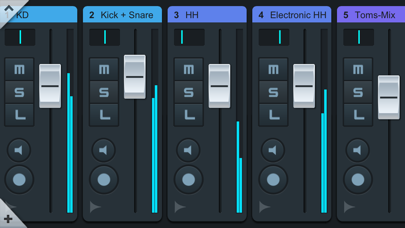
Upon launching Cubase iC Pro, you'll find the project overview page and mixer view. These features allow you to see your project exactly as it appears in Cubase. This makes navigation straightforward, enabling quick access to your work. Additionally, the key command page offers a powerful tool for setting up your most-used keyboard shortcuts and macros setup. This feature enhances your workflow by letting you customize how you interact with your project.
Keep in mind that Cubase iC Pro functions as a remote control app. This means it will not work unless you are connected to Cubase. Some features require advanced Cubase versions to operate fully, so be sure your software is up to date for the best experience.
Before you start using Cubase iC Pro, it’s important to install the Steinberg SKI Remote. This must-have tool can be easily downloaded from the Steinberg website. With it installed, you can unlock the full potential of the app.
Cubase iC Pro not only enhances your recording functionality but also supports various Cubase integrations. Its primary goal is to provide an efficient way to manage your projects. You can enjoy remote mixing capabilities, allowing flexible access to your studio from anywhere. This feature supports music collaboration tools, enabling you to share and work on projects with others seamlessly.
With Cubase iC Pro, you can expect an enhanced recording workflow. The intuitive Cubase user interface ensures that everything feels familiar, so you can focus on your music. Features like Cubase project navigation and recording session management make it easier to stay on track. The app also includes many Cubase functionality enhancements that improve overall efficiency.
As a DAW control app, Cubase iC Pro truly acts as your ideal Cubase companion. You'll find that it provides customizable key commands and project control interfaces, helping you tailor the app to your specific needs. Moreover, you can take advantage of Cubase compatibility across different devices.
In summary, Cubase iC Pro is essential for anyone involved in advanced music production. It brings together various music production tools in one place, simplifying the creative process. If you enjoy using Cubase iC Pro, please take a moment to support us by rating it on the App Store. For updates, new features, and improvements, visit our forums for the latest information.
Upon launching Cubase iC Pro, you'll find the project overview page and mixer view. These features allow you to see your project exactly as it appears in Cubase. This makes navigation straightforward, enabling quick access to your work. Additionally, the key command page offers a powerful tool for setting up your most-used keyboard shortcuts and macros setup. This feature enhances your workflow by letting you customize how you interact with your project.
Keep in mind that Cubase iC Pro functions as a remote control app. This means it will not work unless you are connected to Cubase. Some features require advanced Cubase versions to operate fully, so be sure your software is up to date for the best experience.
Before you start using Cubase iC Pro, it’s important to install the Steinberg SKI Remote. This must-have tool can be easily downloaded from the Steinberg website. With it installed, you can unlock the full potential of the app.
Cubase iC Pro not only enhances your recording functionality but also supports various Cubase integrations. Its primary goal is to provide an efficient way to manage your projects. You can enjoy remote mixing capabilities, allowing flexible access to your studio from anywhere. This feature supports music collaboration tools, enabling you to share and work on projects with others seamlessly.
With Cubase iC Pro, you can expect an enhanced recording workflow. The intuitive Cubase user interface ensures that everything feels familiar, so you can focus on your music. Features like Cubase project navigation and recording session management make it easier to stay on track. The app also includes many Cubase functionality enhancements that improve overall efficiency.
As a DAW control app, Cubase iC Pro truly acts as your ideal Cubase companion. You'll find that it provides customizable key commands and project control interfaces, helping you tailor the app to your specific needs. Moreover, you can take advantage of Cubase compatibility across different devices.
In summary, Cubase iC Pro is essential for anyone involved in advanced music production. It brings together various music production tools in one place, simplifying the creative process. If you enjoy using Cubase iC Pro, please take a moment to support us by rating it on the App Store. For updates, new features, and improvements, visit our forums for the latest information.

International Guitar Chords
Fonexsis
$3.99
$2.99

8180 Monster Tube
Nembrini Audio
$19.99
$9.99

Neutron Music Player
Neutron Code Limited
$12.99
$7.79