

$0.99
FREE
100% Off
Expired on: 17 Jan, 2026
Contact Edge side bar
Yogesh Dama

About the App
Contact Sidebar – Edge Screen Contact Shortcuts is a powerful Android productivity app designed to help you access your favorite contacts instantly using simple edge screen gestures. Instead of scrolling through long contact lists or switching between apps, Contact Sidebar lets you speed dial calls or send SMS directly from an always-on-top sidebar, keeping your workflow fast, smooth, and uninterrupted. The app works seamlessly with any launcher and does not require an internet connection, making it lightweight, private, and reliable.
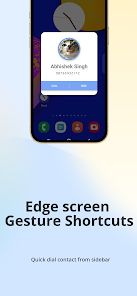
With Contact Sidebar, your most important contacts are always just a swipe away. Simply swipe from the left, right, or bottom edge of your screen to open the contact sidebar and connect with family, friends, or colleagues without leaving your current app. This edge screen launcher is optimized for one-hand operation, making it ideal for multitasking, large-screen devices, and users who want faster access to communication.
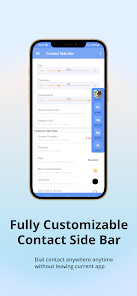
The app is highly customizable, allowing you to tailor the sidebar exactly to your needs. You can adjust the sidebar’s size, width, thickness, transparency, position, and number of columns. Customize the background color, icon style, and layout, choose whether to show contact names or just profile images, and place the sidebar at the left top, left center, left bottom, right top, right center, right bottom, or bottom edge of your screen. This flexibility ensures the sidebar blends perfectly with your usage style.
Contact Sidebar is built to boost productivity and multitasking. It supports speed dial, SMS shortcuts, floating widgets, and edge screen widgets, all accessible through intuitive gestures. You can select any number of contacts to display, rearrange them anytime, and keep only the people you contact most frequently. Auto-start on boot ensures the sidebar is always ready when your phone turns on, and local or Drive backup helps you restore settings easily.
Designed with a clean and easy-to-use interface, the app provides clear descriptions of each feature, making setup simple even for first-time users. Whether you want quick access to family contacts, faster calling during work, or a smarter way to manage communication, Contact Sidebar enhances your Android experience by making contact access faster, simpler, and more convenient.
Key highlights include always-on-top edge launcher functionality, edge screen gestures, speed dial and SMS shortcuts, compatibility with all launchers, no internet permission requirement, and complete control over appearance and behavior. Contact Sidebar is fast, lightweight, and continuously improving, with more features planned for future updates.
Permissions required are minimal and purpose-driven: Contacts permission to access your contact list, Call permission for direct dial shortcuts, and Overlay permission to enable the edge screen gesture control. With privacy in mind and performance at its core, Contact Sidebar is the smart way to connect with your contacts—anytime, anywhere, with just a swipe.
With Contact Sidebar, your most important contacts are always just a swipe away. Simply swipe from the left, right, or bottom edge of your screen to open the contact sidebar and connect with family, friends, or colleagues without leaving your current app. This edge screen launcher is optimized for one-hand operation, making it ideal for multitasking, large-screen devices, and users who want faster access to communication.
The app is highly customizable, allowing you to tailor the sidebar exactly to your needs. You can adjust the sidebar’s size, width, thickness, transparency, position, and number of columns. Customize the background color, icon style, and layout, choose whether to show contact names or just profile images, and place the sidebar at the left top, left center, left bottom, right top, right center, right bottom, or bottom edge of your screen. This flexibility ensures the sidebar blends perfectly with your usage style.
Contact Sidebar is built to boost productivity and multitasking. It supports speed dial, SMS shortcuts, floating widgets, and edge screen widgets, all accessible through intuitive gestures. You can select any number of contacts to display, rearrange them anytime, and keep only the people you contact most frequently. Auto-start on boot ensures the sidebar is always ready when your phone turns on, and local or Drive backup helps you restore settings easily.
Designed with a clean and easy-to-use interface, the app provides clear descriptions of each feature, making setup simple even for first-time users. Whether you want quick access to family contacts, faster calling during work, or a smarter way to manage communication, Contact Sidebar enhances your Android experience by making contact access faster, simpler, and more convenient.
Key highlights include always-on-top edge launcher functionality, edge screen gestures, speed dial and SMS shortcuts, compatibility with all launchers, no internet permission requirement, and complete control over appearance and behavior. Contact Sidebar is fast, lightweight, and continuously improving, with more features planned for future updates.
Permissions required are minimal and purpose-driven: Contacts permission to access your contact list, Call permission for direct dial shortcuts, and Overlay permission to enable the edge screen gesture control. With privacy in mind and performance at its core, Contact Sidebar is the smart way to connect with your contacts—anytime, anywhere, with just a swipe.
Date Calculator Pro
ng-labs
$0.49
FREE

Internet Blocker : Focus Mode
Adobix Tech
$0.49
$0.34
QR Code Generator & Scanner
Apps360 Team
$5.99