
$5.99
$3.99
33% Off
Auto Fills Drum Fill Generator
Cem Olcay


About the App
Auto Fills is a user-friendly MIDI generator app designed to create dynamic drum fills for your favorite drum synth apps or hardware synthesizers. It functions as an Audio Unit AUv3 plugin, making it compatible with several supported host apps like AUM, Logic Pro, Cubasis, Nanostudio, Loopy Pro, and apeMatrix.
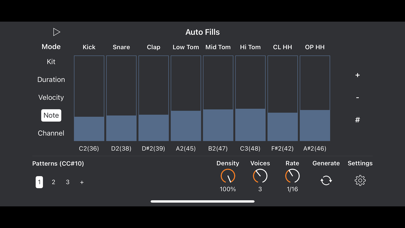
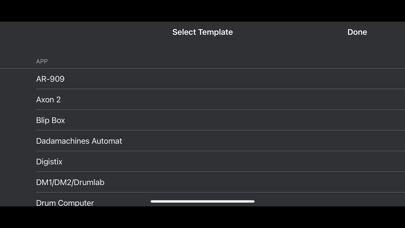
When using Auto Fills, you start by working with a drum kit. You can create your own drum kit by adding various drum parts and assigning the appropriate MIDI notes and channels. Alternatively, you can choose from kit templates found in the settings menu for quick setup with your app or hardware.
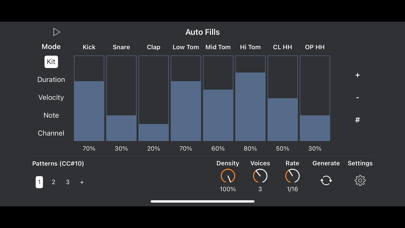
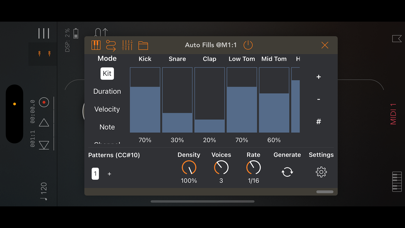
In Kit mode, you can assign probability values to each drum part. This means you can control how often each part plays in your drum fill. If you want a specific drum part to sound more frequently, simply increase its probability. To hear it less often, lower the value, or set it to zero to prevent it from playing altogether.
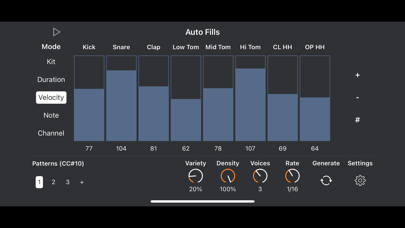
Auto Fills also includes a Velocity mode. In this mode, you can assign velocity assignments to each drum part, allowing you to introduce velocity variety. This lets you have different volumes for your drum hits, adding more character to your fills.
For more control, there’s Duration mode, where you can set the drum fill length and specify waiting time settings. You can adjust how long to wait before or after the drum fill in beats or bars. If you set a waiting time, the drum fill won’t play during those periods.
If you have a preferred drum sequencer, you can easily integrate it with Auto Fills. It’s a simple routing process: Drum sequencer -> Auto Fills -> Drum App. Additionally, you can block incoming MIDI from the drum sequencer during the drum fill by toggling the "block incoming MIDI" option in Duration mode.
You can also randomize the drum fill on every cycle, adding an element of surprise to your beats. The density control knob allows you to leave out notes by decreasing its value, introducing rests into your fills without the need to regenerate the entire fill.
Another feature is the voices polyphony setting, which determines the maximum number of drum parts that can play simultaneously. The algorithm will randomly select a number between 1 and this maximum value during each step of the drum fill, ensuring variety.
To control the speed of your fills, use the rate note adjustment. When you want to experiment or make changes, the regenerate drum fill button lets you quickly create new fills. Whenever you modify the kit by adding or removing parts, adjusting probabilities, or changing the voice count, the fill regenerates automatically.
It's important to note that Auto Fills is a MIDI app. This means it does not produce sound on its own. You need to route the MIDI output from Auto Fills to an audio app’s MIDI input in order to hear the drum fills you’ve created.
With Auto Fills, you have all the tools needed for creative beat sequencing, allowing for customized drum parts and seamless drum fill automation. Whether you are a beginner or an experienced user, this app opens up endless possibilities for unique drum fill generation.
When using Auto Fills, you start by working with a drum kit. You can create your own drum kit by adding various drum parts and assigning the appropriate MIDI notes and channels. Alternatively, you can choose from kit templates found in the settings menu for quick setup with your app or hardware.
In Kit mode, you can assign probability values to each drum part. This means you can control how often each part plays in your drum fill. If you want a specific drum part to sound more frequently, simply increase its probability. To hear it less often, lower the value, or set it to zero to prevent it from playing altogether.
Auto Fills also includes a Velocity mode. In this mode, you can assign velocity assignments to each drum part, allowing you to introduce velocity variety. This lets you have different volumes for your drum hits, adding more character to your fills.
For more control, there’s Duration mode, where you can set the drum fill length and specify waiting time settings. You can adjust how long to wait before or after the drum fill in beats or bars. If you set a waiting time, the drum fill won’t play during those periods.
If you have a preferred drum sequencer, you can easily integrate it with Auto Fills. It’s a simple routing process: Drum sequencer -> Auto Fills -> Drum App. Additionally, you can block incoming MIDI from the drum sequencer during the drum fill by toggling the "block incoming MIDI" option in Duration mode.
You can also randomize the drum fill on every cycle, adding an element of surprise to your beats. The density control knob allows you to leave out notes by decreasing its value, introducing rests into your fills without the need to regenerate the entire fill.
Another feature is the voices polyphony setting, which determines the maximum number of drum parts that can play simultaneously. The algorithm will randomly select a number between 1 and this maximum value during each step of the drum fill, ensuring variety.
To control the speed of your fills, use the rate note adjustment. When you want to experiment or make changes, the regenerate drum fill button lets you quickly create new fills. Whenever you modify the kit by adding or removing parts, adjusting probabilities, or changing the voice count, the fill regenerates automatically.
It's important to note that Auto Fills is a MIDI app. This means it does not produce sound on its own. You need to route the MIDI output from Auto Fills to an audio app’s MIDI input in order to hear the drum fills you’ve created.
With Auto Fills, you have all the tools needed for creative beat sequencing, allowing for customized drum parts and seamless drum fill automation. Whether you are a beginner or an experienced user, this app opens up endless possibilities for unique drum fill generation.

Listenify
志勇 谭
$3.99
$1.99

Riffler
Jonathan Bell
$14.99
$1.99

FAC Alteza
Frederic Corvest
$9.99
$6.99