

$5.99
$3.99
33% Off
Auto Bass AUv3 MIDI Generator
Cem Olcay

About the App
Auto Bass is a user-friendly MIDI generator app that allows you to create basslines and melodies automatically. With its editable algorithm, you have the flexibility to customize your music creation process.
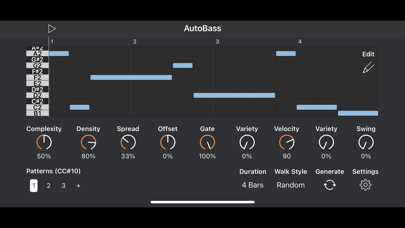
You can start by adjusting the algorithm parameters to match your taste for generating the best basslines. The complexity parameter helps break longer notes into shorter ones, giving your music more rhythm. The density setting determines the ratio of notes to rests, while the spread parameter sets the range of notes in the piano roll. You can also use offset adjustment to shift notes, and the swing parameter to adjust the start position of every other note in your sequence. Additionally, the slide percentage lets you define how many notes will slide into the next note.
For overall control, Auto Bass provides global gate length and velocity control. You can change these settings easily, and the gate variety knob and velocity variety knob help introduce some randomness to your notes, making them more dynamic.
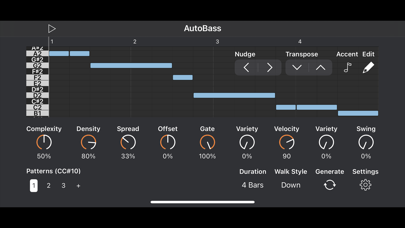
The app features an edit menu with basic editing tools that enhance your music-making experience. Accent mode allows you to add accented velocity to the notes you tap on the piano roll, while slide mode helps you incorporate a slide effect. Move mode lets you drag the notes to change their pitch. The transpose function changes the key of the whole sequence, and the nudge adjustment allows for moving the entire sequence left or right.
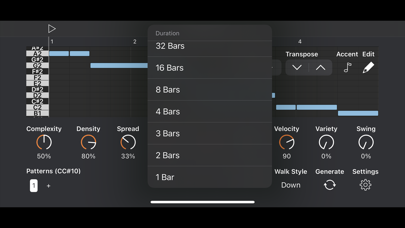
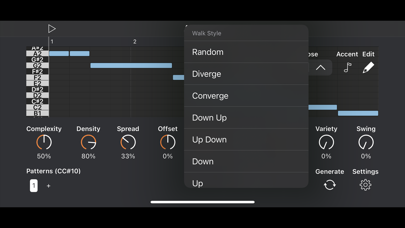
You can set your bassline duration from 1-bar to 64-bars long. The walk type rearrangement feature lets you rearrange notes on the piano roll without regenerating the entire sequence, making it easy to experiment with different patterns.
If you're using a MIDI keyboard or a MIDI sequencer, you can easily transpose your bassline. The edit menu, conveniently located at the top right of the app, allows you to add accents, transpose notes, or nudge them as needed.
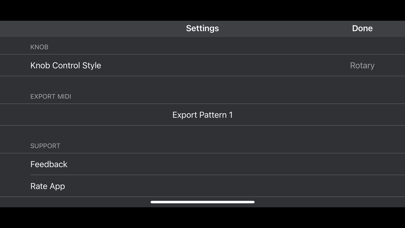
Auto Bass also offers DAW export options, so you can export a MIDI file of your pattern and import it into your Digital Audio Workstation (DAW) for further editing or sharing.
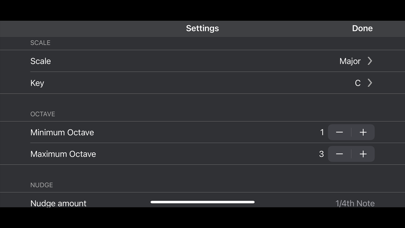
The AUv3 plugin functionality is another standout feature, as it exposes all parameters as AU parameters. This means you can modulate and automate them using a compatible AUv3 host app. Auto Bass includes a music theory engine that supports over 100 music scales, and you can even use your custom ScaleBud 2 scales. Additionally, with BrainBud, you can change the key and scale of Auto Bass in conjunction with other compatible apps.
It’s important to note that Auto Bass is primarily a MIDI app. The standalone version includes an optional internal synth that you can enable or disable in the settings menu. The AUv3 plugin requires an audio app for output, so be sure to host it within an app like AUM, Loopy Pro, Cubasis, Logic Pro, Nanostudio, Drambo, or apeMatrix for full functionality.
Overall, Auto Bass is a powerful tool for musicians looking to enhance their music compositions with ease and creativity.
You can start by adjusting the algorithm parameters to match your taste for generating the best basslines. The complexity parameter helps break longer notes into shorter ones, giving your music more rhythm. The density setting determines the ratio of notes to rests, while the spread parameter sets the range of notes in the piano roll. You can also use offset adjustment to shift notes, and the swing parameter to adjust the start position of every other note in your sequence. Additionally, the slide percentage lets you define how many notes will slide into the next note.
For overall control, Auto Bass provides global gate length and velocity control. You can change these settings easily, and the gate variety knob and velocity variety knob help introduce some randomness to your notes, making them more dynamic.
The app features an edit menu with basic editing tools that enhance your music-making experience. Accent mode allows you to add accented velocity to the notes you tap on the piano roll, while slide mode helps you incorporate a slide effect. Move mode lets you drag the notes to change their pitch. The transpose function changes the key of the whole sequence, and the nudge adjustment allows for moving the entire sequence left or right.
You can set your bassline duration from 1-bar to 64-bars long. The walk type rearrangement feature lets you rearrange notes on the piano roll without regenerating the entire sequence, making it easy to experiment with different patterns.
If you're using a MIDI keyboard or a MIDI sequencer, you can easily transpose your bassline. The edit menu, conveniently located at the top right of the app, allows you to add accents, transpose notes, or nudge them as needed.
Auto Bass also offers DAW export options, so you can export a MIDI file of your pattern and import it into your Digital Audio Workstation (DAW) for further editing or sharing.
The AUv3 plugin functionality is another standout feature, as it exposes all parameters as AU parameters. This means you can modulate and automate them using a compatible AUv3 host app. Auto Bass includes a music theory engine that supports over 100 music scales, and you can even use your custom ScaleBud 2 scales. Additionally, with BrainBud, you can change the key and scale of Auto Bass in conjunction with other compatible apps.
It’s important to note that Auto Bass is primarily a MIDI app. The standalone version includes an optional internal synth that you can enable or disable in the settings menu. The AUv3 plugin requires an audio app for output, so be sure to host it within an app like AUM, Loopy Pro, Cubasis, Logic Pro, Nanostudio, Drambo, or apeMatrix for full functionality.
Overall, Auto Bass is a powerful tool for musicians looking to enhance their music compositions with ease and creativity.

Yukawa – AUv3 Plug-in Effect
iceWorks, Inc.
$5.00
$4.00

PhaseThree
Audio Damage, Inc.
$4.99
$1.99

Laney – Ironheart Guitar Amp
Aurora DSP
$29.99
$17.99