

$4.99
$2.99
40% Off
TaskCat – Simple Todo Tasklist
BoxCat LLC


About the App
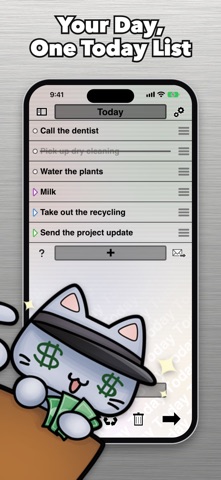
TaskCat is a simple to-do list app that you can easily manage with your thumb. It allows you to quickly handle tasks using swipe gesture controls. For instance, you can swipe right to cross off a task, or swipe left to bring it back if you change your mind. If a task is crossed out, swiping right again deletes it. You can also tap on any task to edit it and hold its handle to drag and drop tasks into a new order.
One of the key features of TaskCat is the Today page. Simply swipe left on any open task, no matter which page you are on, to add it to Today. This lets you see all of today's tasks together on a single page. To help you stay on top of your tasks, the app icon badge shows how many of today's tasks are still open. If you'd prefer not to see this badge, you can easily turn it off in Settings.
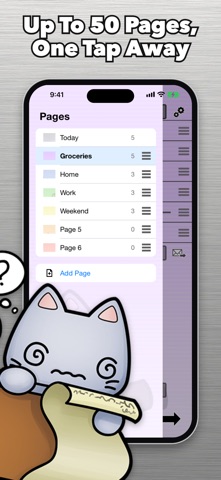
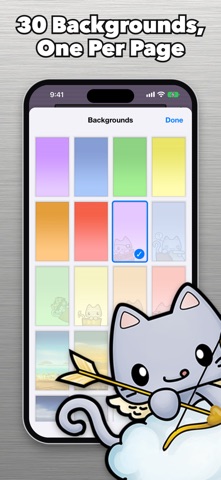
TaskCat offers fantastic page management capabilities. You can keep separate lists on up to 50 pages, including Today. Each page can have its own custom page name and background designs from a selection of 30 options. The page list displays every page along with its open tasks. You can tap to go to any page or drag to rearrange them in the order you prefer. Moving a task to another page is also straightforward from the edit screen.
If you're using an iPad, TaskCat has a special iPad layout that allows you to see multiple pages side by side, maximizing your screen space.
The app includes handy task management tools. You can mark a task with an urgent task marker, which helps with task prioritization. A unique shake to sort feature lets you quickly organize a page, showing urgent tasks first, then today's tasks, followed by everything else. Tasks that are crossed out will appear last. You can also use the task recycling feature to reuse lists, like a shopping list, by uncrossing tasks.
TaskCat allows you to cut, copy, paste, and insert tasks while editing. You can even attach a photo to a task with your camera and email your task list using the Mail app.
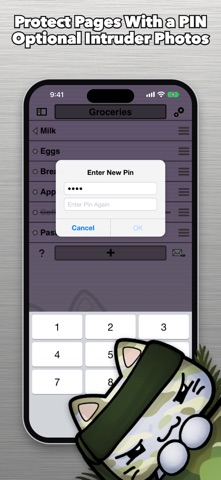
If privacy is a concern, TaskCat offers private task pages, which can be protected with PIN protection. If you enable the Intruder Photos feature, the app will take a photo of anyone who tries to enter the wrong PIN and show it to you the next time you unlock your tasks. Feel reassured knowing that these Intruder Photos are off by default and can be turned on as you wish.
One of the benefits of using TaskCat is that your tasks stay with you. There’s no account required, no ads policy, and no tracking. TaskCat never uploads your tasks or photos. You can choose to email a list, but only when you decide to do so through the Mail app. TaskCat checks a small file on boxcat.ai for updates, but this happens just once a day. Importantly, nothing about you or your tasks is sent during this process.
When you first open TaskCat, a short tutorial will show you all the gestures you need to know. If you want to revisit this tutorial later, you can do so by tapping the ? button.
With TaskCat, you'll find it easy to stay organized and manage your tasks efficiently. Enjoy the user-friendly interface that makes task organization straightforward, helping you keep track of everything that needs to be done.
One of the key features of TaskCat is the Today page. Simply swipe left on any open task, no matter which page you are on, to add it to Today. This lets you see all of today's tasks together on a single page. To help you stay on top of your tasks, the app icon badge shows how many of today's tasks are still open. If you'd prefer not to see this badge, you can easily turn it off in Settings.
TaskCat offers fantastic page management capabilities. You can keep separate lists on up to 50 pages, including Today. Each page can have its own custom page name and background designs from a selection of 30 options. The page list displays every page along with its open tasks. You can tap to go to any page or drag to rearrange them in the order you prefer. Moving a task to another page is also straightforward from the edit screen.
If you're using an iPad, TaskCat has a special iPad layout that allows you to see multiple pages side by side, maximizing your screen space.
The app includes handy task management tools. You can mark a task with an urgent task marker, which helps with task prioritization. A unique shake to sort feature lets you quickly organize a page, showing urgent tasks first, then today's tasks, followed by everything else. Tasks that are crossed out will appear last. You can also use the task recycling feature to reuse lists, like a shopping list, by uncrossing tasks.
TaskCat allows you to cut, copy, paste, and insert tasks while editing. You can even attach a photo to a task with your camera and email your task list using the Mail app.
If privacy is a concern, TaskCat offers private task pages, which can be protected with PIN protection. If you enable the Intruder Photos feature, the app will take a photo of anyone who tries to enter the wrong PIN and show it to you the next time you unlock your tasks. Feel reassured knowing that these Intruder Photos are off by default and can be turned on as you wish.
One of the benefits of using TaskCat is that your tasks stay with you. There’s no account required, no ads policy, and no tracking. TaskCat never uploads your tasks or photos. You can choose to email a list, but only when you decide to do so through the Mail app. TaskCat checks a small file on boxcat.ai for updates, but this happens just once a day. Importantly, nothing about you or your tasks is sent during this process.
When you first open TaskCat, a short tutorial will show you all the gestures you need to know. If you want to revisit this tutorial later, you can do so by tapping the ? button.
With TaskCat, you'll find it easy to stay organized and manage your tasks efficiently. Enjoy the user-friendly interface that makes task organization straightforward, helping you keep track of everything that needs to be done.

Lifetime Premium VPN PRO
Yuix Networks Inc.
$27.99
$17.99

It’s About Time!
Eddy Street Productions, LLC
$1.99
$0.99

Selene: Shift Calendar
Jiawen Sun
$2.99