
$3.99
FREE
100% Off
OBD2 Dashboards: Car Scanner
Potato Powered Games Ltd

About the App
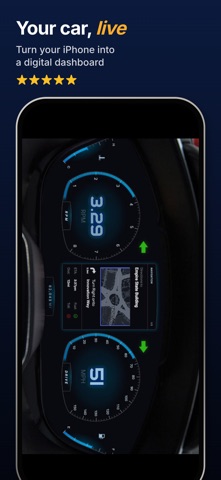
OBD2 Dashboards is a helpful tool that shows you what your car is doing in real time. This app, previously known as OBD Car Wizard, turns your iPhone or iPad into a live car dashboard and performance monitor. You just need to connect an ELM327 OBD2 adapter through Bluetooth LE or Wi-Fi, select a dashboard, and see your car come alive on the screen.
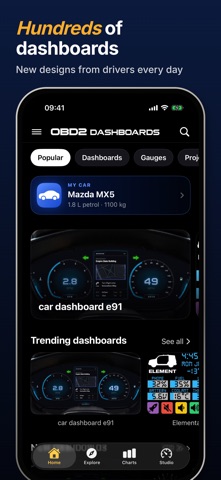
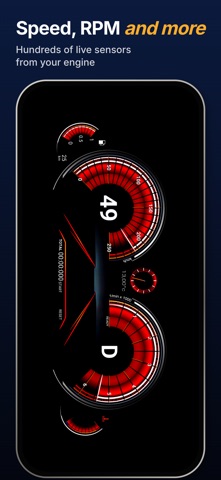
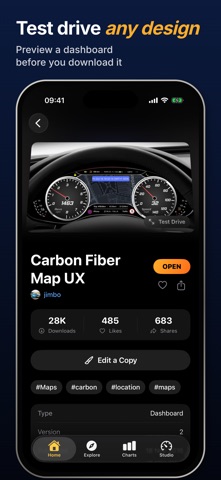
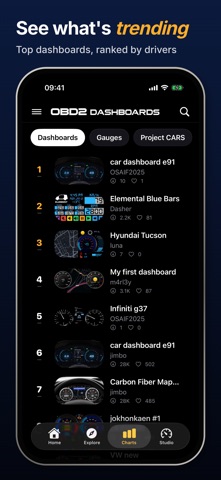
With OBD2 Dashboards, you can choose from hundreds of different dashboards, including sports clusters, retro digital displays, and racing gauges. New dashboards are added every day to keep things fresh. The app allows you to monitor live engine data, giving you real-time information about your speed, RPM, throttle position, turbo boost, coolant temperature, battery voltage, and hundreds of other engine sensor data.
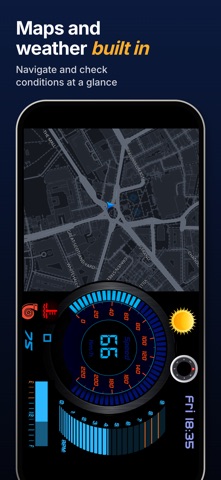
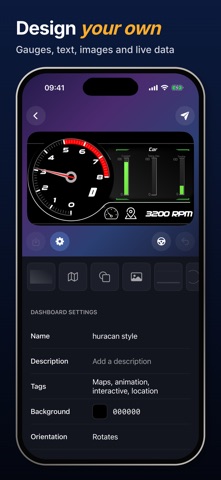
One of the key features of OBD2 Dashboards is its dashboard editor. This tool lets you create custom dashboards with various gauges, text, images, live maps, and even weather information. You can also use one-tap themes to instantly change the look of your dashboard to match your personal style or the theme of your car. Additionally, the app offers stunning text effects, allowing you to customize your displays with glow, outlines, and drop shadows.
The interactive dashboards include tappable hotspots that let you switch screens or reveal more information at a touch. With advanced calculations, you can calculate your car's horsepower, 0–60 times, and more, using the built-in Lua scripting engine. OBD2 Dashboards also features powerful plugins to extend its functionality, including a PID scanner and OBD terminal.
If you're looking to unlock more features, you can choose the Pro version of OBD2 Dashboards. This gives you access to unlimited dashboards from the collection and allows you to use custom PIDs to access additional vehicle sensors with your own formulas. You can also record your driving data and export it as CSV spreadsheets. There’s a HUD mode display to reflect your dashboard onto your windscreen for a heads-up display, especially useful at night.
OBD2 Dashboards works with a wide range of vehicles, such as Ford, Volkswagen, GM, and many others. It supports most OBD2-compatible vehicles, including US vehicles from 1996 and EU petrol vehicles from 2001, as well as EU diesel vehicles from 2004. Keep in mind that the available sensor data can vary based on the specific vehicle and its engine computer.
To use OBD2 Dashboards, you need an ELM327-compatible OBD2 adapter that connects via Bluetooth LE or Wi-Fi. Unfortunately, older Bluetooth Classic adapters won’t work with iPhones. Some popular adapters you might consider are OBDLink CX, Veepeak BLE, and Vgate iCar Pro BLE.
While using OBD2 Dashboards, always configure your dashboard before driving. It’s important not to interact with your phone while on the road for safety.
OBD2 Dashboards operates on a subscription service. Payment is charged to your Apple ID when you confirm the purchase. Subscriptions renew automatically unless canceled at least 24 hours before the end of the current period. You can manage or cancel your subscription anytime through your App Store account settings. If you start a free trial and then subscribe, any unused portion of that trial will be forfeited.
If you have any questions or suggestions about OBD2 Dashboards, feel free to get in touch via email. We would love to hear from you! And please take a moment to review our privacy policy and terms for more information.
With OBD2 Dashboards, you can choose from hundreds of different dashboards, including sports clusters, retro digital displays, and racing gauges. New dashboards are added every day to keep things fresh. The app allows you to monitor live engine data, giving you real-time information about your speed, RPM, throttle position, turbo boost, coolant temperature, battery voltage, and hundreds of other engine sensor data.
One of the key features of OBD2 Dashboards is its dashboard editor. This tool lets you create custom dashboards with various gauges, text, images, live maps, and even weather information. You can also use one-tap themes to instantly change the look of your dashboard to match your personal style or the theme of your car. Additionally, the app offers stunning text effects, allowing you to customize your displays with glow, outlines, and drop shadows.
The interactive dashboards include tappable hotspots that let you switch screens or reveal more information at a touch. With advanced calculations, you can calculate your car's horsepower, 0–60 times, and more, using the built-in Lua scripting engine. OBD2 Dashboards also features powerful plugins to extend its functionality, including a PID scanner and OBD terminal.
If you're looking to unlock more features, you can choose the Pro version of OBD2 Dashboards. This gives you access to unlimited dashboards from the collection and allows you to use custom PIDs to access additional vehicle sensors with your own formulas. You can also record your driving data and export it as CSV spreadsheets. There’s a HUD mode display to reflect your dashboard onto your windscreen for a heads-up display, especially useful at night.
OBD2 Dashboards works with a wide range of vehicles, such as Ford, Volkswagen, GM, and many others. It supports most OBD2-compatible vehicles, including US vehicles from 1996 and EU petrol vehicles from 2001, as well as EU diesel vehicles from 2004. Keep in mind that the available sensor data can vary based on the specific vehicle and its engine computer.
To use OBD2 Dashboards, you need an ELM327-compatible OBD2 adapter that connects via Bluetooth LE or Wi-Fi. Unfortunately, older Bluetooth Classic adapters won’t work with iPhones. Some popular adapters you might consider are OBDLink CX, Veepeak BLE, and Vgate iCar Pro BLE.
While using OBD2 Dashboards, always configure your dashboard before driving. It’s important not to interact with your phone while on the road for safety.
OBD2 Dashboards operates on a subscription service. Payment is charged to your Apple ID when you confirm the purchase. Subscriptions renew automatically unless canceled at least 24 hours before the end of the current period. You can manage or cancel your subscription anytime through your App Store account settings. If you start a free trial and then subscribe, any unused portion of that trial will be forfeited.
If you have any questions or suggestions about OBD2 Dashboards, feel free to get in touch via email. We would love to hear from you! And please take a moment to review our privacy policy and terms for more information.

Evo – The Everything App
Solid Apps S.R.L.
$3.99

Gps Camera Geo Tagging
Yepil paid apps pro 2026
$41.99

Remote Keyboard
峰东
$0.99
Free