
$12.99
$7.99
38% Off
NuRack Auv3 FX Processor
4Pockets.com

About the App
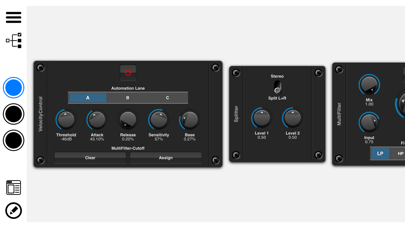
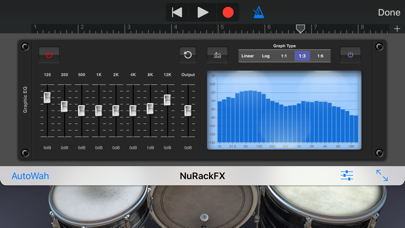
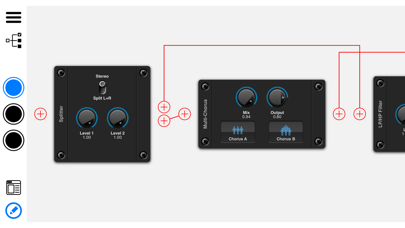
NuRack is an AUv3 based audio processor that offers a unique way to create effects for your music. This multi-channel audio effects and MIDI effects processor lets you design your own custom audio effects using over 80 building blocks. With NuRack, you have full audio routing control, allowing you to create complex audio paths either in series or parallel.
The app runs in two modes. The first mode provides three effects racks that you can customize. You can switch between these racks manually or via MIDI. This feature enables seamless switching effects, meaning your delay trails and other sounds can linger while you bring in a new set of effects. The second mode allows you to route audio through three independent audio racks, giving you even more flexibility in your sound design.
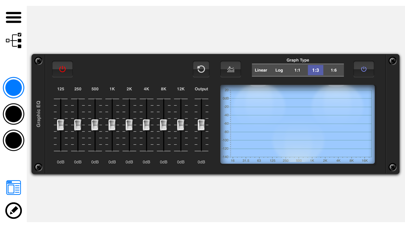
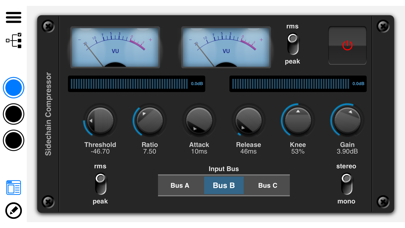
NuRack comes packed with more than 80 audio blocks that fall into different categories. You’ll find modulation effects like Chorus and Flanger, time based effects including Reverb and Delay, and spectral effects like Parametric EQ and Distortion, among others. Dynamic effects help with noise control, and filter effects provide options like LP/HP filters. There are also MIDI effects such as MIDI Harmony and MIDI Control Modules that let you manipulate your MIDI signals easily.
You also get audio splitters and mixers to help manage your audio signals better. Visual automation modules provide ways to enhance your audio experience with tools like VU meters and scopes. You can even use the X/Y pad modulation to control your modulation effects effectively. Automation options are abundant, with features such as touchpad automation and pattern automation. These flexibility options allow you to engage with your audio in many unique ways.
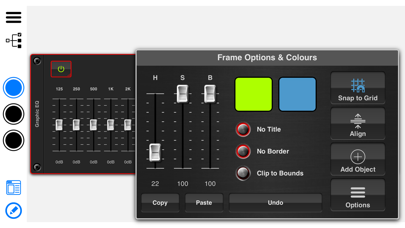
Creating your effects takes just a few steps. Start a new rack and add your desired modules. Most modules connect automatically, but you can also choose to manually route these connections. Once you have your sound just how you like it, you can enter the custom interface builder mode. This lets you combine all of your modules into a single, easy-to-use interface. You can drag and drop elements, resize them, and even add your own custom backgrounds or images to personalize your design.
NuRack also supports dark/light modes to suit your visual preference while you work. Its DAW compatibility options ensure that even if your digital audio workstation does not support multi-channel setups, you can still use NuRack effectively.
Feel free to take advantage of MIDI input automation to control various elements smoothly. You can also use the velocity of incoming signals to manipulate effects like filter cutoff or gain levels. With NuRack, the possibilities expand as you experiment and create new sounds.
If you're looking for an audio processor that combines power with ease of use, NuRack is the tool for you. You can explore tutorials and demos on 'Paul the MusicMan' YouTube channel to help you get started and navigate through its rich features.
The app runs in two modes. The first mode provides three effects racks that you can customize. You can switch between these racks manually or via MIDI. This feature enables seamless switching effects, meaning your delay trails and other sounds can linger while you bring in a new set of effects. The second mode allows you to route audio through three independent audio racks, giving you even more flexibility in your sound design.
NuRack comes packed with more than 80 audio blocks that fall into different categories. You’ll find modulation effects like Chorus and Flanger, time based effects including Reverb and Delay, and spectral effects like Parametric EQ and Distortion, among others. Dynamic effects help with noise control, and filter effects provide options like LP/HP filters. There are also MIDI effects such as MIDI Harmony and MIDI Control Modules that let you manipulate your MIDI signals easily.
You also get audio splitters and mixers to help manage your audio signals better. Visual automation modules provide ways to enhance your audio experience with tools like VU meters and scopes. You can even use the X/Y pad modulation to control your modulation effects effectively. Automation options are abundant, with features such as touchpad automation and pattern automation. These flexibility options allow you to engage with your audio in many unique ways.
Creating your effects takes just a few steps. Start a new rack and add your desired modules. Most modules connect automatically, but you can also choose to manually route these connections. Once you have your sound just how you like it, you can enter the custom interface builder mode. This lets you combine all of your modules into a single, easy-to-use interface. You can drag and drop elements, resize them, and even add your own custom backgrounds or images to personalize your design.
NuRack also supports dark/light modes to suit your visual preference while you work. Its DAW compatibility options ensure that even if your digital audio workstation does not support multi-channel setups, you can still use NuRack effectively.
Feel free to take advantage of MIDI input automation to control various elements smoothly. You can also use the velocity of incoming signals to manipulate effects like filter cutoff or gain levels. With NuRack, the possibilities expand as you experiment and create new sounds.
If you're looking for an audio processor that combines power with ease of use, NuRack is the tool for you. You can explore tutorials and demos on 'Paul the MusicMan' YouTube channel to help you get started and navigate through its rich features.

SWAM Tenor Sax
Audio Modeling
$29.99
$19.99

FieldScaper
Igor Vasiliev
$9.99
$4.99

Charango Tuner Pro
Pedro Daniel Macalupu Cumpen
$6.99
$4.99