
$29.99
FREE
100% Off
oscRFR
Alien Stagecraft

About the App
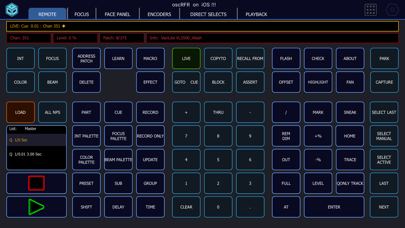
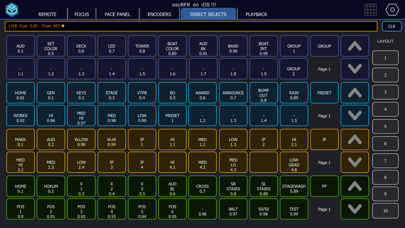
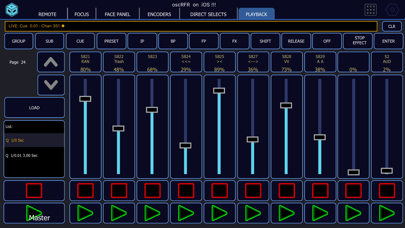
oscRFR puts the power of your console right in your hand. This app serves as a complete wireless remote control for both ETC Eos and grandMA3. With oscRFR, you can access every key, encoder, fader, and direct select from the phone or tablet you already own. This means you can easily walk the stage while focusing on your performance, allowing you to avoid being tied to the desk.
While the app is primarily designed for tablets, it is also available for larger phone formats. However, if you're looking for a remote specifically for a smaller phone, it's best not to purchase this app.
oscRFR communicates with your lighting console using the OSC communication protocol, offering a very fast experience. When you press a key, it becomes a command on the console, and you receive immediate feedback about what you're working with. This includes various elements such as the command line, encoder values, cue text, and fader levels feedback, ensuring you're always aware of your current cue and every action you take.
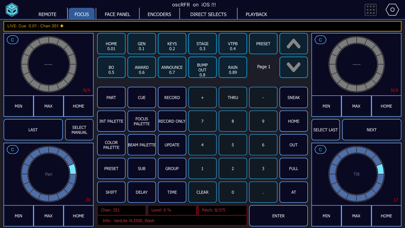
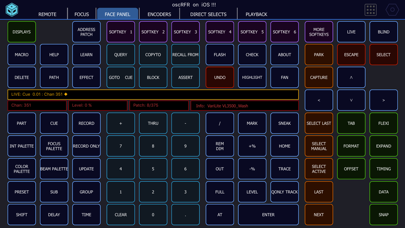
When working with the ETC Eos, you can use every hard key on the face panel, which comes labeled with softkey labels from the console. The app also features encoders with coarse, fine, and super-fine adjustments, which can be saved in custom page layouts. Additionally, it allows for labeled direct select keys that are also saveable. You can easily navigate through every fader in your showfile, organized into pages, and you have access to a dedicated focus page. The labels cover cues, channels, palettes, presets, subs, macros, curves, scenes, and notes. You can make use of the colour picker tool, which supports up to 14 preset tiles per layout, and you can patch channels, determining their type, label, and level. The app works seamlessly with consoles and ETCnomad starting from Eos 2.3 or later.
For grandMA3 users, oscRFR lets you use a keypad and a command line interface that reflects the console's own prompt. Encoders display live values, and you have options for direct selects, playback, layouts, sequence sheets, and a focus page. The toggle keys will light up to indicate when they're active on the console, enhancing your controls. Setting everything up is easy with a one-tap setup that installs the required Companion plugin on the console, with your consent. You can choose between team and solo modes that best fit your workflow, ensuring that you have the flexibility needed for various performances on consoles and onPC, compatible with grandMA3 2.4.
With oscRFR page layouts, you can save every page of buttons, encoders, and direct selects. Master layouts can be created to capture the entire app, making it easy to adapt to different venues, with the capability to save as many console configurations as you need.
The free version provides basic functionality by letting you connect to your console and access hard keys, keypads, and the command line. While encoders, faders, direct-select fires, and the colour picker show live but are view-only, upgrading to oscRFR Pro, available for $9.99 a year, unlocks full functionality. With Pro, you gain access to encoders, faders, direct selects, colour picker, labels, and any new features we add in the future, including those for grandMA3.
We understand that live events need to run smoothly. If the app has trouble connecting to the store—most console networks lack internet—it will still allow you to work.
oscRFR collects no user analytics, accounts, or crash reporting data. The only network traffic it generates is the OSC communication with your console and the store's billing when you subscribe.
To use oscRFR effectively, you'll need a wireless network that reaches the console and its IP address. The app operates in landscape mode, whether on a phone or tablet. For additional connection help, you can find console-side screenshots inside the app that work offline.
oscRFR is created by Alien Stagecraft, a small team of working lighting programmers. It's designed specifically for the theatre lighting industry and by programmers who understand your needs. The app has been available on the App Store since 2016. It is important to note that oscRFR is not affiliated with or endorsed by ETC or MA Lighting.
The oscRFR Pro subscription is auto-renewable, meaning you'll be charged through your App Store account upon purchase confirmation. The subscription automatically renews unless you cancel at least 24 hours before the end of the current period. You can manage or cancel your subscription in your App Store account settings.
With oscRFR, you have a versatile tool that’s built for lighting programming, supporting everything from fast console feedback to dedicated features for programmers. Rest assured, you’re prepared for any event with this reliable app that offers a user-driven design tailored for multi-venues setup.
While the app is primarily designed for tablets, it is also available for larger phone formats. However, if you're looking for a remote specifically for a smaller phone, it's best not to purchase this app.
oscRFR communicates with your lighting console using the OSC communication protocol, offering a very fast experience. When you press a key, it becomes a command on the console, and you receive immediate feedback about what you're working with. This includes various elements such as the command line, encoder values, cue text, and fader levels feedback, ensuring you're always aware of your current cue and every action you take.
When working with the ETC Eos, you can use every hard key on the face panel, which comes labeled with softkey labels from the console. The app also features encoders with coarse, fine, and super-fine adjustments, which can be saved in custom page layouts. Additionally, it allows for labeled direct select keys that are also saveable. You can easily navigate through every fader in your showfile, organized into pages, and you have access to a dedicated focus page. The labels cover cues, channels, palettes, presets, subs, macros, curves, scenes, and notes. You can make use of the colour picker tool, which supports up to 14 preset tiles per layout, and you can patch channels, determining their type, label, and level. The app works seamlessly with consoles and ETCnomad starting from Eos 2.3 or later.
For grandMA3 users, oscRFR lets you use a keypad and a command line interface that reflects the console's own prompt. Encoders display live values, and you have options for direct selects, playback, layouts, sequence sheets, and a focus page. The toggle keys will light up to indicate when they're active on the console, enhancing your controls. Setting everything up is easy with a one-tap setup that installs the required Companion plugin on the console, with your consent. You can choose between team and solo modes that best fit your workflow, ensuring that you have the flexibility needed for various performances on consoles and onPC, compatible with grandMA3 2.4.
With oscRFR page layouts, you can save every page of buttons, encoders, and direct selects. Master layouts can be created to capture the entire app, making it easy to adapt to different venues, with the capability to save as many console configurations as you need.
The free version provides basic functionality by letting you connect to your console and access hard keys, keypads, and the command line. While encoders, faders, direct-select fires, and the colour picker show live but are view-only, upgrading to oscRFR Pro, available for $9.99 a year, unlocks full functionality. With Pro, you gain access to encoders, faders, direct selects, colour picker, labels, and any new features we add in the future, including those for grandMA3.
We understand that live events need to run smoothly. If the app has trouble connecting to the store—most console networks lack internet—it will still allow you to work.
oscRFR collects no user analytics, accounts, or crash reporting data. The only network traffic it generates is the OSC communication with your console and the store's billing when you subscribe.
To use oscRFR effectively, you'll need a wireless network that reaches the console and its IP address. The app operates in landscape mode, whether on a phone or tablet. For additional connection help, you can find console-side screenshots inside the app that work offline.
oscRFR is created by Alien Stagecraft, a small team of working lighting programmers. It's designed specifically for the theatre lighting industry and by programmers who understand your needs. The app has been available on the App Store since 2016. It is important to note that oscRFR is not affiliated with or endorsed by ETC or MA Lighting.
The oscRFR Pro subscription is auto-renewable, meaning you'll be charged through your App Store account upon purchase confirmation. The subscription automatically renews unless you cancel at least 24 hours before the end of the current period. You can manage or cancel your subscription in your App Store account settings.
With oscRFR, you have a versatile tool that’s built for lighting programming, supporting everything from fast console feedback to dedicated features for programmers. Rest assured, you’re prepared for any event with this reliable app that offers a user-driven design tailored for multi-venues setup.
PM Pro: Password Manager
TFH Technologies
$1.99
$1.00

Minuted: AI Meeting Notes
Future Software Solutions
$19.99
$9.99
1% Habit
Stephen Coffey
$4.99
$0.99