

$49.99
$24.99
50% Off
Cubasis 3 – DAW & Music Studio
Steinberg Media Technologies GmbH

About the App
With Cubasis 3, you can quickly and easily capture your musical ideas as they come to you and transform them into professional-sounding songs. This multi-award-winning app is designed for anyone who wants to create music on their iPhone or iPad. Cubasis 3 allows you to perform, record, mix, and share your music anywhere, making it one of the fastest and most intuitive iOS DAWs available.
Cubasis 3 has received accolades like the Computer Music Editor’s Choice Award and the MusicTech Choice Award, proving it’s a trusted tool for musicians. Users appreciate how Cubasis combines great features with easy usability, setting a standard for mobile DAWs. It’s not just powerful; it’s also user-friendly, which is why many musicians turn to it for quick demos or elaborate productions.
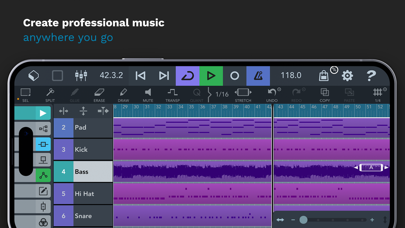
In Cubasis 3, you have unlimited audio and MIDI tracks, giving you the freedom to create without limits. The app supports tempo and signature tracks, making it easy to manage the rhythm and style of your project. With group tracks, you can combine individual audio and MIDI tracks into one, simplifying your mixing process.
The full-screen mixer is a standout feature, allowing you to easily adjust levels and effects. You can rearrange your FX with the FX rearrangement feature, letting you shift plug-ins quickly and change their positions with ease. The app also features 960 PPQN MIDI resolution, which ensures precise audio and MIDI editing, all crucial for professional results.
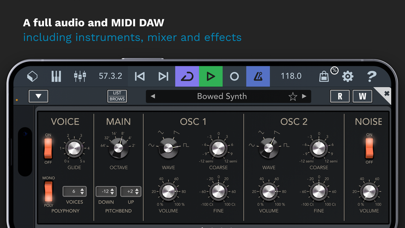
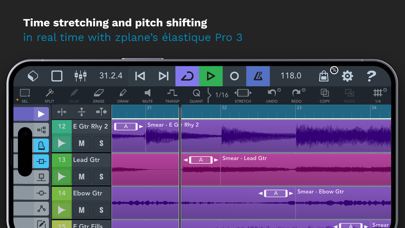
Cubasis 3 supports high-quality audio I/O resolution of up to 24-bit/96 kHz audio. This means that every sound you create will be crystal clear and impressive. You’ll appreciate the real-time time-stretching and pitch-shifting capabilities, allowing you to manipulate audio in creative ways. The Micrologue virtual synthesizer provides 126 ready-to-go presets, while the MicroSonic instruments bring over 120 virtual instrument sounds to your fingertips.
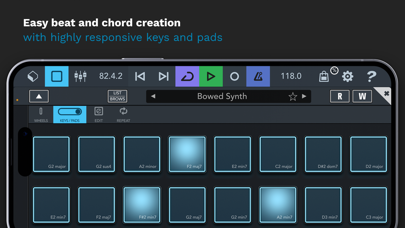
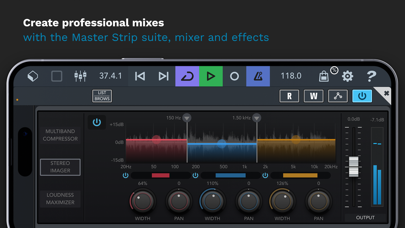
The studio-grade channel strip helps you mix your tracks effectively, and Cubasis includes over 550 MIDI loops to inspire your creative process. The virtual keyboard functionality, complete with chord buttons and drum pads, allows for intuitive note repeat, making it easier to craft melodies and beats.
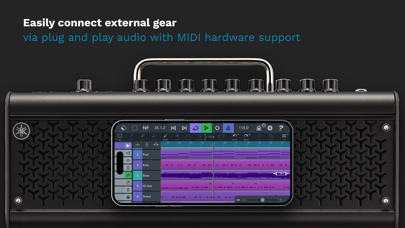
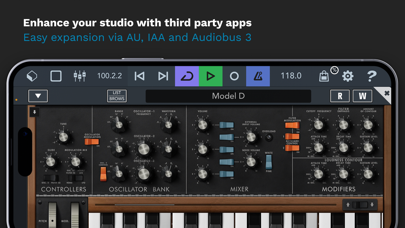
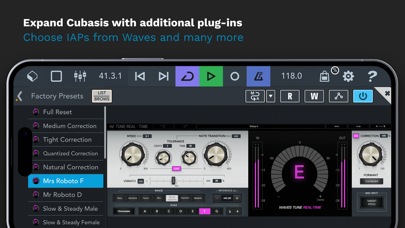
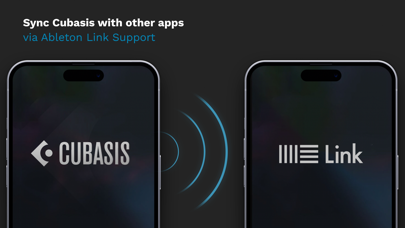
MIDI CC support is built into the software, ensuring that you can manage all your MIDI data effectively. Cubasis 3 is compatible with Core Audio, Bluetooth MIDI support, and inter-app audio, which means that you can connect various devices and use other music apps seamlessly. Additionally, it offers Ableton Link support for syncing with other software, along with Mackie Control support for enhanced control.
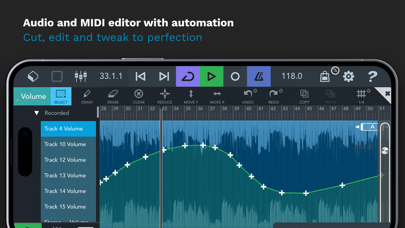
Automation editing is simple in Cubasis 3, allowing you to adjust levels and effects over time. The MIDI Learn functionality enables you to map controls easily, making your workflow even smoother. You can use preset audio effects to quickly enhance your tracks, and the track exporting options let you share your work via various platforms.
Cubasis provides excellent cloud storage integration, allowing you to save your projects in iCloud Drive, Dropbox, and more. Music sharing features let you send your creations directly to friends, collaborators, or social media. With imports supported through iTunes, Files app, AirDrop, or AudioPaste, getting started on your projects is straightforward.
For those looking to dive deeper into music creation, Cubasis 3 equips you with everything you need to bring your ideas to life. Whether you’re a beginner or a seasoned musician, this app helps you make music successfully, anywhere you go. If you have previously used Cubasis 2, the Cubasis 2 IAP transfer feature makes it easy to bring your in-app purchases along.
As you explore Cubasis 3, you’ll find numerous features designed to elevate your music experience. The redesigned instruments and effects create a modern style while maintaining precise operation. With tools for automation, audio and MIDI automation, and a dedicated audio editor, every aspect of music creation is covered.
For quick access to support, you can visit the official forums, where you can find help and connect with other users. If you enjoy using Cubasis 3, consider rating it in the App Store to show your support for continued improvements and updates.
Cubasis 3 has received accolades like the Computer Music Editor’s Choice Award and the MusicTech Choice Award, proving it’s a trusted tool for musicians. Users appreciate how Cubasis combines great features with easy usability, setting a standard for mobile DAWs. It’s not just powerful; it’s also user-friendly, which is why many musicians turn to it for quick demos or elaborate productions.
In Cubasis 3, you have unlimited audio and MIDI tracks, giving you the freedom to create without limits. The app supports tempo and signature tracks, making it easy to manage the rhythm and style of your project. With group tracks, you can combine individual audio and MIDI tracks into one, simplifying your mixing process.
The full-screen mixer is a standout feature, allowing you to easily adjust levels and effects. You can rearrange your FX with the FX rearrangement feature, letting you shift plug-ins quickly and change their positions with ease. The app also features 960 PPQN MIDI resolution, which ensures precise audio and MIDI editing, all crucial for professional results.
Cubasis 3 supports high-quality audio I/O resolution of up to 24-bit/96 kHz audio. This means that every sound you create will be crystal clear and impressive. You’ll appreciate the real-time time-stretching and pitch-shifting capabilities, allowing you to manipulate audio in creative ways. The Micrologue virtual synthesizer provides 126 ready-to-go presets, while the MicroSonic instruments bring over 120 virtual instrument sounds to your fingertips.
The studio-grade channel strip helps you mix your tracks effectively, and Cubasis includes over 550 MIDI loops to inspire your creative process. The virtual keyboard functionality, complete with chord buttons and drum pads, allows for intuitive note repeat, making it easier to craft melodies and beats.
MIDI CC support is built into the software, ensuring that you can manage all your MIDI data effectively. Cubasis 3 is compatible with Core Audio, Bluetooth MIDI support, and inter-app audio, which means that you can connect various devices and use other music apps seamlessly. Additionally, it offers Ableton Link support for syncing with other software, along with Mackie Control support for enhanced control.
Automation editing is simple in Cubasis 3, allowing you to adjust levels and effects over time. The MIDI Learn functionality enables you to map controls easily, making your workflow even smoother. You can use preset audio effects to quickly enhance your tracks, and the track exporting options let you share your work via various platforms.
Cubasis provides excellent cloud storage integration, allowing you to save your projects in iCloud Drive, Dropbox, and more. Music sharing features let you send your creations directly to friends, collaborators, or social media. With imports supported through iTunes, Files app, AirDrop, or AudioPaste, getting started on your projects is straightforward.
For those looking to dive deeper into music creation, Cubasis 3 equips you with everything you need to bring your ideas to life. Whether you’re a beginner or a seasoned musician, this app helps you make music successfully, anywhere you go. If you have previously used Cubasis 2, the Cubasis 2 IAP transfer feature makes it easy to bring your in-app purchases along.
As you explore Cubasis 3, you’ll find numerous features designed to elevate your music experience. The redesigned instruments and effects create a modern style while maintaining precise operation. With tools for automation, audio and MIDI automation, and a dedicated audio editor, every aspect of music creation is covered.
For quick access to support, you can visit the official forums, where you can find help and connect with other users. If you enjoy using Cubasis 3, consider rating it in the App Store to show your support for continued improvements and updates.

FAC Chorus
Frédéric Corvest
$9.99
$6.99

JAF Model One
Jens Guell
$5.99

Charango Tuner Pro
Pedro Daniel Macalupu Cumpen
$6.99
$4.99