
$12.99
$6.99
46% Off
MIDI Layers
4Pockets.com

About the App
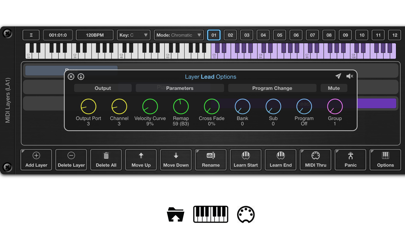
MIDI Layers is an AUv3 MIDI plugin that helps you manage complex MIDI data routing in music hosts like AUM or Cubasis. This tool is perfect for anyone who wants to play multiple instruments from a single master keyboard during live performances. If you’re looking to set up keyboard splits, crossfade layers, or create an ensemble of instruments, MIDI Layers is the solution you need.
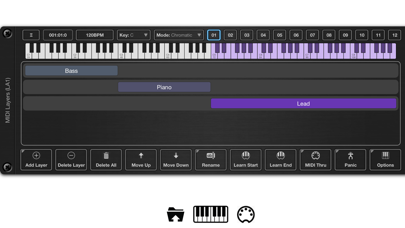
With MIDI Layers, you can create up to 12 scenes per preset, and each scene can have up to 127 layers. This means you can cover the entire range of your master keyboard. Switching between different layer mappings is smooth and easy, allowing for quick transitions during a performance.
Each layer in MIDI Layers controls the MIDI output and can be directed to one of 16 output ports and 16 channels. For example, if you have 5 layers in your scene, each layer can take influence from the MIDI key input and control up to 5 different instruments with just one master keyboard.
Layers can overlap, allowing you to assemble an ensemble of two or more instruments. You can even set crossfade layers, letting you smoothly transition between sounds over a specified range. Additionally, the velocity curves control feature helps you emphasize the note velocity for certain octaves, giving you greater creative freedom.
Every layer can also be remapped to target a different key range on your instruments. This is especially useful if you want to assign specific drum machine samples to separate note layers. You can assign a song to each scene or divide parts of a single song across multiple scenes.
Switching scenes is an easy task using the on-screen scene buttons, through AU parameters integration, or by adding a special control layer that you can trigger with your master keyboard. Moreover, you can implement Program Changes assignment for each layer. When you change scenes, each layer can send its own program change to your destination instruments.
For added precision, each scene can come with its own scale assignment, allowing you to play using only the white notes and dramatically reduce the chance of hitting wrong notes.
MIDI Layers also features mute groups assignment, which lets you quickly turn groups of layers on or off with a simple key or button press. This is particularly helpful during live performance MIDI settings where you need quick adjustments.
Other significant MIDI Layers features include custom layouts provision and a scene selection mode that is easy to navigate. You can also define your master keyboard size, whether it’s 6, 7, 8, or 10 octaves. Each layer can have its own cross fade settings, velocity curves, and remapping options tailored to your needs.
In summary, MIDI Layers makes efficient MIDI management a straightforward process. It's built for musicians looking to enhance their multi-instrument setup while enjoying seamless integration with MIDI devices. Whether you require specific drum machine samples or want to create a musical ensemble, MIDI Layers is a powerful tool that meets those needs effectively.
With MIDI Layers, you can create up to 12 scenes per preset, and each scene can have up to 127 layers. This means you can cover the entire range of your master keyboard. Switching between different layer mappings is smooth and easy, allowing for quick transitions during a performance.
Each layer in MIDI Layers controls the MIDI output and can be directed to one of 16 output ports and 16 channels. For example, if you have 5 layers in your scene, each layer can take influence from the MIDI key input and control up to 5 different instruments with just one master keyboard.
Layers can overlap, allowing you to assemble an ensemble of two or more instruments. You can even set crossfade layers, letting you smoothly transition between sounds over a specified range. Additionally, the velocity curves control feature helps you emphasize the note velocity for certain octaves, giving you greater creative freedom.
Every layer can also be remapped to target a different key range on your instruments. This is especially useful if you want to assign specific drum machine samples to separate note layers. You can assign a song to each scene or divide parts of a single song across multiple scenes.
Switching scenes is an easy task using the on-screen scene buttons, through AU parameters integration, or by adding a special control layer that you can trigger with your master keyboard. Moreover, you can implement Program Changes assignment for each layer. When you change scenes, each layer can send its own program change to your destination instruments.
For added precision, each scene can come with its own scale assignment, allowing you to play using only the white notes and dramatically reduce the chance of hitting wrong notes.
MIDI Layers also features mute groups assignment, which lets you quickly turn groups of layers on or off with a simple key or button press. This is particularly helpful during live performance MIDI settings where you need quick adjustments.
Other significant MIDI Layers features include custom layouts provision and a scene selection mode that is easy to navigate. You can also define your master keyboard size, whether it’s 6, 7, 8, or 10 octaves. Each layer can have its own cross fade settings, velocity curves, and remapping options tailored to your needs.
In summary, MIDI Layers makes efficient MIDI management a straightforward process. It's built for musicians looking to enhance their multi-instrument setup while enjoying seamless integration with MIDI devices. Whether you require specific drum machine samples or want to create a musical ensemble, MIDI Layers is a powerful tool that meets those needs effectively.

S-Modular
Paul Betowski
$3.99
$2.99
MRH810 V2 Lead Series
Nembrini Audio
$19.99
$9.99

MuseBud – AUv3 MIDI Generator
Cem Olcay
$5.99
$3.99