
$0.49
FREE
100% Off
FocusClock
CELEST Watches




About the App
FocusClock is a minimalist desk companion that brings two simple yet effective tools into your workspace. It replaces your Always-On Display (AOD) with a high-visibility clock and a focus countdown timer that keeps you organized and on track. There’s no complicated setup, no AI, no subscriptions, just straightforward functionality.
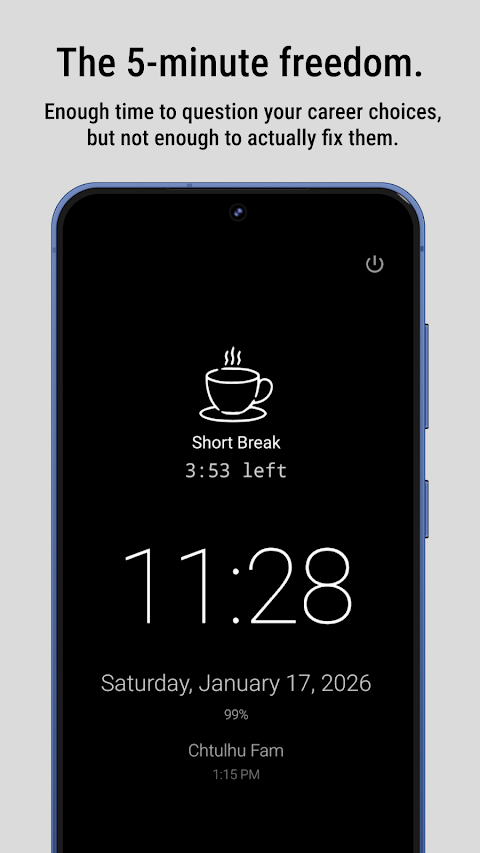
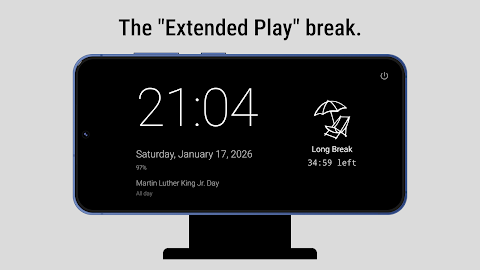
With FocusClock, you benefit from two key features. First, there’s the Big Clock. This easy-to-read clock displays the current time along with your next calendar event, making it an ideal always-on display replacement while your phone is docked. Second, the Pomodoro-style timer works alongside the clock to help you efficiently manage your work and break sessions.
Using FocusClock is simple. Open it in desk mode when you sit down at your workspace. The clean design ensures you can see the clock from across the room. Below the time, the info stack display provides useful details like the date, battery level, and your upcoming calendar meetings so you’re always aware of when your focus session will end.
The app allows for customizable focus sessions. You can set the default timer to 25 minutes, but you can adjust this to your preferences. FocusClock also incorporates a break management system that automatically handles your short and long breaks, letting you concentrate fully on your tasks. To protect your screen, it includes screen protection technology, which is particularly useful for OLED displays, ensuring they remain in good condition.
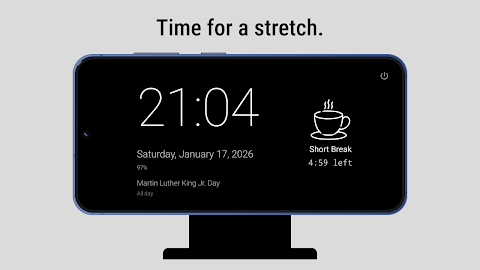
Using FocusClock is about choice. You can change your phase manually, switching between focus, short break, and long break by simply tapping an icon. To access settings, just swipe down for configuration options, and if you need to exit, pressing the power button will close the app.
One of the most appealing aspects of FocusClock is that it does not charge a monthly fee. This is a one-time purchase model, meaning you can enjoy all its features without recurring costs. It also respects your privacy, as it does not show ads, track user data, or require you to create an account or login.
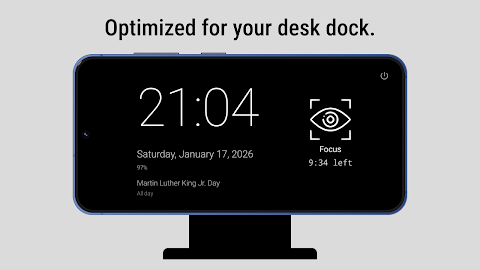
Designed specifically for desk docks, FocusClock offers great phone dock compatibility. By placing your phone on a charger and launching FocusClock, you establish a clear visual signal that you’re in focus mode. The app supports both portrait and landscape views, ensuring it fits into your workspace as you prefer.
FocusClock features an OLED-friendly design with pure black backgrounds and adjustments for brightness controls. You can customize the display with multiple color themes to make it visually appealing. Plus, the lightweight app means it has a small download size and works fully offline, requiring only optional calendar access to show upcoming events.
This app is ideal for a range of users. Office workers will find it helpful as a visible focus indicator, while students can manage their study sessions effectively. It also serves as a functional clock for anyone using a desk dock or looking for a reliable distraction-free tool.
The focus session management in FocusClock is designed without unnecessary complexity. It provides a straightforward experience without gamified elements, ensuring a non-gamified experience that keeps your productivity in check. With configurable timer intervals, you can choose from 1 to 120 minutes to best suit your workflow.
In summary, FocusClock is built on a simple design philosophy: it’s just a clock and a timer, crafted for desk use. It focuses on helping you manage your time and concentration without distractions. If you’re looking for a straightforward way to track your focus sessions and keep an eye on the time, FocusClock is just what you need.
With FocusClock, you benefit from two key features. First, there’s the Big Clock. This easy-to-read clock displays the current time along with your next calendar event, making it an ideal always-on display replacement while your phone is docked. Second, the Pomodoro-style timer works alongside the clock to help you efficiently manage your work and break sessions.
Using FocusClock is simple. Open it in desk mode when you sit down at your workspace. The clean design ensures you can see the clock from across the room. Below the time, the info stack display provides useful details like the date, battery level, and your upcoming calendar meetings so you’re always aware of when your focus session will end.
The app allows for customizable focus sessions. You can set the default timer to 25 minutes, but you can adjust this to your preferences. FocusClock also incorporates a break management system that automatically handles your short and long breaks, letting you concentrate fully on your tasks. To protect your screen, it includes screen protection technology, which is particularly useful for OLED displays, ensuring they remain in good condition.
Using FocusClock is about choice. You can change your phase manually, switching between focus, short break, and long break by simply tapping an icon. To access settings, just swipe down for configuration options, and if you need to exit, pressing the power button will close the app.
One of the most appealing aspects of FocusClock is that it does not charge a monthly fee. This is a one-time purchase model, meaning you can enjoy all its features without recurring costs. It also respects your privacy, as it does not show ads, track user data, or require you to create an account or login.
Designed specifically for desk docks, FocusClock offers great phone dock compatibility. By placing your phone on a charger and launching FocusClock, you establish a clear visual signal that you’re in focus mode. The app supports both portrait and landscape views, ensuring it fits into your workspace as you prefer.
FocusClock features an OLED-friendly design with pure black backgrounds and adjustments for brightness controls. You can customize the display with multiple color themes to make it visually appealing. Plus, the lightweight app means it has a small download size and works fully offline, requiring only optional calendar access to show upcoming events.
This app is ideal for a range of users. Office workers will find it helpful as a visible focus indicator, while students can manage their study sessions effectively. It also serves as a functional clock for anyone using a desk dock or looking for a reliable distraction-free tool.
The focus session management in FocusClock is designed without unnecessary complexity. It provides a straightforward experience without gamified elements, ensuring a non-gamified experience that keeps your productivity in check. With configurable timer intervals, you can choose from 1 to 120 minutes to best suit your workflow.
In summary, FocusClock is built on a simple design philosophy: it’s just a clock and a timer, crafted for desk use. It focuses on helping you manage your time and concentration without distractions. If you’re looking for a straightforward way to track your focus sessions and keep an eye on the time, FocusClock is just what you need.

Financial Loan Calculators
George Dev Apps.
$2.49
$0.99
Language Translator Pro
GEO SOFTECH
$1.69
$0.69

Number to word convert offline
Power Mind Apps
$0.99
FREE