

$1.49
$0.29
81% Off
PasteLina – Icon Pack
GomoTheGom






About the App
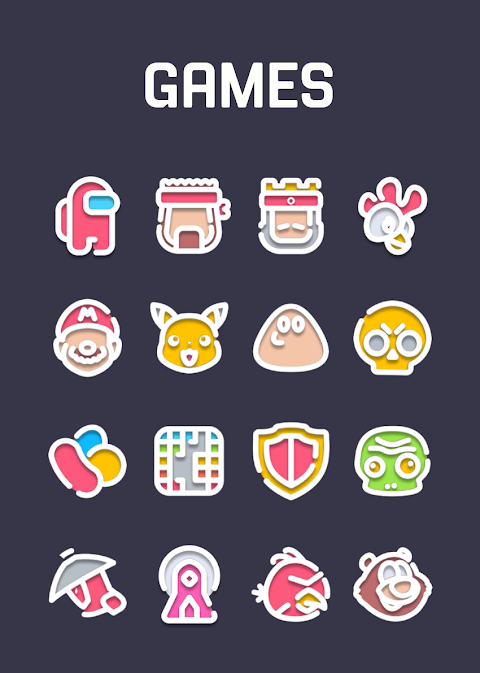
PasteLina is a unique white line icon pack designed specifically for those who appreciate clean and simple aesthetics. With its beautiful pastel color background and soft shadow effect, this icon theme is easy on the eyes and perfect for anyone looking to give their device a fresh look.
Each icon in PasteLina is created with pixel perfection, ensuring that users have access to a high quality icon theme. Currently, there are over 3500 icons available, each sized at 254x254 pixels, and this collection is regularly updated with new additions. If you find any icons missing for your apps, you can make a free icon request, and we will do our best to add them.
Using PasteLina is simple. You can quickly apply it to your favorite launchers for a smooth user experience. There is a helpful dashboard for icon management, allowing you to easily navigate and customize your icons. You can even try out icons on your current wallpaper using the icon preview pane before you make any changes.
PasteLina enjoys frequent updates and long term support, ensuring that your icon pack is always up to date with the latest features and designs. It is compatible with many popular Android launchers. For smooth application, we recommend using Nova Launcher or Lawnchair Launcher, but it also supports ABC Launcher, Action Launcher, ADW Launcher, Apex Launcher, Evie Launcher, and more. If you have a different launcher, you can still apply the icons by accessing your phone's launcher theme or icon change screen, where you will find PasteLina in the list.
For those using Go Launcher, please note that if the icons do not change, you may need to adjust the icon pack theme settings. In this case, look for the downloaded button at the top right to make the necessary changes. If some icons remain unchanged, you can long-press the icon and use the replace menu to customize them.
PasteLina also offers customizable icon shapes, allowing you to tailor your home screen to match your personal style. Additionally, simply check the icon management dashboard to keep everything organized and updated.
Whether you're new to customizing your device or an experienced user, PasteLina is designed to make the process easy and enjoyable. With its attractive design and convenient features, this icon pack is a great way to enhance your Android experience. If you encounter any issues while using PasteLina, please don't hesitate to contact us. We’re here to help and will respond quickly.
In summary, PasteLina is an ideal choice for anyone looking to enhance their device with a high quality icon theme. Embrace the beauty of simple design and give your phone a refreshing new look with PasteLina.
Each icon in PasteLina is created with pixel perfection, ensuring that users have access to a high quality icon theme. Currently, there are over 3500 icons available, each sized at 254x254 pixels, and this collection is regularly updated with new additions. If you find any icons missing for your apps, you can make a free icon request, and we will do our best to add them.
Using PasteLina is simple. You can quickly apply it to your favorite launchers for a smooth user experience. There is a helpful dashboard for icon management, allowing you to easily navigate and customize your icons. You can even try out icons on your current wallpaper using the icon preview pane before you make any changes.
PasteLina enjoys frequent updates and long term support, ensuring that your icon pack is always up to date with the latest features and designs. It is compatible with many popular Android launchers. For smooth application, we recommend using Nova Launcher or Lawnchair Launcher, but it also supports ABC Launcher, Action Launcher, ADW Launcher, Apex Launcher, Evie Launcher, and more. If you have a different launcher, you can still apply the icons by accessing your phone's launcher theme or icon change screen, where you will find PasteLina in the list.
For those using Go Launcher, please note that if the icons do not change, you may need to adjust the icon pack theme settings. In this case, look for the downloaded button at the top right to make the necessary changes. If some icons remain unchanged, you can long-press the icon and use the replace menu to customize them.
PasteLina also offers customizable icon shapes, allowing you to tailor your home screen to match your personal style. Additionally, simply check the icon management dashboard to keep everything organized and updated.
Whether you're new to customizing your device or an experienced user, PasteLina is designed to make the process easy and enjoyable. With its attractive design and convenient features, this icon pack is a great way to enhance your Android experience. If you encounter any issues while using PasteLina, please don't hesitate to contact us. We’re here to help and will respond quickly.
In summary, PasteLina is an ideal choice for anyone looking to enhance their device with a high quality icon theme. Embrace the beauty of simple design and give your phone a refreshing new look with PasteLina.

You IconPack
JustNewDesigns
$1.59
$0.19
WFP 355 Tactical Watch face
WFProduction by Alexandr Kovalev
$1.99
$1.00
Simple Photo Widget
Neelam Govind Bhanushali
$0.99